
用GDI和GDI+绘制旋转多行文本
用GDI和GDI+绘制旋转多行文本
提问于 2014-01-05 14:31:31
在我的Delphi应用程序中,我需要用GDI和GDI+绘制多行文本。我有这些物品:
- 要画的文字;
- 旋转角度(文本可以旋转);
- 最大宽度(假设包含文本的矩形,我对矩形宽度有限制,但对矩形高度没有限制);
- 字体名称和文字高度;
是否有一种简单的方法可以同时使用GDI和GDI+来绘制这个文本?我找不到关于它的GDI和GDI+函数。
回答 2
Stack Overflow用户
回答已采纳
发布于 2014-01-05 15:00:05
tl;博士
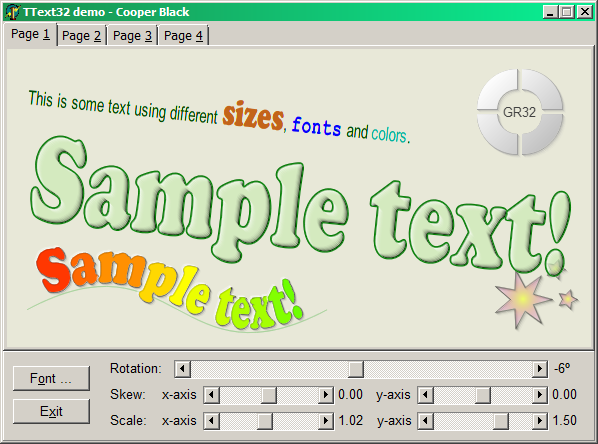
将graphics32与GR32_Text结合使用。
对于GDI,最简单的方法是使用字体的转义和定向属性。例如:
procedure TForm1.PaintBox1Paint(Sender: TObject);
const
  Text = 'Lorem ipsum dolor sit amet, consectetur adipisicing elit, sed do '
    + 'eiusmod tempor incididunt ut labore et dolore magna aliqua. Ut enim '
    + 'ad minim veniam, quis nostrud exercitation ullamco laboris nisi ut '
    + 'aliquip ex ea commodo consequat. Duis aute irure dolor in reprehenderit '
    + 'in voluptate velit esse cillum dolore eu fugiat nulla pariatur. Excepteur '
    + 'sint occaecat cupidatat non proident, sunt in culpa qui officia deserunt '
    + 'mollit anim id est laborum.';
var
  angle: Integer;
  Canvas: TCanvas;
  lf: LOGFONT;
  R: TRect;
begin
  Canvas := PaintBox1.Canvas;

  Canvas.Brush.Style := bsClear; // Set the brush style to transparent.
  lf := Default(LOGFONT);
  lf.lfHeight := 20;
  lf.lfCharSet := DEFAULT_CHARSET;
  lf.lfFaceName := 'Times New Roman';

  angle := 15;
  lf.lfEscapement := 10*angle;//lfEscapement measured in 1/10th of degree
  lf.lfOrientation := lf.lfEscapement;
  Canvas.Font.Handle := CreateFontIndirect(lf);
  R := PaintBox1.ClientRect;
  inc(R.Top, 200);
  DrawText(Canvas.Handle, Text, -1, R, DT_NOCLIP or DT_WORDBREAK);
end;
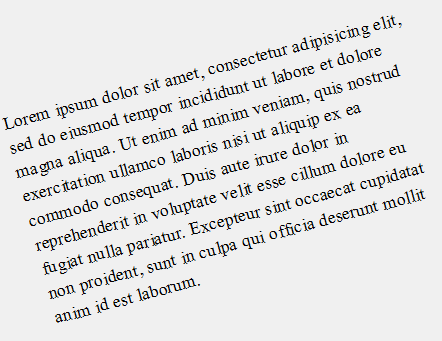
它产生了相当奇怪的布局:
使用SetWorldTransform提供了不同的布局,尽管质量仍然很差:
procedure TForm1.PaintBox1Paint(Sender: TObject);
const
  Text = 'Lorem ipsum dolor sit amet, consectetur adipisicing elit, sed do '
    + 'eiusmod tempor incididunt ut labore et dolore magna aliqua. Ut enim '
    + 'ad minim veniam, quis nostrud exercitation ullamco laboris nisi ut '
    + 'aliquip ex ea commodo consequat. Duis aute irure dolor in reprehenderit '
    + 'in voluptate velit esse cillum dolore eu fugiat nulla pariatur. Excepteur '
    + 'sint occaecat cupidatat non proident, sunt in culpa qui officia deserunt '
    + 'mollit anim id est laborum.';
var
  angle: Integer;
  Transform: TXForm;
  Canvas: TCanvas;
  lf: LOGFONT;
  R: TRect;
begin
  Canvas := PaintBox1.Canvas;

  angle := 15;
  Transform := Default(TXForm);
  SinCos(DegToRad(-angle), Transform.eM12, Transform.eM11);
  Transform.eM22 := Transform.eM11;
  Transform.eM21 := -Transform.eM12;

  SetGraphicsMode(Canvas.Handle, GM_ADVANCED);
  SetWorldTransform(Canvas.Handle, Transform);

  Canvas.Brush.Style := bsClear; // Set the brush style to transparent.
  lf := Default(LOGFONT);
  lf.lfHeight := 20;
  lf.lfCharSet := DEFAULT_CHARSET;
  lf.lfFaceName := 'Times New Roman';
  Canvas.Font.Handle := CreateFontIndirect(lf);
  R := PaintBox1.ClientRect;
  inc(R.Top, 200);
  inc(R.Left, Round(200*Transform.eM12));
  DrawText(Canvas.Handle, Text, -1, R, DT_NOCLIP or DT_WORDBREAK);
end;
坦率地说,我认为使用这两种方法都不会取得好的结果。如果我是你,我会用一个很好的图书馆,比如graphics32和安格斯约翰逊的文本
对于GDI+,其结果与GDI的结果非常相同。示例代码为:
uses
  GDIPAPI, GDIPOBJ;

....

{$TYPEDADDRESS ON}
procedure TForm1.PaintBox1Paint(Sender: TObject);
const
  Text = 'Lorem ipsum dolor sit amet, consectetur adipisicing elit, sed do '
    + 'eiusmod tempor incididunt ut labore et dolore magna aliqua. Ut enim '
    + 'ad minim veniam, quis nostrud exercitation ullamco laboris nisi ut '
    + 'aliquip ex ea commodo consequat. Duis aute irure dolor in reprehenderit '
    + 'in voluptate velit esse cillum dolore eu fugiat nulla pariatur. Excepteur '
    + 'sint occaecat cupidatat non proident, sunt in culpa qui officia deserunt '
    + 'mollit anim id est laborum.';
var
  Graphics: TGPGraphics;
  Font: TGPFont;
  Brush: TGPBrush;
  lf: LOGFONT;
begin
  Graphics := TGPGraphics.Create(PaintBox1.Canvas.Handle);
  try
    Graphics.SetTextRenderingHint(TextRenderingHintSystemDefault);

    lf := Default(LOGFONT);
    lf.lfHeight := 20;
    lf.lfCharSet := DEFAULT_CHARSET;
    lf.lfFaceName := 'Times New Roman';

    Font := TGPFont.Create(PaintBox1.Canvas.Handle, @lf);
    try
      Brush := TGPSolidBrush.Create(MakeColor(0, 0, 0));
      try
        Graphics.RotateTransform(-15);
        Graphics.DrawString(
          Text,
          -1,
          Font,
          MakeRect(0.0, 150.0, 450.0, 600.0),
          nil,
          Brush
        );
      finally
        Brush.Free;
      end;
    finally
      Font.Free;
    end;
  finally
    Graphics.Free;
  end;
end;
以及产出:
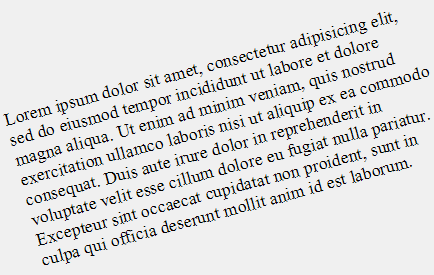
在我看来还是挺傻的。因此,为了获得最好的质量,我推荐graphics32和GR32_Text。
Stack Overflow用户
发布于 2014-01-05 15:21:32
基本知识似乎很简单:
procedure TForm2.FormPaint(Sender: TObject);
const
  S = 'Multiline sample text with 50 degrees rotation';
  H = 20;
  A = -50;
var
  R: TRect;
  NewFont: HFONT;
  OldFont: HFONT;
  TextHeight: Integer;
begin
  R := ClientRect;
  InflateRect(R, -20, -20);
  NewFont := CreateFont(-H, 0, A * 10, A * 10, FW_NORMAL, 0, 0, 0,
    DEFAULT_CHARSET, OUT_TT_ONLY_PRECIS, CLIP_DEFAULT_PRECIS, DEFAULT_QUALITY,
    DEFAULT_PITCH, 'Tahoma');
  try
    OldFont := SelectObject(Canvas.Handle, NewFont);
    DrawText(Canvas.Handle, S, -1, R, DT_LEFT or DT_BOTTOM or
      DT_WORDBREAK or DT_NOCLIP);
  finally
    DeleteObject(SelectObject(Canvas.Handle, OldFont));
  end;
end;
但这并不适用于多行文本:
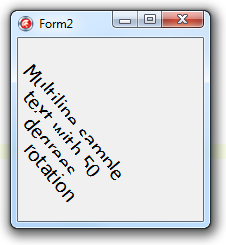
您需要做的不是在字体级别使用旋转,而是在画布级别使用SetWorldTransform。
页面原文内容由Stack Overflow提供。腾讯云小微IT领域专用引擎提供翻译支持
原文链接:
https://stackoverflow.com/questions/20934754
复制相关文章
相似问题
腾讯云开发者

Copyright © 2013 - 2026 Tencent Cloud. All Rights Reserved. 腾讯云 版权所有
深圳市腾讯计算机系统有限公司 ICP备案/许可证号:粤B2-20090059  粤公网安备44030502008569号
腾讯云计算(北京)有限责任公司 京ICP证150476号 | 京ICP备11018762号