
相机投影
我正在建立一个玩具3d渲染器,我有一个尚未确定的问题。我有一个相机,它指向太空中的某个点。照相机有一个框架和一个给定的焦距。我想在相机的画框上投射一个任意的点。与往常一样,X坐标和Y坐标分别处理。图像显示了我是如何计算X的。我使用了三角形的余弦定理:给定三个三角形的长度,我首先找到这个角度,然后用相机的焦距得到X。
图片:
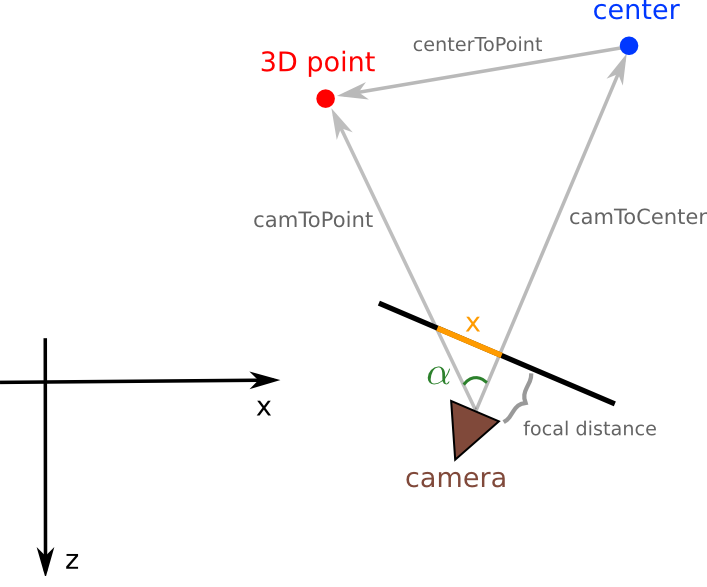
这同样适用于Y坐标。在我看来,它看起来很干净,但是结果并不像预期的那样:我在空间中设置了8个点作为一个立方体顶点,并设置了相机围绕原点旋转。相机移动时,立方体变形严重。
关键方法:
private void project(double[][] points3D, int[][] points2D) {

    double x;
    double y;
    double angle;
    double camToPoint2;
    double camToCenter2;
    double centerToPoint2;
    double[] camToCenter;
    double[] centerToPoint;

    for(int i = 0; i < points3D.length; i++) {

        // x's projection

        camToCenter = new double[] {center[0]-camera.position[0], center[2]-camera.position[2]};
        centerToPoint = new double[] {points3D[i][0]-center[0], points3D[i][2]-center[2]};

        camToCenter2 = camToCenter[0]*camToCenter[0] + camToCenter[1]*camToCenter[1];
        centerToPoint2 = centerToPoint[0]*centerToPoint[0] + centerToPoint[1]*centerToPoint[1];
        camToPoint2 = (points3D[i][0]-camera.position[0])*(points3D[i][0]-camera.position[0]) +
                        (points3D[i][2]-camera.position[2])*(points3D[i][2]-camera.position[2]);

        angle = Math.acos((camToCenter2 + camToPoint2 - centerToPoint2) /
                (2 * Math.sqrt(camToCenter2) * Math.sqrt(camToPoint2)));

        x = camera.focalLength * Math.tan(angle);
        // check if x lies to the left or right of the frame's center
        x = camToCenter[0]*centerToPoint[1] + camToCenter[1]*centerToPoint[0] < 0 ? -x : x;
        // reescale
        points2D[i][0] = (int) (screenW * (0.5 * camera.frame[0] + x) / camera.frame[0]);

        // y's projection

        camToCenter = new double[] {center[1]-camera.position[1], center[2]-camera.position[2]};
        centerToPoint = new double[] {points3D[i][1]-center[1], points3D[i][2]-center[2]};

        camToCenter2 = camToCenter[0]*camToCenter[0] + camToCenter[1]*camToCenter[1];
        centerToPoint2 = centerToPoint[0]*centerToPoint[0] + centerToPoint[1]*centerToPoint[1];
        camToPoint2 = (points3D[i][1]-camera.position[1])*(points3D[i][1]-camera.position[1]) +
                        (points3D[i][2]-camera.position[2])*(points3D[i][2]-camera.position[2]);

        angle = Math.acos((camToCenter2 + camToPoint2 - centerToPoint2) /
                (2 * Math.sqrt(camToCenter2) * Math.sqrt(camToPoint2)));

        y = camera.focalLength * Math.tan(angle);
        // check if y lies to the left or right of the frame's center
        y = camToCenter[0]*centerToPoint[1] + camToCenter[1]*centerToPoint[0] < 0 ? -y : y;
        // reescale
        points2D[i][1] = (int) (screenH * (0.5 * camera.frame[1] + y) / camera.frame[1]);
    }
}代码是上述解释的精确翻译。唯一的附加操作是:一个点积用来检查投影点是在相机的帧中心的左边还是右边。这里将讨论这个问题,确定一个2D向量是在另一个向量的右边还是左边。有什么线索可以说明错误在哪里吗?在这里,我粘贴测试代码所需的内容。
Main.java
import javax.swing.JFrame;

public class Main {

    public static void main(String[] args) {

        Universe universe = new Universe();

        JFrame frame = new JFrame("3D Projection");

        frame.setDefaultCloseOperation(JFrame.EXIT_ON_CLOSE);
        frame.getContentPane().add(universe);
        frame.pack();
        frame.setLocationRelativeTo(null);
        frame.setResizable(false);
        frame.setVisible(true);

        universe.loop();
    }
}
Camera.java
public class Camera {

    // both measures in meters
    public final double focalLength = 50e-3;
    public final double[] frame = {36e-3, 24e-3};

    public double[] position;

    public Camera(double x, double y, double z) {

        position = new double[] {x, y, z};
    }
}
Universe.java
import java.awt.Color;
import java.awt.Dimension;
import java.awt.Graphics;

import javax.swing.JPanel;

public class Universe extends JPanel {

private int screenW;
private int screenH;
private int[][] points2D;

private double[] center;
private double[][] points3D;

private Camera camera;

public Universe() {

    screenW = 864;
    screenH = 576;

    setPreferredSize(new Dimension(screenW, screenH));

    points2D = new int[8][2];

    center = new double[] {0, 0, 0};

    camera = new Camera(0, 0, 10);

    points3D = new double[][] {{1, 1, 1},
                                {1, 1, -1},
                                {1, -1, 1},
                                {1, -1, -1},
                                {-1, 1, 1},
                                {-1, 1, -1},
                                {-1, -1, 1},
                                {-1, -1, -1}};
}

public void paint(Graphics g) {

    g.setColor(new Color(0, 0, 0));
    g.fillRect(0, 0, screenW, screenH);

    g.setColor(new Color(255, 255, 255));
    g.drawLine(points2D[0][0], points2D[0][1], points2D[1][0], points2D[1][1]);
    g.drawLine(points2D[2][0], points2D[2][1], points2D[3][0], points2D[3][1]);
    g.drawLine(points2D[4][0], points2D[4][1], points2D[5][0], points2D[5][1]);
    g.drawLine(points2D[6][0], points2D[6][1], points2D[7][0], points2D[7][1]);
    g.drawLine(points2D[1][0], points2D[1][1], points2D[5][0], points2D[5][1]);
    g.drawLine(points2D[0][0], points2D[0][1], points2D[4][0], points2D[4][1]);
    g.drawLine(points2D[3][0], points2D[3][1], points2D[7][0], points2D[7][1]);
    g.drawLine(points2D[2][0], points2D[2][1], points2D[6][0], points2D[6][1]);
    g.drawLine(points2D[0][0], points2D[0][1], points2D[2][0], points2D[2][1]);
    g.drawLine(points2D[1][0], points2D[1][1], points2D[3][0], points2D[3][1]);
    g.drawLine(points2D[5][0], points2D[5][1], points2D[7][0], points2D[7][1]);
    g.drawLine(points2D[4][0], points2D[4][1], points2D[6][0], points2D[6][1]);
}

public void loop() {

    double t = 0;
    double dt = 0.02;

    while(true) {

        try {
            Thread.sleep(50);
        } catch(InterruptedException ex) {
            Thread.currentThread().interrupt();
        }

        camera.position[0] = 10 * Math.sin(t % (2 * Math.PI));
        camera.position[2] = 10 * Math.cos(t % (2 * Math.PI));

        project(points3D, points2D);

        repaint();
        t += dt;
    }
}

private void project(double[][] points3D, int[][] points2D) {

    double x;
    double y;
    double angle;
    double camToPoint2;
    double camToCenter2;
    double centerToPoint2;
    double[] camToCenter;
    double[] centerToPoint;

    for(int i = 0; i < points3D.length; i++) {

        // x's projection

        camToCenter = new double[] {center[0]-camera.position[0], center[2]-camera.position[2]};
        centerToPoint = new double[] {points3D[i][0]-center[0], points3D[i][2]-center[2]};

        camToCenter2 = camToCenter[0]*camToCenter[0] + camToCenter[1]*camToCenter[1];
        centerToPoint2 = centerToPoint[0]*centerToPoint[0] + centerToPoint[1]*centerToPoint[1];
        camToPoint2 = (points3D[i][0]-camera.position[0])*(points3D[i][0]-camera.position[0]) +
                        (points3D[i][2]-camera.position[2])*(points3D[i][2]-camera.position[2]);

        angle = Math.acos((camToCenter2 + camToPoint2 - centerToPoint2) /
                (2 * Math.sqrt(camToCenter2) * Math.sqrt(camToPoint2)));

        System.out.print(angle * (360/(2*Math.PI)) + " ");

        x = camera.focalLength * Math.tan(angle);
        x = camToCenter[0]*centerToPoint[1] + camToCenter[1]*centerToPoint[0] < 0 ? -x : x;

        points2D[i][0] = (int) (screenW * (0.5 * camera.frame[0] + x) / camera.frame[0]);

        // y's projection

        camToCenter = new double[] {center[1]-camera.position[1], center[2]-camera.position[2]};
        centerToPoint = new double[] {points3D[i][1]-center[1], points3D[i][2]-center[2]};

        camToCenter2 = camToCenter[0]*camToCenter[0] + camToCenter[1]*camToCenter[1];
        centerToPoint2 = centerToPoint[0]*centerToPoint[0] + centerToPoint[1]*centerToPoint[1];
        camToPoint2 = (points3D[i][1]-camera.position[1])*(points3D[i][1]-camera.position[1]) +
                        (points3D[i][2]-camera.position[2])*(points3D[i][2]-camera.position[2]);

        angle = Math.acos((camToCenter2 + camToPoint2 - centerToPoint2) /
                (2 * Math.sqrt(camToCenter2) * Math.sqrt(camToPoint2)));

        System.out.println(angle * (360/(2*Math.PI)));

        y = camera.focalLength * Math.tan(angle);
        y = camToCenter[0]*centerToPoint[1] + camToCenter[1]*centerToPoint[0] < 0 ? -y : y;

        points2D[i][1] = (int) (screenH * (0.5 * camera.frame[1] + y) / camera.frame[1]);
    }

    System.out.println();
}
}回答 1
Stack Overflow用户
发布于 2014-01-05 08:12:25
我相信你的问题是你忽略了模拟相机的姿势。想象一个立方体漂浮在某处的房间里。明白了?在你的脑海中,画一个笛卡儿坐标系,严格地连接到立方体上,x和z轴在水平平面上,y轴指向天花板。因为相机是在你的例子代码中移动的东西,你也可以选择可视化立方体的坐标系,如果你愿意的话,你可以选择把它固定在房间里。
现在,想象一下相机在周围移动,从不同的角度观察立方体。想象一下,一个独立的笛卡儿坐标系也严格地附着在这个坐标系上。它有一个x轴指向相机的右侧,一个y轴指向顶部,一个z轴指向背面(也就是说,当你通过取景器看时朝向你的脸)。当你拿着相机绕着立方体走的时候,它必须绕y轴旋转,这样才能保持对着立方体。假设你保持相机直立,相机的y轴将始终保持与立方体的y轴平行,但两个x轴和z轴之间的关系将随着时间的推移而变化。
这种关系,在两个笛卡尔坐标系的三个轴之间,可能被认为是相机的“方位”或“姿态”,而你目前还没有对它进行建模。为了模拟姿势,你需要一个3X3矩阵。如果你对坐标系旋转的数学不太了解,我建议你学习这里,这里和这里。
我在Camera类中添加了位姿模型作为3X3旋转矩阵,并更新了Universe类以利用它。Main类保持不变。新的Camera类在这里:
public class Camera {

    // both measures in meters
    public final double focalLength = 50e-3;
    public final double[] frame = {36e-3, 24e-3};

    public double[] position;
    // The rotation vector gives the unit vector directions, in the coordinate
    // frame of the object, of each of the axes of the camera's coordinate
    // frames
    public double[][] rotation;

    public Camera(double[] pos, double[][] rot) {

        position = pos;
        rotation = rot;
    }
}新的Universe类在这里:
import java.awt.Color;
import java.awt.Dimension;
import java.awt.Graphics;

import javax.swing.JPanel;

public class Universe extends JPanel {

private int screenW;
private int screenH;
private int[][] points2D;

private double[] center;
private double[][] points3D;

private Camera camera;

public Universe() {

    screenW = 864;
    screenH = 576;

    setPreferredSize(new Dimension(screenW, screenH));

    points2D = new int[8][2];

    center = new double[] {0, 0, 0};

    // Initialize the camera object with "placeholder" values, just to
    // reserve space in memory for two suitably sized arrays
    double[] initpos = new double[] {0, 0, 10};
    double[][] initrot = new double[][] {{1, 0, 0}, {0, 1, 0}, {0, 0, 1}};
    camera = new Camera(initpos, initrot);

    points3D = new double[][] {{1, 1, 1},
                                {1, 1, -1},
                                {1, -1, 1},
                                {1, -1, -1},
                                {-1, 1, 1},
                                {-1, 1, -1},
                                {-1, -1, 1},
                                {-1, -1, -1}};
}

public void paint(Graphics g) {

    g.setColor(new Color(0, 0, 0));
    g.fillRect(0, 0, screenW, screenH);

    g.setColor(new Color(255, 255, 255));
    g.drawLine(points2D[0][0], points2D[0][1], points2D[1][0], points2D[1][1]);
    g.drawLine(points2D[2][0], points2D[2][1], points2D[3][0], points2D[3][1]);
    g.drawLine(points2D[4][0], points2D[4][1], points2D[5][0], points2D[5][1]);
    g.drawLine(points2D[6][0], points2D[6][1], points2D[7][0], points2D[7][1]);
    g.drawLine(points2D[1][0], points2D[1][1], points2D[5][0], points2D[5][1]);
    g.drawLine(points2D[0][0], points2D[0][1], points2D[4][0], points2D[4][1]);
    g.drawLine(points2D[3][0], points2D[3][1], points2D[7][0], points2D[7][1]);
    g.drawLine(points2D[2][0], points2D[2][1], points2D[6][0], points2D[6][1]);
    g.drawLine(points2D[0][0], points2D[0][1], points2D[2][0], points2D[2][1]);
    g.drawLine(points2D[1][0], points2D[1][1], points2D[3][0], points2D[3][1]);
    g.drawLine(points2D[5][0], points2D[5][1], points2D[7][0], points2D[7][1]);
    g.drawLine(points2D[4][0], points2D[4][1], points2D[6][0], points2D[6][1]);
}

public void loop() {

    double t = 0;
    double dt = 0.02;

    while(true) {

        try {
            Thread.sleep(50);
        } catch(InterruptedException ex) {
            Thread.currentThread().interrupt();
        }

        camera.position[0] =  10 * Math.sin(t % (2 * Math.PI));
        camera.position[1] =   0;
        camera.position[2] =  10 * Math.cos(t % (2 * Math.PI));

        // The x unit vector of the camera plane coordinate frame, expressed
        // in the cube's coordinate frame
        camera.rotation[0][0] = Math.cos(t % (2 * Math.PI));
        camera.rotation[0][1] = 0;
        camera.rotation[0][2] = -Math.sin(t % (2 * Math.PI));
        // The y unit vector of the camera plane coordinate frame, expressed
        // in the cube's coordinate frame
        camera.rotation[1][0] = 0;
        camera.rotation[1][1] = 1;
        camera.rotation[1][2] = 0;
        // Ditto, z unit vector
        camera.rotation[2][0] = Math.sin(t % (2 * Math.PI));
        camera.rotation[2][1] = 0;
        camera.rotation[2][2] = Math.cos(t % (2 * Math.PI));

        project(points3D, points2D);

        repaint();
        t += dt;
    }
}

private void project(double[][] points3D, int[][] points2D) {;

    for(int i = 0; i < points3D.length; i++) {

        double[] camToPoint = new double[3];
        double[] rotPoint   = new double[3];

        // You may visualize this operation as "shifting" the vertices of the
        // cube to some new translational offset within an unrotated camera
        // coordinate frame.
        for(int j = 0; j < 3; j++) {
            camToPoint[j]  = points3D[i][j] - camera.position[j];
        }

        // Picture this operation as "rotating" the camera by the correct
        // amount so that it will always be facing the cube, no matter what
        // the current absolute position of the camera is within the cube's
        // coordinate frame.  If you don't do this, then the cube will pan
        // across your view and back around behind the camera much like the
        // sun rotating through the sky over the course of one complete day/
        // night cycle.
        rotPoint = new double[] {0, 0, 0};
        for(int j = 0; j< 3; j++) {
            for(int k = 0; k < 3; k++) {
                rotPoint[j] += camera.rotation[j][k] * camToPoint[k];
            }
        }

        // Project the cube onto the camera plane.
        points2D[i][0] = (int) (screenW * (0.5 * camera.frame[0] +
                            camera.focalLength * rotPoint[0] /
                            rotPoint[2]) / camera.frame[0]);
        points2D[i][1] = (int) (screenH * (0.5 * camera.frame[1] +
                            camera.focalLength * rotPoint[1] /
                            rotPoint[2]) / camera.frame[1]);
    }
}
}https://stackoverflow.com/questions/20926643
复制相似问题
腾讯云开发者

Copyright © 2013 - 2026 Tencent Cloud. All Rights Reserved. 腾讯云 版权所有
深圳市腾讯计算机系统有限公司 ICP备案/许可证号:粤B2-20090059  粤公网安备44030502008569号
腾讯云计算(北京)有限责任公司 京ICP证150476号 | 京ICP备11018762号