
在代码编辑器和ipython控制台之间切换的键盘快捷方式
如何创建键盘快捷方式,在代码编辑器和ipython控制台之间使用Canopy进行切换?
我尝试过根据用于代码编辑(http://docs.enthought.com/canopy/configure/editor-scripting-api.html#code-editor-scripting-commands)的文档和ipython窗格脚本命令(http://docs.enthought.com/canopy/configure/ipython-scripting-api.html#ipython-pane-scripting-commands )编写宏,但没有找到解决方案。
例如,我有一个宏,它将执行当前的代码行(而不必选择它),但如果能够在执行后将光标切换回代码编辑器,而不接触鼠标/触控板,那就更好了。
def run():
    code_task = get_active_task()
    code_editor = code_task.active_editor
    cursor = code_editor.cursor
    cursor.start_of_line()
    cursor.next_line(select=True)
    code_task.run_selection()
在MacOSX10.7.5上使用Canopy版本: 1.1.1 (64位)
回答 2
Stack Overflow用户
发布于 2014-01-03 19:35:57
谢谢,好建议。添加到树冠愿望列表中。(您可以使用键盘快捷方式Control+Tab在文件浏览器、编辑器和IPython之间循环,但这还不是可宏的。)
Stack Overflow用户
发布于 2018-11-30 19:10:26
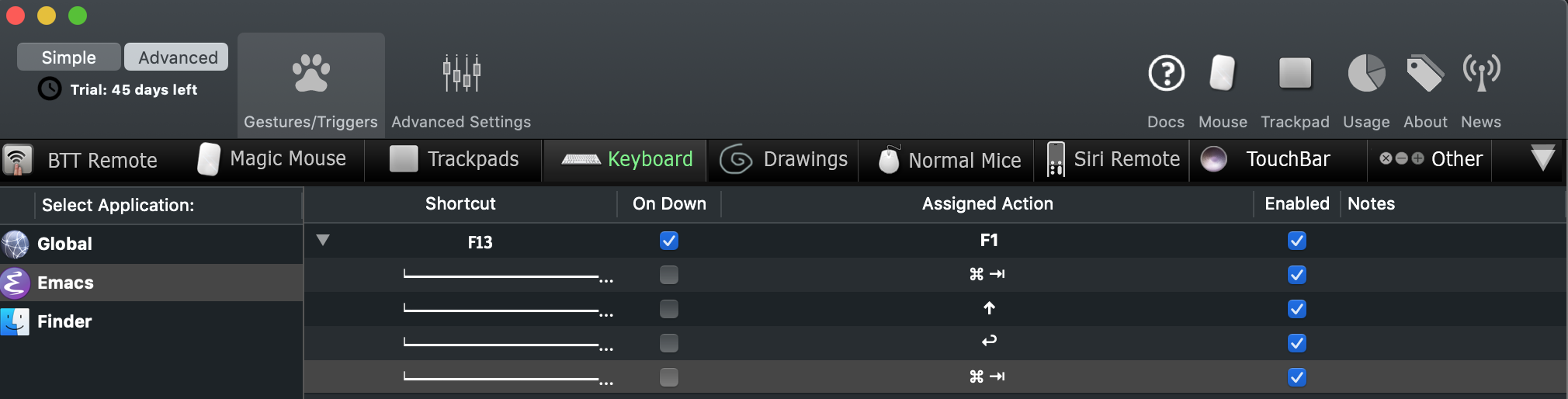
(在Mac上) ->更好的触摸工具。这是一个只有在我处于emacs中时才处于活动状态的宏,它执行以下操作:
- 保存当前缓冲区(在我的emacs中设置为F1 )
- cmd-选项卡到最后一个窗口(终端)
- “向上”箭头(以重新加载上次编译/运行cmd)
- “入场”键
- cmd-选项卡用于其他窗口(emacs),一旦进程终止。
今天为我节省了成千上万的按键。
https://stackoverflow.com/questions/20907113
复制相似问题
腾讯云开发者

Copyright © 2013 - 2026 Tencent Cloud. All Rights Reserved. 腾讯云 版权所有
深圳市腾讯计算机系统有限公司 ICP备案/许可证号:粤B2-20090059  粤公网安备44030502008569号
腾讯云计算(北京)有限责任公司 京ICP证150476号 | 京ICP备11018762号