
如何在android中显示如下布局
如何在android中显示如下布局
提问于 2013-12-31 07:03:55
在这里,我想通过使用片段来创建一个包含以下内容的布局我应该用在顶部,还是可以用碎片?哪一个是最好的方法。而不是滑动选项卡,我想在底部显示.(dot)。例如Android主屏幕底部3-5点。
+-----------------------------------------------+
|  +------------+                               |
|  |            |           Line 1              |
|  |  Image     |           Line 2              |
|  |            |           Line 3              |
|  |            |        (Static)               |
|  +------------+                               |
|-----------------------------------------------|
|                                               |
|                                               |
|                                               |
|                                               |
|      Some Content goes here                   |
|            (Swipe tab)                        |
|              Swipe to next -->>>              |
|       Here dot(.) represent the pages         |
|                                               |
|                                               |
|                                               |
|____________________._._.______________________|
|                                               |
|     3 images goes here                        |
|          (Static Horizontal scroll able)      |
+-----------------------------------------------+回答 2
Stack Overflow用户
回答已采纳
发布于 2013-12-31 07:23:47
嗯.我试过it...and,这是输出.
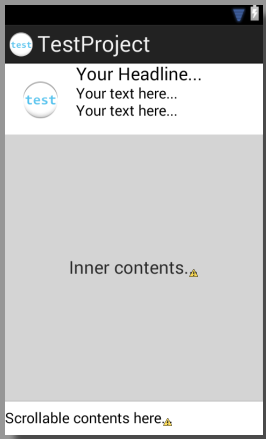
这是来源..。
<TableLayout xmlns:android="http://schemas.android.com/apk/res/android"
xmlns:tools="http://schemas.android.com/tools"
android:layout_width="match_parent"
android:layout_height="match_parent" >
<LinearLayout
    android:id="@+id/news_item_container"
    android:layout_width="match_parent"
    android:layout_height="wrap_content"
    android:orientation="horizontal" >
    <ImageView
        android:id="@+id/news_image"
        android:layout_width="wrap_content"
        android:layout_height="wrap_content"
        android:contentDescription="Test image"
        android:padding="20dp"
        android:src="@drawable/ic_launcher" />
    <LinearLayout
        android:id="@+id/textView1"
        android:layout_width="wrap_content"
        android:layout_height="wrap_content"
        android:orientation="vertical" >
        <TextView
            android:id="@+id/textView2"
            android:layout_width="wrap_content"
            android:layout_height="wrap_content"
            android:text="Your headline..."
            android:textAppearance="?android:attr/textAppearanceLarge" />
        <TextView
            android:id="@+id/textView3"
            android:layout_width="wrap_content"
            android:layout_height="wrap_content"
            android:text="Your text here..."
            android:textAppearance="?android:attr/textAppearanceMedium" />
        <TextView
            android:id="@+id/textView4"
            android:layout_width="wrap_content"
            android:layout_height="wrap_content"
            android:text="Your text here..."
            android:textAppearance="?android:attr/textAppearanceMedium" />
    </LinearLayout>
</LinearLayout>
<FrameLayout
    android:layout_width="match_parent"
    android:layout_height="0dp"
    android:layout_weight="1"
    android:background="#FFCCCCCC" >
    <TextView
        android:id="@+id/textView5"
        android:layout_width="wrap_content"
        android:layout_height="wrap_content"
        android:layout_gravity="center"
        android:text="Inner contents..."
        android:textAppearance="?android:attr/textAppearanceLarge" />
</FrameLayout>
<HorizontalScrollView
    android:id="@+id/horizontalScrollView1"
    android:layout_width="wrap_content"
    android:layout_height="wrap_content" >
    <LinearLayout
        android:layout_width="wrap_content"
        android:layout_height="match_parent"
        android:layout_marginBottom="10dp"
        android:layout_marginTop="10dp"
        android:orientation="horizontal" >
        <TextView
            android:id="@+id/textView6"
            android:layout_width="wrap_content"
            android:layout_height="wrap_content"
            android:text="Scrollable contents here..."
            android:textAppearance="?android:attr/textAppearanceMedium" />
    </LinearLayout>
</HorizontalScrollView>
注意:你需要把你的标签或其他任何东西放在内部内容部分。和任何内容在较低的滚动面板由您自己。我只是想给你做个结构..。
希望这能帮上忙。
Stack Overflow用户
发布于 2013-12-31 07:15:29
你必须放三个布局。在第一个线性水平布局中,放置图像视图和文本视图。在第二个位置中,放置一个具有按钮或其他内容的水平滚动视图,内容与匹配的父级宽度相匹配。放置每一个按钮的页面指示符。第三种是普通滚动视图或使用图库视图来放置内容。
页面原文内容由Stack Overflow提供。腾讯云小微IT领域专用引擎提供翻译支持
原文链接:
https://stackoverflow.com/questions/20853295
复制相关文章
相似问题
腾讯云开发者

Copyright © 2013 - 2026 Tencent Cloud. All Rights Reserved. 腾讯云 版权所有
深圳市腾讯计算机系统有限公司 ICP备案/许可证号:粤B2-20090059  粤公网安备44030502008569号
腾讯云计算(北京)有限责任公司 京ICP证150476号 | 京ICP备11018762号