
如何实现DataSheet
如何实现DataSheet
提问于 2013-12-26 06:09:26
我想要实现数据表来显示用户的历史。我想实现这样的设计:
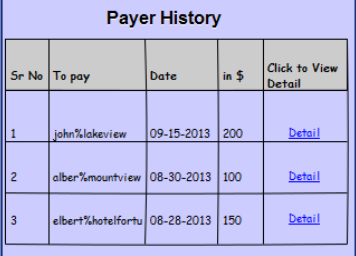
但是我不知道怎么做that...Can -请大家帮帮我
编辑:

回答 2
Stack Overflow用户
回答已采纳
发布于 2013-12-26 06:16:17
添加在特定位置的水平线和位置的标签,它将如下所示。
创建一个表视图,并在cellForRowAtIndexPath方法中添加此代码。
- (UITableViewCell *)tableView:(UITableView *)tableView cellForRowAtIndexPath:(NSIndexPath *)indexPath
{

    NSString *SimpleTableIdentifier;
    UITableViewCell * cell;

    SimpleTableIdentifier = @"SimpleTableIdentifier";
    cell = [tableView  dequeueReusableCellWithIdentifier: nil];

    if(cell == nil) {

        cell = [[UITableViewCell alloc]
                initWithStyle:UITableViewCellStyleDefault
                reuseIdentifier:SimpleTableIdentifier];


        UILabel * numLbl = [[UILabel alloc] initWithFrame:CGRectMake(0,5,33,30)];
        numLbl.text = @"1";
        [numLbl setFont:[UIFont fontWithName:@"Helvetica" size:10.0]];
        numLbl.backgroundColor = [UIColor clearColor];
        [cell addSubview:numLbl];

        UILabel * nameLbl = [[UILabel alloc] initWithFrame:CGRectMake(30,5,50,30)];
        nameLbl.text = @"john%Lakeview";
        [nameLbl setFont:[UIFont fontWithName:@"Helvetica" size:10.0]];
        nameLbl.backgroundColor = [UIColor clearColor];
        [cell addSubview:nameLbl];


        //create a hoizontal separator in cell to display it like column
        UIView* hSeparatorview1 = [[UIView alloc] initWithFrame:CGRectMake(25, 0, 1, 30)];
        hSeparatorview1.backgroundColor = [UIColor blackColor];
        hSeparatorview1.tag = 1;
        [cell addSubview:hSeparatorview1];

        UIView* hSeparatorview2 = [[UIView alloc] initWithFrame:CGRectMake(85, 0, 1, 30)];
        hSeparatorview2.backgroundColor = [UIColor blackColor];
        hSeparatorview2.tag = 2;
        [cell addSubview:hSeparatorview2];
    }

    return cell;
}

//this method is used to set the hight of the tableview cell
- (CGFloat)tableView:(UITableView *)tableView heightForRowAtIndexPath:(NSIndexPath      *)indexPath;
{
    return 30;
}
我只为两个标签和两个水平视图创建了它,但是您可以创建任意数量的视图。
是的,点忘了将代码放在didSelectRowAtIndexPath中,否则当用户单击单元格时,水平视图将消失。
- (void)tableView:(UITableView *)atableView didSelectRowAtIndexPath:(NSIndexPath *)indexPath
{
    //get the cell which is selected
    UITableViewCell *selectedCell = [atableView cellForRowAtIndexPath:indexPath];

    //set cell horizontal saparator view color of selected cell bcoz when cell selected all view color is gone
    UIView *hSeparatorview1=[selectedCell viewWithTag:1];
    hSeparatorview1.backgroundColor = [UIColor blackColor];

    UIView *hSeparatorview2=[selectedCell viewWithTag:2];
    hSeparatorview2.backgroundColor = [UIColor blackColor];

}Stack Overflow用户
发布于 2013-12-26 06:15:13
最好尝试使用自定义的表格单元格作为文本,UIViews用于行,我在我的应用程序中也是这样做的。
页面原文内容由Stack Overflow提供。腾讯云小微IT领域专用引擎提供翻译支持
原文链接:
https://stackoverflow.com/questions/20779979
复制相关文章
相似问题
腾讯云开发者

Copyright © 2013 - 2026 Tencent Cloud. All Rights Reserved. 腾讯云 版权所有
深圳市腾讯计算机系统有限公司 ICP备案/许可证号:粤B2-20090059  粤公网安备44030502008569号
腾讯云计算(北京)有限责任公司 京ICP证150476号 | 京ICP备11018762号