
如何在android中实现注册/注册?
如何在android中实现注册/注册?
提问于 2013-12-24 03:42:08
我想要设置一个用户注册,其中包括多个步骤。每一步都将以栏的形式突出显示。深灰色条将是已完成的步骤,而淡灰条将是需要完成的步骤。似乎想不出有什么办法能做到这一点。请建议一下。
我们可以在myfitnesspal上看到这个。我在下面的图片中用红色方框突出显示了这一点。
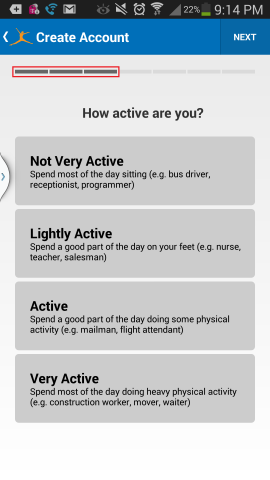
回答 3
Stack Overflow用户
回答已采纳
发布于 2013-12-24 04:09:37
<RelativeLayout
        android:id="@+id/layout"
        android:layout_width="fill_parent"
        android:layout_height="wrap_content">

        <LinearLayout
            android:id="@+id/tab_layout"
            android:layout_width="fill_parent"
            android:layout_height="wrap_content"
            android:layout_alignParentTop="true"
            android:orientation="horizontal" >

            <Button
                android:id="@+id/step1"
                android:layout_width="wrap_content"
                android:layout_height="wrap_content"
                android:layout_marginLeft="5dp"
                android:layout_marginTop="-5dp"
                android:background="@drawable/tab_active" />

            <Button
                android:id="@+id/step2"
                android:layout_width="wrap_content"
                android:layout_height="wrap_content"
                android:layout_marginLeft="5dp"
                android:layout_marginTop="-5dp"
                android:background="@drawable/tab_active" />

           <Button
                android:id="@+id/step3"
                android:layout_width="wrap_content"
                android:layout_height="wrap_content"
                android:layout_marginLeft="5dp"
                android:layout_marginTop="-5dp"
                android:background="@drawable/tab_active" />

           <Button
                android:id="@+id/step4"
                android:layout_width="wrap_content"
                android:layout_height="wrap_content"
                android:layout_marginLeft="5dp"
                android:layout_marginTop="-5dp"
                android:background="@drawable/tab_active" />
        </LinearLayout>

        <LinearLayout
            android:id="@+id/steptitle"
            android:layout_width="fill_parent"
            android:layout_height="wrap_content"
            android:layout_below="@+id/tab_layout" >

            <TextView
                android:id="@+id/eventItemTitle"
                android:layout_width="match_parent"
                android:layout_height="wrap_content"
                android:layout_gravity="center_vertical"
                android:ellipsize="end"
                android:paddingLeft="15dp"
                android:singleLine="true"
                android:text="@string/symptomstitlebar"
                android:textColor="@color/white_color"
                android:textSize="14sp"
                android:textStyle="bold" />
        </LinearLayout>

        <LinearLayout
            android:id="@+id/content"
            android:layout_width="fill_parent"
            android:layout_height="wrap_content"
            android:layout_below="@+id/event_title_layout"
            android:orientation="horizontal"
            android:paddingLeft="10dp"
            android:paddingRight="10dp" >

            <include
                android:id="@+id/stepContent"
                android:layout_width="match_parent"
                android:layout_height="match_parent"
                layout="@layout/event_tab_layout" />
        </LinearLayout>
    </RelativeLayout>
尝试这样的布局并定义片段来动态地更改内容
Stack Overflow用户
发布于 2013-12-24 04:02:00
如果您对连续条表示满意,可以使用自定义进度条,如this answer中所解释的那样。
如果您真的想要图片中的各个片段,您可能需要创建一个“光”和“暗”图像资源,并将一堆ImageViews放在水平LinearLayout中。当您进入下一步时,您将只需将该ImageView的可绘制性更改为“黑暗”图像资源。
Stack Overflow用户
发布于 2013-12-24 04:27:02
页面原文内容由Stack Overflow提供。腾讯云小微IT领域专用引擎提供翻译支持
原文链接:
https://stackoverflow.com/questions/20754542
复制相关文章
相似问题
腾讯云开发者

Copyright © 2013 - 2026 Tencent Cloud. All Rights Reserved. 腾讯云 版权所有
深圳市腾讯计算机系统有限公司 ICP备案/许可证号:粤B2-20090059  粤公网安备44030502008569号
腾讯云计算(北京)有限责任公司 京ICP证150476号 | 京ICP备11018762号