
JSwing简单按钮/JFXPanel布局
JSwing简单按钮/JFXPanel布局
提问于 2013-12-21 20:35:31
有人能告诉我用Java实现以下图像布局的最简单方法吗?
JFXPanel应该占用所有的屏幕空间,但当窗口调整大小时,按钮应该保持相同的大小。
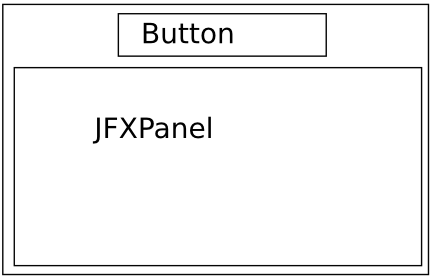
更普遍地说,Java中是否有任何LayoutManager可以让我以一种简单的方式对另一个组件进行堆栈?
我所做的每一件事都会使按钮太大。也许是JFXPanel搞砸了尺寸,我不知道。
谢谢,这让我发疯了。
回答 1
Stack Overflow用户
发布于 2013-12-21 20:36:42
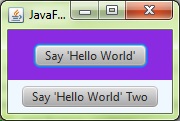
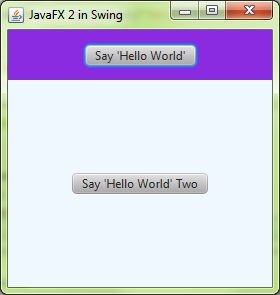
- 使用嵌套的JPanels,这是关键,每个都使用自己的布局。
- 整个事情的BorderLayout,在主JPanel中。
- 一个FlowLayout JPanel来保存JButton,并将该JPanel放置在主JPanel BorderLayout.PAGE_START中。
- 将JFXPanel放置在主JPanel BorderLayout.CENTER中
- 阅读布局管理教程,因为这是所有的解释和显示在那里。
import java.awt.BorderLayout;
import java.awt.Dimension;
import javafx.application.Platform;
import javafx.embed.swing.JFXPanel;
import javafx.event.ActionEvent;
import javafx.event.EventHandler;
import javafx.scene.Scene;
import javafx.scene.control.Button;
import javafx.scene.layout.StackPane;
import javafx.scene.paint.Color;
import javax.swing.JApplet;
import javax.swing.JFrame;
import javax.swing.SwingUtilities;
import javax.swing.UIManager;

public class JavaFXSwingApplication1 extends JApplet {

    private static final int JFXPANEL_WIDTH_INT = 300;
    private static final int JFXPANEL_HEIGHT_INT = 250;
    private static JFXPanel fxContainer;
    private static JFXPanel fxContainerTwo;
    private static final long serialVersionUID = 1L;

    public static void main(String[] args) {
        SwingUtilities.invokeLater(new Runnable() {
            @Override
            public void run() {
                try {
                    UIManager.setLookAndFeel("com.sun.java.swing.plaf.nimbus.NimbusLookAndFeel");
                } catch (Exception e) {
                }
                JFrame frame = new JFrame("JavaFX embeded in Swing");
                frame.setLayout(new BorderLayout(5, 5));
                frame.setDefaultCloseOperation(JFrame.EXIT_ON_CLOSE);
                JApplet applet = new JavaFXSwingApplication1();
                applet.init();
                frame.setContentPane(applet.getContentPane());
                frame.pack();
                frame.setLocationRelativeTo(null);
                frame.setVisible(true);
                applet.start();
            }
        });
    }

    @Override
    public void init() {
        fxContainer = new JFXPanel();
        fxContainer.setPreferredSize(new Dimension(JFXPANEL_WIDTH_INT / 5, JFXPANEL_HEIGHT_INT / 5));
        add(fxContainer, BorderLayout.NORTH);
        fxContainerTwo = new JFXPanel();
        fxContainerTwo.setPreferredSize(new Dimension(JFXPANEL_WIDTH_INT, JFXPANEL_HEIGHT_INT));
        add(fxContainerTwo, BorderLayout.CENTER);
        Platform.runLater(new Runnable() {
            @Override
            public void run() {
                createScene();
                createScene2();
            }
        });
    }

    private void createScene() {
        Button btn = new Button();
        btn.setText("Say 'Hello World'");
        btn.setOnAction(new EventHandler<ActionEvent>() {
            @Override
            public void handle(ActionEvent event) {
                System.out.println("Hello World!");
            }
        });
        StackPane root = new StackPane();
        root.getChildren().add(btn);
        Scene scene = new Scene(root, Color.BLUEVIOLET);
        fxContainer.setScene(scene);
    }

    private void createScene2() {
        Button btn = new Button();
        btn.setText("Say 'Hello World' Two");
        btn.setOnAction(new EventHandler<ActionEvent>() {
            @Override
            public void handle(ActionEvent event) {
                System.out.println("Hello World!");
            }
        });
        StackPane root = new StackPane();
        root.getChildren().add(btn);
        Scene scene = new Scene(root, Color.ALICEBLUE);
        fxContainerTwo.setScene(scene);
    }
}页面原文内容由Stack Overflow提供。腾讯云小微IT领域专用引擎提供翻译支持
原文链接:
https://stackoverflow.com/questions/20723289
复制相关文章
相似问题
腾讯云开发者

Copyright © 2013 - 2026 Tencent Cloud. All Rights Reserved. 腾讯云 版权所有
深圳市腾讯计算机系统有限公司 ICP备案/许可证号:粤B2-20090059  粤公网安备44030502008569号
腾讯云计算(北京)有限责任公司 京ICP证150476号 | 京ICP备11018762号