
添加后台资源时,EditText中的居中文本不以编程方式工作
添加后台资源时,EditText中的居中文本不以编程方式工作
提问于 2013-12-17 18:31:13
我正在开发一个应用程序,它以编程方式将EditText框插入到布局中。当我以编程方式添加EditText时,我似乎无法让中心文本正常工作,但是当我通过XML布局进行添加时,它工作得很好。当我添加背景资源时,我已经确定了问题所在。我在下面添加了代码,以显示通过代码添加时的EditText和XML。
<LinearLayout
   android:id="@+id/layoutLinear_main"
   xmlns:android="http://schemas.android.com/apk/res/android"
   xmlns:tools="http://schemas.android.com/tools"
   android:layout_width="match_parent"
   android:layout_height="match_parent"
   android:orientation="vertical"
   android:background="@drawable/background" >

   <LinearLayout
      android:id="@+id/layoutLinear_answerDisplay"
      android:layout_width="fill_parent"
      android:layout_height="wrap_content"
      android:layout_gravity="center_horizontal"
      android:gravity="center_horizontal"
      android:orientation="vertical" >

      <EditText
         android:layout_width="fill_parent"
         android:layout_height="wrap_content"
         android:paddingLeft="5dp"
         android:paddingRight="5dp"
         android:paddingTop="5dp"
         android:paddingBottom="5dp"
         android:gravity="center"
         android:background="@drawable/background_field"
         android:layout_gravity="center"
         android:layout_marginLeft="120dp"
         android:layout_marginRight="120dp"
         android:layout_marginTop="10dp"
         android:layout_marginBottom="10dp"
         android:textSize="30dp"
         android:hint="F"
         android:text="F" />

  </LinearLayout></LinearLayout>
然后在主代码中。我以编程方式添加一个EditText。我删除了空白处和垫子,只是为了清楚地识别问题。
LinearLayout layoutLinear_answerDisplay = ((LinearLayout) this.findViewById(R.id.layoutLinear_answerDisplay));

EditText ed = new EditText(this);
ed.setGravity(Gravity.CENTER);

LinearLayout.LayoutParams layoutParams = new LinearLayout.LayoutParams(LayoutParams.FILL_PARENT, LayoutParams.WRAP_CONTENT);
layoutParams.gravity = Gravity.CENTER;
ed.setLayoutParams(layoutParams);

ed.setBackgroundResource(R.drawable.background_field);
ed.setTextSize(30);
ed.setHint("F");
ed.setText("F");

layoutLinear_answerDisplay.addView(ed);
然后,下面是ouptut。您可以从图像中看到顶部的EditText具有居中文本(这是通过XML代码完成的)。从底部的EditText中可以看到,文本是以关闭为中心的(通过后面的代码完成)。
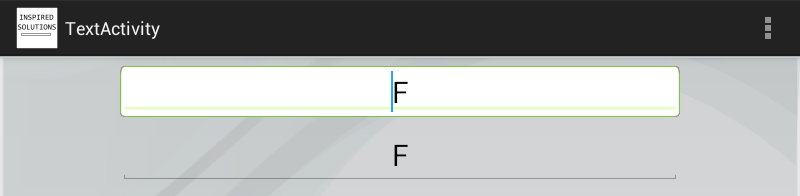
我还为EditText附加了我的背景资料。任何帮助都将不胜感激。谢谢

回答 1
Stack Overflow用户
回答已采纳
发布于 2013-12-17 19:14:44
看起来,您正在使用layout_margin (左和右)对xml编辑文本进行居中。当您在代码中设置这些时,您没有考虑到dp扩展。
    final int width = (int) TypedValue.applyDimension(TypedValue.COMPLEX_UNIT_DIP,
            (float) 120.0, getResources().getDisplayMetrics());
使用像上面这样的东西来缩放你的120度量值到正确的像素当量,然后他们将在相同的地方。但也要意识到,您不应该使用如此高的值为左/右边距,以您的文本为中心
页面原文内容由Stack Overflow提供。腾讯云小微IT领域专用引擎提供翻译支持
原文链接:
https://stackoverflow.com/questions/20641972
复制相关文章
相似问题
腾讯云开发者

Copyright © 2013 - 2026 Tencent Cloud. All Rights Reserved. 腾讯云 版权所有
深圳市腾讯计算机系统有限公司 ICP备案/许可证号:粤B2-20090059  粤公网安备44030502008569号
腾讯云计算(北京)有限责任公司 京ICP证150476号 | 京ICP备11018762号