
DataGridView缺少空数据源的新行
我正在创建一个应用程序,该应用程序使用DataGridView来创建和修改本地列表,稍后将导入到系统中。它应该由用户编辑(点击和写入DGV),它还应该支持从csv导入,这意味着我需要DGV和数据源之间的双向同步。
我已经将DGV的DataSource设置为如下所示的BindingList<Client>:
//In my seperate Client class-file
public class Client
{
    private string _name;
    private string _mac;
    private string _status;

    public Client(string pcnavn, string MAC)
    {
        _pcnavn = pcnavn;
        _mac = mac;
    }

    public string Name
    {
        get
        {
            return _name;
        }
        set
        {
            _name = value;
        }
    }

    public string MAC
    {
        get
        {
            return _mac;
        }
        set
        {
            _mac = value;
        }
    }

    public string Status
    {
        get
        {
            return _status;
        }
        set
        {
            _status = value;
        }
    }
}

//In my mainform class

public BindingList<Client> clientDataSource = new BindingList<Client>();

public MainForm()
{
InitializeComponent();
//clienDataGridView.AutoGenerateColumns = false; //The duplicate columns where fixed by setting DataPropertyName for all columns.
clientDataGridView.DataSource = clientDataSource;
}
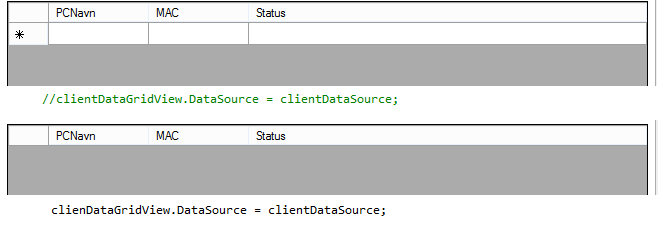
使用这种方法,将生成DGV,但它是空的(仅为标头),因此用户不能使用DGV添加一行。如果没有DataSource,它就会显示一个空白行,就像一个SQL编辑器,这样我就可以在DGV中手动创建行。当链接到空数据源时,如何显示“新项”-row?我发现的所有例子都使用非空数据源。
AllowUserToAddRows和AllowUserToDeleteRows设置为true。
这张照片显示了我的问题。使用数据源时缺少“第一行”。不可能通过输入DGV来添加数据。
回答 3
Stack Overflow用户
发布于 2013-12-15 18:37:20
在查看MSDN时,我发现了以下内容:
如果该属性和数据源的IBindingList.AllowNew属性都设置为true,则如果DataGridView绑定到数据,则允许用户添加行。
在默认情况下,BindingList似乎将这个属性作为false,所以这个小技巧修复了它:
public BindingList<Client> clientDataSource = new BindingList<Client>() { AllowNew = true };Stack Overflow用户
发布于 2013-12-15 07:50:46
我想您错过了DataPropertyName设置。
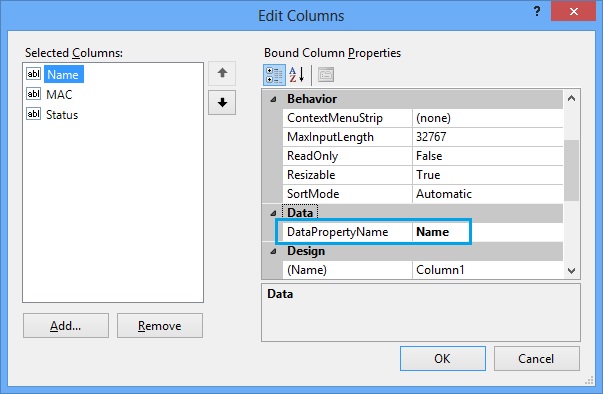
- 首先,必须向数据网格中添加列。转到“添加列”选项,并使用向导添加所需的列。
- 其次,您必须在向导模式下编辑每个列并设置
DataPropertyName。基本上,对于您创建的每个网格列,都需要给出客户端类的确切绑定属性名称。
Displaying Empty Row
当将空列表绑定到DGV时,默认行将被删除。如果您需要显示一个空行,那么就这样做,
//Adding a client object to the collection so that an empty row will be inserted to DGV
clientDataSource.Add(new Client());
clientDataGridView.DataSource = clientDataSource;Stack Overflow用户
发布于 2018-02-28 03:31:43
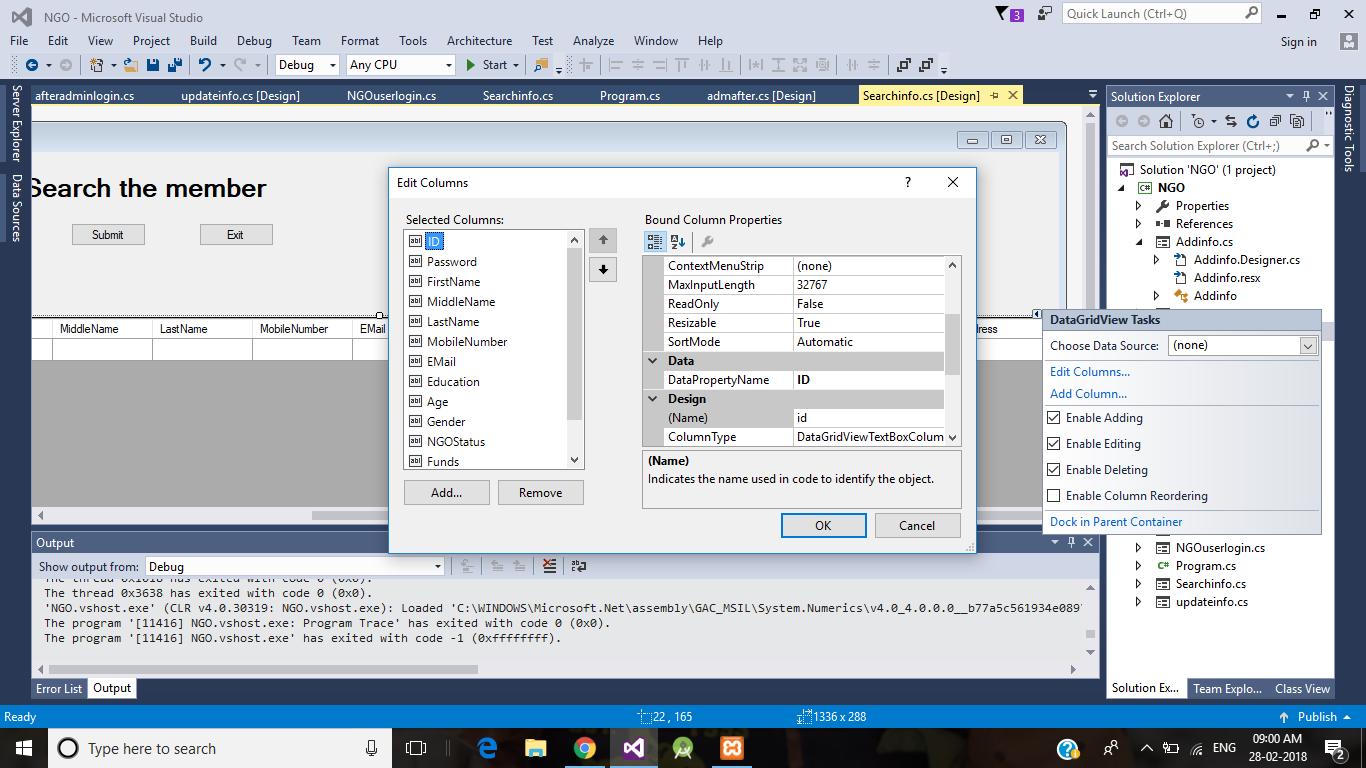
参见这里的配置
try
{

  int id =Convert.ToInt32( textBox1.Text);
    string query = "SELECT * FROM ngo.inser WHERE ID LIKE '%" + id + "%'";
    command = new MySqlCommand(query, connection);
    adapter = new MySqlDataAdapter(command);
    table = new DataTable();
    adapter.Fill(table);

    dataGridView1.DataSource = table;
}
catch(Exception ex)
{
    MessageBox.Show(ex.Message);
}
然后转到datagridview编辑列设置。在该数据菜单中,具有DataPropertyName的非属性将更改为实际的数据库列名。然后它将显示该列的信息。如果您有多个列,那么像这样设置所有信息。
https://stackoverflow.com/questions/20589351
复制相似问题
腾讯云开发者

Copyright © 2013 - 2026 Tencent Cloud. All Rights Reserved. 腾讯云 版权所有
深圳市腾讯计算机系统有限公司 ICP备案/许可证号:粤B2-20090059  粤公网安备44030502008569号
腾讯云计算(北京)有限责任公司 京ICP证150476号 | 京ICP备11018762号