
"QComboBox流行“扩展与QtWebkit
在Firefox/Chrome/InternetExplorer/Safari/Opera作为内容展开的组合框中,请参见Firefox图片:
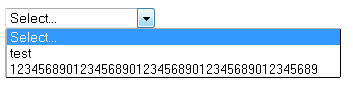
QComboBox弹出不会扩展内容。弹出窗口受QComboBox大小的限制,请参见QWebView图片:
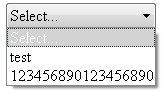
因此,我实现了QComboBox::showPopup
void newQComboBox::showPopup() {
    int width = this->width();
    this->view()->setTextElideMode( Qt::ElideNone );

    const int iconSize = this->iconSize().width();
    const QFontMetrics fontMetrics = this->fontMetrics();
    const int j = this->count();

    for( int i=0; i < j; ++i ) {
        const int textWidth = fontMetrics.width( this->itemText(i) + "WWW" );
        if (this->itemIcon(i).isNull()) {
            width = qMax(width, textWidth);
        } else {
            width = qMax(width, textWidth + iconSize);
        }
    }

    QStyleOptionComboBox opt;
    this->initStyleOption(&opt);
    QSize size(width, 0);
    size = this->style()->sizeFromContents(QStyle::CT_ComboBox, &opt, size, this);

    this->view()->setFixedWidth( width );

    QComboBox::showPopup();
}
是否有任何方法修改(重新实现) QComboBox::showPopup of QWebViews (QtWebkit)?
Qt-BUG (建议): https://bugreports.qt.io/browse/QTBUG-35771
回答 2
Stack Overflow用户
发布于 2014-01-03 17:45:37
我使用QProxyStyle类进行了求解,例如:
#include <QProxyStyle>
#include <QAbstractItemView>
#include <QComboBox>

class myProxyStyle : public QProxyStyle
{

public:
    int styleHint(StyleHint hint, const QStyleOption *option, const QWidget *widget, QStyleHintReturn *returnData) const
    {
        if(hint == QStyle::SH_ComboBox_Popup) {
            const QComboBox *combo = (QComboBox *) widget;//cast to QComboBox
            const QObjectList a = combo->children();
            const int j = a.count();
            QAbstractItemView *view = 0;
            QString className = "";
            bool hasView = false;

            /*
            at this point I have not used combo->view() because he "crash" the application without explanation
            so I had to make a loop to find the "view"
            */
            for (int i = 0; i < j; ++i) {
                const QObjectList b = a.at(i)->children();
                const int y = b.count();

                for (int x = 0; x < y; ++x) {
                    className = b.at(x)->metaObject()->className();

                    if (className == "QComboBoxListView") {
                        view = (QAbstractItemView *) b.at(x);
                        hasView = true;
                        break;
                    }
                }

                if (hasView) {
                    break;
                }
            }

            if (hasView) {
                const int iconSize = combo->iconSize().width();
                const QFontMetrics fontMetrics1 = view->fontMetrics();
                const QFontMetrics fontMetrics2 = combo->fontMetrics();
                const int j = combo->count();
                int width = combo->width(); //default width

                for (int i = 0; i < j; ++i) {
                    const int textWidth = qMax(
                        fontMetrics1.width(combo->itemText(i) + "WW"),
                        fontMetrics2.width(combo->itemText(i) + "WW")
                    );

                    if(combo->itemIcon(i).isNull()) {
                        width = qMax(width, textWidth);
                    } else {
                        width = qMax(width, textWidth + iconSize);
                    }
                }

                view->setFixedWidth(width);
            }
        }

        return QProxyStyle::styleHint(hint, option, widget, returnData);
    }
};
如何使用:
您必须在QApplication (通常是文件main.cpp)中申请:
int main(int argc, char *argv[])
{
    QApplication a(argc, argv);
    a.setStyle(new myProxyStyle);//set ProxyStyle

    return a.exec();
}https://stackoverflow.com/users/1873944/peppe感谢你的评论我找到了解决方案
Stack Overflow用户
发布于 2013-12-31 05:27:17
请尝试使用setMinimumWidth函数,并传递您计算的最大宽度。它应该工作ui.comboBox->view()->setMinimumWidth(width);的更多细节请通过https://qt-project.org/forums/viewthread/26388链接
https://stackoverflow.com/questions/20554940
复制相似问题
腾讯云开发者

Copyright © 2013 - 2026 Tencent Cloud. All Rights Reserved. 腾讯云 版权所有
深圳市腾讯计算机系统有限公司 ICP备案/许可证号:粤B2-20090059  粤公网安备44030502008569号
腾讯云计算(北京)有限责任公司 京ICP证150476号 | 京ICP备11018762号