
TStringGrid与SpeedButtons
TStringGrid与SpeedButtons
提问于 2013-12-11 09:06:20
我想有一个按钮与图标在每一行的末尾。
就像这里:
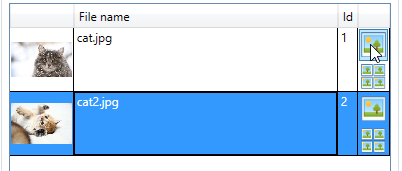
我试过这个
procedure TMyFrame.sgrd1DrawCell(Sender: TObject; ACol,
  ARow: Integer; Rect: TRect; State: TGridDrawState);
var
  canvas: TCanvas;
  sgrd: TStringGrid;
  point: TPoint;
  btn: TSpeedButton;
begin
  sgrd := TStringGrid(Sender);
  canvas := sgrd.Canvas;

  canvas.FillRect(Rect);

  if (ACol = 1) then
  begin
    point := Self.ScreenToClient(ClientToScreen(Rect.TopLeft));

    btn := TSpeedButton.Create(sgrd);

    btn.Parent := sgrd;

    btn.OnClick := SpeedButton1Click;
    btn.Tag := ARow;

    btn.enabled:=true;
    btn.visible:= true;

    btn.Top := point.Y;
    btn.Left := point.X;
    btn.Width := 20;
    btn.Height := 24;
  end;
end;
但是这个按钮看起来不像“活动”,尽管单击事件是有效的。没有点击,悬停动画,焦点等。
回答 3
Stack Overflow用户
回答已采纳
发布于 2013-12-11 09:29:08
问题是,每次单元格需要刷新时,您都会不断地创建一个新的速度按钮。必须在create事件中创建按钮。
procedure TForm1.FormCreate(Sender: TObject);
var
  canvas: TCanvas;
  point: TPoint;
  btn: TSpeedButton;
  row : integer;
  rect: TRect;
begin
  for row:=0 to stringGrid1.RowCount-1 do
   begin
    rect := stringGrid1.CellRect(1,row);
    point := ScreenToClient(ClientToScreen(Rect.TopLeft));
    btn := TSpeedButton.Create(StringGrid1);
    btn.Parent := StringGrid1;
    btn.OnClick := SpeedButton1Click;
    btn.Tag := row;
    btn.enabled:=true;
    btn.visible:= true;
    btn.Top := point.Y;
    btn.Left := point.X;
    btn.Width := 20;
    btn.Height := 24;
end;Stack Overflow用户
发布于 2013-12-11 10:31:34
假设您可能希望能够在StringGrid中滚动并将按钮与选定的行关联,则必须为TopLeftChanged实现一个处理程序。如果没有实现代码,在Stringgrid中滚动按钮将不会被移动。
procedure TForm3.SpeedButton1Click(Sender: TObject);
begin
  Showmessage(TSpeedButton(Sender).Name  + ' ' +  IntToStr(TSpeedButton(Sender).Tag));
end;

const
  C_COL = 4;

procedure TForm3.StringGrid1TopLeftChanged(Sender: TObject);
var
  point: TPoint;
  btn: TSpeedButton;
  row: integer;
  rect: TRect;
  y: integer;
begin
  rect := TStringGrid(Sender).CellRect(C_COL, TStringGrid(Sender).TopRow);
  point := ScreenToClient(ClientToScreen(rect.TopLeft));
  y := rect.Top;
  for row := 0 to TStringGrid(Sender).RowCount - 1 do
  begin
    btn := TSpeedButton(TStringGrid(Sender).FindComponent(Format('SP%d', [row])));
    if row >= TStringGrid(Sender).TopRow then
    begin
      btn.Top := y;
      btn.Left := rect.Left;
      btn.Visible := rect.Right > 0;
      y := y + TStringGrid(Sender).DefaultRowHeight;
    end
    else
      btn.Visible := false;
  end;
end;

procedure TForm3.FormCreate(Sender: TObject);
var
  point: TPoint;
  btn: TSpeedButton;
  row: integer;
  rect: TRect;
  y: integer;
begin
  rect := StringGrid1.CellRect(C_COL, StringGrid1.TopRow);
  point := ScreenToClient(ClientToScreen(rect.TopLeft));
  y := rect.Top;
  for row := 0 to StringGrid1.RowCount - 1 do
  begin
    btn := TSpeedButton.Create(StringGrid1);
    btn.Name := Format('SP%d', [row]);
    btn.Parent := StringGrid1;
    btn.OnClick := SpeedButton1Click;
    btn.tag := row;
    btn.Width := StringGrid1.ColWidths[C_COL];
    btn.Height := StringGrid1.DefaultRowHeight;
    btn.Visible := false;
  end;
  StringGrid1TopLeftChanged(TStringGrid(Sender));
end;
@Tlama建议的增强版本将使得有必要实现一个interposer类,或者使用自己的组件覆盖ColWidthsChanged和RowHeightsChanged,以使绘制的按钮不仅在滚动时而且在行/列大小上保持正确。
//.....

type
  TStringGrid=Class(Grids.TStringGrid)
    procedure ColWidthsChanged; override;
    procedure RowHeightsChanged; override;
  End;

  TForm3 = class(TForm)
    StringGrid1: TStringGrid;
    SpeedButton1: TSpeedButton;
    procedure FormCreate(Sender: TObject);
    procedure StringGrid1TopLeftChanged(Sender: TObject);
  private
    procedure SpeedButton1Click(Sender: TObject);
    { Private-Deklarationen }
  public
    { Public-Deklarationen }
  end;

var
  Form3: TForm3;

implementation

{$R *.dfm}


{ TStringGrid }

procedure TStringGrid.ColWidthsChanged;
begin
  inherited;
  TopLeftChanged;
end;

procedure TStringGrid.RowHeightsChanged;
begin
  inherited;
  TopLeftChanged;
end;


procedure TForm3.SpeedButton1Click(Sender: TObject);
begin
  Showmessage(TSpeedButton(Sender).Name  + ' ' +  IntToStr(TSpeedButton(Sender).Tag));
end;

const
  C_COL = 4;

procedure TForm3.StringGrid1TopLeftChanged(Sender: TObject);
var
  point: TPoint;
  btn: TSpeedButton;
  row: integer;
  rect: TRect;
  y: integer;
begin
  for row := 0 to TStringGrid(Sender).RowCount - 1 do
  begin
    btn := TSpeedButton(TStringGrid(Sender).FindComponent(Format('SP%d', [row])));
    if row >= TStringGrid(Sender).TopRow then
    begin
      rect := TStringGrid(Sender).CellRect(C_COL, row);
      btn.BoundsRect := rect;
      btn.Visible := rect.Right > 0;
      y := y + TStringGrid(Sender).DefaultRowHeight;
    end
    else
      btn.Visible := false;
  end;
end;

procedure TForm3.FormCreate(Sender: TObject);
var
  point: TPoint;
  btn: TSpeedButton;
  row: integer;
  rect: TRect;
  y: integer;
begin
  rect := StringGrid1.CellRect(C_COL, StringGrid1.TopRow);
  point := ScreenToClient(ClientToScreen(rect.TopLeft));
  y := rect.Top;
  for row := 0 to StringGrid1.RowCount - 1 do
  begin
    btn := TSpeedButton.Create(StringGrid1);
    btn.Name := Format('SP%d', [row]);
    btn.Parent := StringGrid1;
    btn.OnClick := SpeedButton1Click;
    btn.tag := row;

    btn.Visible := false;
  end;
  StringGrid1TopLeftChanged(TStringGrid(Sender));
end;Stack Overflow用户
发布于 2013-12-11 09:54:20
procedure TForm1.FormCreate(Sender: TObject);
var
  Canvas: TCanvas;
  Point: TPoint;
  MySpeedBtn: TSpeedButton;
  Row: integer;
  Rect: TRect;
begin
  for Row := 1 to StringGrid1.RowCount - 1 do
  begin
    Rect := StringGrid1.CellRect(4, Row);
    point := ScreenToClient(ClientToScreen(Rect.TopLeft));
    MySpeedBtn := TSpeedButton.Create(StringGrid1);
    MySpeedBtn.Parent := StringGrid1;
    MySpeedBtn.OnClick := SpeedButton1Click;
    MySpeedBtn.Tag := Row;
    MySpeedBtn.Width := 20;
    MySpeedBtn.Height := StringGrid1.RowHeights[1];
    MySpeedBtn.Top := Point.Y;
    MySpeedBtn.Left := Point.X + StringGrid1.ColWidths[1] - MySpeedBtn.Width;
  end;
end;页面原文内容由Stack Overflow提供。腾讯云小微IT领域专用引擎提供翻译支持
原文链接:
https://stackoverflow.com/questions/20514849
复制相关文章
相似问题
腾讯云开发者

Copyright © 2013 - 2026 Tencent Cloud. All Rights Reserved. 腾讯云 版权所有
深圳市腾讯计算机系统有限公司 ICP备案/许可证号:粤B2-20090059  粤公网安备44030502008569号
腾讯云计算(北京)有限责任公司 京ICP证150476号 | 京ICP备11018762号