
MigLayout对准
MigLayout对准
提问于 2013-12-09 05:16:59
我想尝试使用miglayout,因为它更灵活。我试图添加日期和一些按钮,但在我使用包装后,按钮之间的差距是库存和交易变得很远,但之间的交易按钮和添加项目按钮是可以的。
这是我的密码:
    top = new JPanel();
    top.setLayout(new MigLayout("","",""));
    center = new JPanel();
    bottom = new JPanel();
    right = new JPanel();
    left = new JPanel();

    inventory = new JButton("Inventory");
    transaction = new JButton("Transaction");
    addItem = new JButton("Add Item");

    date = new Date();
    dateFormat = new SimpleDateFormat("yyyy/MM/dd HH:mm:ss");
    dateTime = new JLabel(dateFormat.format(date));

    top.add(dateTime,"wrap");
    dateTime.setBorder(BorderFactory.createLineBorder(Color.red));
    top.add(inventory);
    inventory.setBorder(BorderFactory.createLineBorder(Color.red));
    top.add(transaction);
    transaction.setBorder(BorderFactory.createLineBorder(Color.red));
    top.add(addItem);
    addItem.setBorder(BorderFactory.createLineBorder(Color.red));
    add(top,BorderLayout.NORTH);
显示:
2013/12/09 13.09.15 库存添加项目
回答 1
Stack Overflow用户
回答已采纳
发布于 2013-12-10 00:10:16
基于您的代码,我制作了一个SSCCE,以方便地显示您的问题。下一次这个任务由你来完成。注意:我已经删除了自定义边框和其他面板,因为它们与问题无关。
import java.awt.BorderLayout;
import java.text.SimpleDateFormat;
import java.util.Date;
import javax.swing.JButton;
import javax.swing.JFrame;
import javax.swing.JLabel;
import javax.swing.JPanel;
import javax.swing.SwingUtilities;
import net.miginfocom.swing.MigLayout;

public class Demo {

    private void initGUI() {
        JPanel top = new JPanel();
        top.setLayout(new MigLayout("","",""));

        SimpleDateFormat dateFormat = new SimpleDateFormat("yyyy/MM/dd HH:mm:ss");
        JLabel dateTime = new JLabel(dateFormat.format(new Date()));

        top.add(dateTime, "wrap");
        top.add(new JButton("Inventory"));
        top.add(new JButton("Transaction"));
        top.add(new JButton("Add Item"));

        JFrame frame = new JFrame("Demo");
        frame.add(top,BorderLayout.NORTH);
        frame.setDefaultCloseOperation(JFrame.DISPOSE_ON_CLOSE);
        frame.pack();
        frame.setLocationRelativeTo(null);
        frame.setVisible(true);
    }

    public static void main(String[] args) {
        SwingUtilities.invokeLater(new Runnable() {
            @Override
            public void run() {
                new Demo().initGUI();
            }
        });
    }
}
当前,您的顶部面板如下所示:
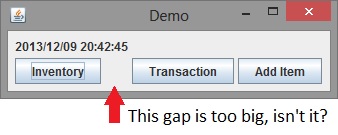
有几种方法可以达到你的目标,你只需要玩弄约束。例如,您可以这样做:
top.add(dateTime, "wrap");
top.add(new JButton("Inventory"), "split 3"); // split the column in 3 cells here
top.add(new JButton("Transaction"));
top.add(new JButton("Add Item"));
你会看到这样的东西:
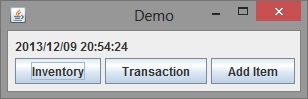
也可以在第一行中定义3列和跨3单元格,如下所示:
JPanel top = new JPanel();
top.setLayout(new MigLayout("","[][][]")); // Use column constraints here
...
top.add(dateTime, "span 3, wrap"); // span 3 cells and then wrap
top.add(new JButton("Inventory"));
top.add(new JButton("Transaction"));
top.add(new JButton("Add Item"));
其结果将与前一次类似。
有关更多信息,请访问快速启动指南
页面原文内容由Stack Overflow提供。腾讯云小微IT领域专用引擎提供翻译支持
原文链接:
https://stackoverflow.com/questions/20463657
复制相关文章
相似问题
腾讯云开发者

Copyright © 2013 - 2026 Tencent Cloud. All Rights Reserved. 腾讯云 版权所有
深圳市腾讯计算机系统有限公司 ICP备案/许可证号:粤B2-20090059  粤公网安备44030502008569号
腾讯云计算(北京)有限责任公司 京ICP证150476号 | 京ICP备11018762号