
ListCellRenderer未显示所需文本
ListCellRenderer未显示所需文本
提问于 2013-12-09 02:56:54
我试图只获取ArrayList元素中显示在组合框中的第一项。有人建议,使用ListCellRenderer将帮助我实现这一目标。我试过并尝试过,但无法访问显示所需的getCourseNum()方法。我的代码:
import java.awt.*;
import java.awt.event.*;
import javax.swing.*;
import java.util.*;

public class CourseCon extends JPanel {

private static JPanel editPanel;
private JComboBox<String> editComboLevel;
private JComboBox editCombo;
private static ArrayList<Course> course = new ArrayList<Course>();

    public CourseCon() {

        Integer[] intArray = new Integer[course.size()];
        for (int i = 0; i < course.size(); i++) {
            intArray[i] = new Integer(i);
        }
        editPanel = new JPanel();
        editPanel.setPreferredSize(new Dimension(100,70));
        editPanel.add(editCombo = new JComboBox(intArray));
        ComboBoxRenderer renderer= new ComboBoxRenderer();
        editCombo.setRenderer(renderer);
        editCombo.setSelectedIndex(0);
    }

    private static void createAndShowGUI() {
        JFrame frame = new JFrame("Example of Code Snippet");
        JComponent newContentPane = new CourseCon();
        newContentPane.setOpaque(true);
        frame.add(editPanel);
        frame.setDefaultCloseOperation(JFrame.EXIT_ON_CLOSE);
        frame.setLocationRelativeTo(null);
        frame.setPreferredSize(new Dimension(120,80));
        frame.pack();
        frame.setVisible(true);
    }

    public static void main(String[] args) {
        SwingUtilities.invokeLater(new Runnable() {
            @Override
            public void run() {
                course.add(new Course("Course-1", "Description-1",
                            1, 2, "Level 1"));
                course.add(new Course("Course-2", "Description-2",
                            3, 4, "Level 2"));
                createAndShowGUI();
                for(Course item : course)
                    System.out.println(item);
            }
        });
    }
    class ComboBoxRenderer extends JLabel
                   implements ListCellRenderer {
        public ComboBoxRenderer() {
            setOpaque(true);
            setHorizontalAlignment(CENTER);
            setVerticalAlignment(CENTER);
        }

        public Component getListCellRendererComponent(
                                           JList list,
                                           Object value,
                                           int index,
                                           boolean isSelected,
                                           boolean cellHasFocus) {
            int selectedIndex = ((Integer)value).intValue();
            //String course = courseArray[selectedIndex];
                //I couldn't get this to work

            if (isSelected) {
                setBackground(list.getSelectionBackground());
                setForeground(list.getSelectionForeground());
            } else {
                setBackground(list.getBackground());
                setForeground(list.getForeground());
            }
            //I put this in to test and it does show two times
            //makes me think if I could just access getCourseNum()
            //I'd have it. Correct me if I'm wrong please
            setText("Testing");

            return this;
        }
    }
}
这是我合作的班级:
import java.util.*;

public class Course {

    private String courseNum, courseTitle, courseLevel;
    private int courseDur, courseFee;

    Course() {}

    Course(String courseNum, String courseTitle, int courseDur,
                int courseFee, String courseLevel) {
        this.courseNum = courseNum;
        this.courseTitle = courseTitle;
        this.courseDur = courseDur;
        this.courseFee = courseFee;
        this.courseLevel = courseLevel;
    }
    @Override
    public String toString() {
        String courseInfo = this.getCourseNum()+ ", "+this.getCourseTitle()+", "
        +this.getCourseDur()+", "+this.getCourseFee()+", "+this.getCourseLevel();
        return courseInfo;
    }
    public String getCourseNum() {
        return this.courseNum;
    }
    public String getCourseTitle() {
        return this.courseTitle;
    }
    public int getCourseDur() {
        return this.courseDur;
    }
    public int getCourseFee() {
        return this.courseFee;
    }
    public String getCourseLevel() {
        return this.courseLevel;
    }
    public void setCourseNum(String courseNum) {
        this.courseNum = courseNum;
    }
    public void setCourseTitle(String courseTitle) {
        this.courseTitle = courseTitle;
    }
    public void setCourseDur(int courseDur) {
        this.courseDur = courseDur;
    }
    public void setCourseTitle(int courseFee) {
        this.courseFee = courseFee;
    }
    public void setCourseLevel(String courseLevel) {
        this.courseLevel = courseLevel;
    }
}
我已经试了几天了,但我在未知的水域里游泳。我如何访问getCourseNum()方法,以便这是填充combobox的唯一方法?任何帮助都将不胜感激。注意:几天前,我问了一个类似的问题,有人建议我修改我的代码。这是我的新尝试。我是个初学的学生,所以欢迎任何建议。干杯
回答 1
Stack Overflow用户
回答已采纳
发布于 2013-12-09 03:26:45
首先,将所有的Course添加到组合框中,这将使您的生活在长期内无限地变得更好和更容易.
editPanel.add(editCombo = new JComboBox(course.toArray(new Course[course.size()])));第二,修改您的ComboBoxRenderer以接受Course而不是int.
if (value instanceof Course) {
    Course course = (Course) value;
    value = course.getCourseNum();
}最后,您可能需要考虑使用DefaultListCellRenderer扩展而不是JLabel,并实现ListCellRenderer,因为它处理了大量重要的stuff...like选择--突出显示.
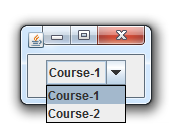
import java.awt.Component;
import java.awt.Dimension;
import java.util.ArrayList;
import javax.swing.DefaultListCellRenderer;
import javax.swing.JComboBox;
import javax.swing.JComponent;
import javax.swing.JFrame;
import javax.swing.JLabel;
import javax.swing.JList;
import javax.swing.JPanel;
import javax.swing.ListCellRenderer;
import javax.swing.SwingUtilities;

public class CourseCon extends JPanel {

    private static JPanel editPanel;
    private JComboBox<String> editComboLevel;
    private JComboBox editCombo;
    private static ArrayList<Course> course = new ArrayList<Course>();

    public CourseCon() {

        editPanel = new JPanel();
        editPanel.setPreferredSize(new Dimension(100, 70));
        editPanel.add(editCombo = new JComboBox(course.toArray(new Course[course.size()])));
        ComboBoxRenderer renderer = new ComboBoxRenderer();
        editCombo.setRenderer(renderer);
        editCombo.setSelectedIndex(0);
    }

    private static void createAndShowGUI() {
        JFrame frame = new JFrame("Example of Code Snippet");
        JComponent newContentPane = new CourseCon();
        newContentPane.setOpaque(true);
        frame.add(editPanel);
        frame.setDefaultCloseOperation(JFrame.EXIT_ON_CLOSE);
        frame.setLocationRelativeTo(null);
        frame.setPreferredSize(new Dimension(120, 80));
        frame.pack();
        frame.setVisible(true);
    }

    public static void main(String[] args) {
        SwingUtilities.invokeLater(new Runnable() {
            @Override
            public void run() {
                course.add(new Course("Course-1", "Description-1",
                        1, 2, "Level 1"));
                course.add(new Course("Course-2", "Description-2",
                        3, 4, "Level 2"));
                createAndShowGUI();
                for (Course item : course) {
                    System.out.println(item);
                }
            }
        });
    }

    class ComboBoxRenderer extends DefaultListCellRenderer {

        public Component getListCellRendererComponent(
                JList list,
                Object value,
                int index,
                boolean isSelected,
                boolean cellHasFocus) {

            if (value instanceof Course) {
                Course course = (Course) value;
                value = course.getCourseNum();
            }

            return super.getListCellRendererComponent(list, value, index, isSelected, cellHasFocus);
        }
    }

    public static class Course {

        private String courseNum, courseTitle, courseLevel;
        private int courseDur, courseFee;

        Course() {
        }

        Course(String courseNum, String courseTitle, int courseDur,
                int courseFee, String courseLevel) {
            this.courseNum = courseNum;
            this.courseTitle = courseTitle;
            this.courseDur = courseDur;
            this.courseFee = courseFee;
            this.courseLevel = courseLevel;
        }

        @Override
        public String toString() {
            String courseInfo = this.getCourseNum() + ", " + this.getCourseTitle() + ", "
                    + this.getCourseDur() + ", " + this.getCourseFee() + ", " + this.getCourseLevel();
            return courseInfo;
        }

        public String getCourseNum() {
            return this.courseNum;
        }

        public String getCourseTitle() {
            return this.courseTitle;
        }

        public int getCourseDur() {
            return this.courseDur;
        }

        public int getCourseFee() {
            return this.courseFee;
        }

        public String getCourseLevel() {
            return this.courseLevel;
        }

        public void setCourseNum(String courseNum) {
            this.courseNum = courseNum;
        }

        public void setCourseTitle(String courseTitle) {
            this.courseTitle = courseTitle;
        }

        public void setCourseDur(int courseDur) {
            this.courseDur = courseDur;
        }

        public void setCourseTitle(int courseFee) {
            this.courseFee = courseFee;
        }

        public void setCourseLevel(String courseLevel) {
            this.courseLevel = courseLevel;
        }
    }
}页面原文内容由Stack Overflow提供。腾讯云小微IT领域专用引擎提供翻译支持
原文链接:
https://stackoverflow.com/questions/20462340
复制相关文章
相似问题
腾讯云开发者

Copyright © 2013 - 2026 Tencent Cloud. All Rights Reserved. 腾讯云 版权所有
深圳市腾讯计算机系统有限公司 ICP备案/许可证号:粤B2-20090059  粤公网安备44030502008569号
腾讯云计算(北京)有限责任公司 京ICP证150476号 | 京ICP备11018762号