
与ActionBar的问题
与ActionBar的问题
提问于 2013-12-05 16:55:39
在我的Android Studio应用程序中,我已经尝试了好几天来删除ActionBar。我不知道为什么总是显示,尽管我更改了默认的Theme。自从我将Android Studio更新到3.6.0 version之后,我就有了这个问题。你能帮帮我吗?这是我的manifest
<application
    android:allowBackup="true"
    android:icon="@drawable/ic_launcher"
    android:label="@string/app_name"
    android:theme="@style/AppTheme">
    <activity
        android:name="com.ultimate.app.MainActivity"
        android:screenOrientation="portrait"
        >
        <intent-filter>
            <action android:name="android.intent.action.MAIN" />

            <category android:name="android.intent.category.LAUNCHER" />
        </intent-filter>
    </activity>
    ...
</application>这是我的styles.xml
<?xml version="1.0" encoding="utf-8"?>
<resources>

<style name="AppTheme" parent="android:Theme.Holo.Light.DialogWhenLarge.NoActionBar"/>

</resources>
编辑 MainActivity.java
public class MainActivity extends TabActivity {


@Override
protected void onCreate(Bundle savedInstanceState) {
    super.onCreate(savedInstanceState);
    setContentView(R.layout.activity_main);


    TabHost tabHost = (TabHost)findViewById(android.R.id.tabhost);

    TabHost.TabSpec tab1 = tabHost.newTabSpec("");
    TabHost.TabSpec tab2 = tabHost.newTabSpec("");
    TabHost.TabSpec tab3 = tabHost.newTabSpec("");


    tab1.setIndicator("Home");
    tab1.setContent(new Intent(this, Tab1Activity.class));


    tab2.setIndicator("Preferiti");
    tab2.setContent(new Intent(this,Tab2Activity.class));

    tab3.setIndicator("Altro");
    tab3.setContent(new Intent(this,Tab3Activity.class));

    /** Add the tabs  to the TabHost to display. */
    tabHost.addTab(tab1);
    tabHost.addTab(tab2);
    tabHost.addTab(tab3);
}


@Override
public boolean onCreateOptionsMenu(Menu menu) {
    // Inflate the menu; this adds items to the action bar if it is present.
    getMenuInflater().inflate(R.menu.main, menu);
    return true;
}

}
这就是我一直拥有的:
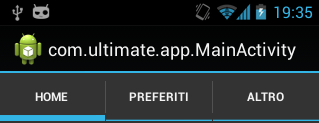
编辑更新manifest
<application
    android:allowBackup="true"
    android:icon="@drawable/ic_launcher"
    android:label="@string/app_name"
    android:theme="@android:style/Theme.NoTitleBar">
    <activity
        android:name="com.ultimate.app.MainActivity"
        android:screenOrientation="portrait"
        >
        <intent-filter>
            <action android:name="android.intent.action.MAIN" />

            <category android:name="android.intent.category.LAUNCHER" />
        </intent-filter>
    </activity>
    ...
</application>回答 2
Stack Overflow用户
回答已采纳
发布于 2013-12-05 17:38:28
在文件夹值中的style.xml中尝试如下所示:
<style name="AppBaseTheme" parent="android:Theme.Holo.Light.NoActionBar"></style>
<style name="AppTheme" parent="AppBaseTheme"></style>
对于每个API级别,您将更改基础,创建一个文件夹‘values vXX’,其中'XX‘是API级别。例如:
<style name="AppBaseTheme" parent="android:Theme.NoTitleBar"></style>在你的名单中:
<android:theme="@style/AppTheme">文件夹值中的style.xml设置目标API级别的主题。
Stack Overflow用户
发布于 2013-12-05 17:13:45
如您所见,您的应用程序没有使用您在style.xml中设置的主题。我猜你并没有在正确的地方改变应用程序的主题。请检查一下。
页面原文内容由Stack Overflow提供。腾讯云小微IT领域专用引擎提供翻译支持
原文链接:
https://stackoverflow.com/questions/20405986
复制相关文章
相似问题
腾讯云开发者

Copyright © 2013 - 2026 Tencent Cloud. All Rights Reserved. 腾讯云 版权所有
深圳市腾讯计算机系统有限公司 ICP备案/许可证号:粤B2-20090059  粤公网安备44030502008569号
腾讯云计算(北京)有限责任公司 京ICP证150476号 | 京ICP备11018762号