
在Android上处理蓝牙耳机点击(ACTION_VOICE_COMMAND和ACTION_WEB_SEARCH)
我正在开发一个Android应用程序,我希望它与headset按钮单击交互。我正在Nexus 5和安卓KitKat 4.4上测试它。
我首先尝试了一个简单的耳机(不是无线的)。接收到的按钮事件是KEYCODE_HEADSETHOOK (79)。我创建了一个MEDIA_BUTTON receiver来处理它的点击:
<receiver android:name="com.example.mytest.SearchActivity$MediaButtonIntentReceiver">
    <intent-filter>
        <intent-filter android:priority="1000000000">
            <action android:name="android.intent.action.MEDIA_BUTTON" />
        </intent-filter>
    </intent-filter>
</receiver>
这是保存接收者的活动:
public class SearchActivity extends Activity {

    private AudioManager mAudioManager;
    private ComponentName mAudioReceiver;

    @Override
    protected void onCreate(Bundle savedInstanceState) {
        super.onCreate(savedInstanceState);
        setContentView(R.layout.search);

        mAudioManager = (AudioManager) getSystemService(AUDIO_SERVICE);
        mAudioReceiver =  new ComponentName(getPackageName(),
            MediaButtonIntentReceiver.class.getName());
    }

    @Override
    protected void onResume() {
        super.onResume();

        mAudioManager.registerMediaButtonEventReceiver(mAudioReceiver);
    }

    @Override
    protected void onPause() {
        super.onPause();

        mAudioManager.unregisterMediaButtonEventReceiver(mAudioReceiver);
    }

    public static class MediaButtonIntentReceiver extends BroadcastReceiver {

        @Override
        public void onReceive(Context context, Intent intent) {
            Log.d("SA", "ON RECEIVE");

            ...

            abortBroadcast();
        }
    }
}只有当用户执行简短的单击时,此代码才适用于我的有线耳机。执行长时间单击将打开Google Voice Search。我也想捕捉长点击,但我不介意这是不可能的。
之后,我用bluetooth耳机对它进行了测试。具体来说,我使用的是Moveteck蓝牙耳机BH119A (您可以在这篇文章的底部看到图像)。这个耳机只有一个按钮,如果我按下它,就会打开下面的"activity“:
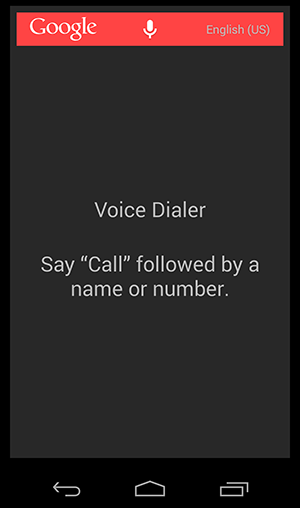
如果我的Activity被打开,我也想捕捉这个点击事件。我该怎么做呢?我尝试在我的接收器中添加以下过滤器,但它也不起作用:
<action android:name="android.bluetooth.headset.action.VENDOR_SPECIFIC_HEADSET_EVENT" />
<action android:name="android.intent.action.VOICE_COMMAND" />
<action android:name="android.intent.action.CALL_BUTTON" />我还尝试在我的活动中重写onKeyDown,但没有触发它。
有人知道我怎么能拦截这些事件吗?
这是我的蓝牙耳机

编辑**
按照Toaster的建议,我检查了整个日志,寻找耳机触发的事件。
有线耳机长时间单击
这是我长时间单击有线耳机(打开Google Voice Search)时的日志:
12-10 09:24:36.644: I/MediaFocusControl(740): voice-based interactions: about to use ACTION_WEB_SEARCH
12-10 09:24:36.644: I/ActivityManager(740): START u0 {act=android.speech.action.WEB_SEARCH flg=0x10800000 cmp=com.google.android.googlequicksearchbox/.SearchActivity} from pid 740
12-10 09:24:36.754: I/ActivityManager(740): START u0 {act=android.speech.action.WEB_SEARCH flg=0x10000000 cmp=com.google.android.googlequicksearchbox/com.google.android.launcher.GEL} from pid 10153
12-10 09:24:36.764: I/InputDispatcher(740): Dropping event because there is no focused window or focused application.
12-10 09:24:36.764: I/InputDispatcher(740): Dropping event because there is no focused window or focused application.
12-10 09:24:36.774: I/GEL(1025): handleIntent(Intent { act=android.speech.action.WEB_SEARCH flg=0x10400000 cmp=com.google.android.googlequicksearchbox/com.google.android.launcher.GEL })
12-10 09:24:36.774: V/SearchControllerCache(10153): creating SearchController
12-10 09:24:36.804: I/AudioRouter(10153): ROUTE_NONE->ROUTE_NO_BLUETOOTH
12-10 09:24:36.804: I/MediaFocusControl(740):  AudioFocus  requestAudioFocus() from android.media.AudioManager@4267ad58com.google.android.voicesearch.audio.AudioRouterImpl$1@42695f60
12-10 09:24:36.804: I/Velvet.SdchManager(10153): Sdch cache load complete.
12-10 09:24:36.814: W/IInputConnectionWrapper(18407): showStatusIcon on inactive InputConnection
12-10 09:24:36.814: I/Icing.InternalIcingCorporaProvider(10153): Updating corpora: A: NONE, C: DELTA
12-10 09:24:36.854: I/VS.G3EngineManager(10153): create_rm: m=GRAMMAR,l=en-US
12-10 09:24:36.854: W/Search.ConcurrentUtils(10153): Executor queue length is now 9. Perhaps some tasks are too long, or the pool is too small. [GrecoExecutor-1]
12-10 09:24:36.854: I/VS.G3EngineManager(10153): Brought up new g3 instance :/system/usr/srec/en-US/grammar.config for: en-USin: 9 ms
12-10 09:24:36.864: D/audio_hw_primary(189): out_set_parameters: enter: usecase(1: low-latency-playback) kvpairs: routing=4
12-10 09:24:36.864: D/audio_hw_primary(189): select_devices: out_snd_device(4: headphones) in_snd_device(0: )
12-10 09:24:36.874: D/audio_hw_primary(189): select_devices: out_snd_device(0: ) in_snd_device(18: headset-mic)
12-10 09:24:36.874: D/(189): Failed to fetch the lookup information of the device 00000008
12-10 09:24:36.874: E/ACDB-LOADER(189): Error: ACDB AudProc vol returned = -19
12-10 09:24:38.864: I/LATENCY(10153): 0-4,45-2064,
12-10 09:24:38.874: I/AudioRouter(10153): ROUTE_NO_BLUETOOTH->ROUTE_NONE
12-10 09:24:38.874: I/MediaFocusControl(740):  AudioFocus  abandonAudioFocus() from android.media.AudioManager@4267ad58com.google.android.voicesearch.audio.AudioRouterImpl$1@42695f60
12-10 09:24:38.874: I/MicrophoneInputStream(10153): mic_close它似乎触发了一个ACTION_WEB_SEARCH事件,所以我尝试将它添加到过滤器中。我试过两种方法:
- 在清单中声明筛选器:
- 以编程方式声明筛选器: 受保护的onResume() { IntentFilter f=新的IntentFilter(Intent.ACTION_WEB_SEARCH);registerReceiver( myReceiver,f);}registerReceiver(myReceiver,f);} BroadcastReceiver myReceiver=新的BroadcastReceiver() {@覆盖公共空onReceive(上下文,意图){ Log.d("AA","ON RECEIVE");};};
这些选项都不起作用。正如我说过的,这个场景并不重要,我可以处理它。
无线耳机简单单击
无线耳机简单的点击是一个打开语音拨号和,这是事件,我真的需要捕获。这是日志输出:
12-10 10:41:22.014: E/bt-rfcomm(21800): PORT_DataInd, p_port:0x7507a7e8, p_data_co_callback is null
12-10 10:41:22.014: D/HeadsetStateMachine(21800): processVrEvent: state=1 mVoiceRecognitionStarted: false mWaitingforVoiceRecognition: false isInCall: false
12-10 10:41:22.014: I/ActivityManager(740): START u0 {act=android.intent.action.VOICE_COMMAND flg=0x10000000 cmp=com.google.android.googlequicksearchbox/com.google.android.voicesearch.handsfree.HandsFreeIntentActivity} from pid 21800
12-10 10:41:22.154: V/Avrcp(21800): New genId = 440, clearing = 1
12-10 10:41:22.154: D/HandsFreeIntentActivity(10153): #onStart(Intent { act=android.intent.action.VOICE_COMMAND flg=0x10800000 cmp=com.google.android.googlequicksearchbox/com.google.android.voicesearch.handsfree.HandsFreeIntentActivity })
12-10 10:41:22.154: D/HandsFreeIntentActivity(10153): Starting activity: Intent { act=android.intent.action.VOICE_COMMAND flg=0x10000000 cmp=com.google.android.googlequicksearchbox/com.google.android.voicesearch.handsfree.HandsFreeActivity }
12-10 10:41:22.154: I/ActivityManager(740): START u0 {act=android.intent.action.VOICE_COMMAND flg=0x10000000 cmp=com.google.android.googlequicksearchbox/com.google.android.voicesearch.handsfree.HandsFreeActivity} from pid 10153
12-10 10:41:22.204: D/OpenGLRenderer(10153): Enabling debug mode 0
12-10 10:41:22.214: W/IInputConnectionWrapper(18895): showStatusIcon on inactive InputConnection
12-10 10:41:22.244: I/ActivityManager(740): Displayed com.google.android.googlequicksearchbox/com.google.android.voicesearch.handsfree.HandsFreeActivity: +80ms (total +89ms)
12-10 10:41:22.374: I/AudioRouter(10153): ROUTE_NONE->ROUTE_BLUETOOTH_WANTED
12-10 10:41:22.384: I/MediaFocusControl(740):  AudioFocus  requestAudioFocus() from android.media.AudioManager@4267ad58com.google.android.voicesearch.audio.AudioRouterImpl$1@42695f60
12-10 10:41:22.384: V/Avrcp(21800): New genId = 441, clearing = 1
12-10 10:41:22.384: D/BluetoothManagerService(740): Message: 30
12-10 10:41:22.384: D/BluetoothHeadset(10153): Proxy object connected
12-10 10:41:22.384: I/BluetoothController(10153): BT device connected
12-10 10:41:22.394: I/AudioRouter(10153): BT required, starting SCO
12-10 10:41:22.394: I/BluetoothController(10153): Starting VR
12-10 10:41:22.394: D/BluetoothHeadset(10153): startVoiceRecognition()
12-10 10:41:22.394: D/HeadsetStateMachine(21800): Voice recognition started successfully
12-10 10:41:22.394: D/HeadsetStateMachine(21800): Initiating audio connection for Voice Recognition
12-10 10:41:22.394: W/bt-btm(21800): BTM Remote does not support 3-EDR eSCO
12-10 10:41:22.434: I/TextToSpeech(10153): Sucessfully bound to com.google.android.tts
12-10 10:41:22.454: I/TextToSpeech(10153): Connected to ComponentInfo{com.google.android.tts/com.google.android.tts.service.GoogleTTSService}
12-10 10:41:22.454: I/TextToSpeech(10153): Set up connection to ComponentInfo{com.google.android.tts/com.google.android.tts.service.GoogleTTSService}
12-10 10:41:22.484: D/dalvikvm(21966): GC_CONCURRENT freed 346K, 3% free 16647K/17064K, paused 2ms+3ms, total 13ms
12-10 10:41:22.764: D/audio_hw_primary(189): out_set_parameters: enter: usecase(1: low-latency-playback) kvpairs: routing=32
12-10 10:41:22.774: D/audio_hw_primary(189): select_devices: out_snd_device(11: bt-sco-headset) in_snd_device(0: )
12-10 10:41:24.874: I/EventLogService(1148): Aggregate from 1386666683008 (log), 1386666683008 (data)
12-10 10:41:24.994: I/ServiceDumpSys(1148): dumping service [account]
12-10 10:41:25.994: D/dalvikvm(10153): GC_CONCURRENT freed 1582K, 15% free 23868K/27920K, paused 5ms+7ms, total 60ms
12-10 10:41:26.014: I/VS.G3EngineManager(10153): create_rm: m=GRAMMAR,l=en-US
12-10 10:41:26.024: I/VS.G3EngineManager(10153): Brought up new g3 instance :/system/usr/srec/en-US/grammar.config for: en-USin: 4 ms
12-10 10:41:26.024: D/audio_hw_primary(189): out_set_parameters: enter: usecase(1: low-latency-playback) kvpairs: routing=32
12-10 10:41:26.034: D/audio_hw_primary(189): select_devices: out_snd_device(0: ) in_snd_device(25: bt-sco-mic)
12-10 10:41:26.034: D/(189): Failed to fetch the lookup information of the device 00000015
12-10 10:41:26.034: E/ACDB-LOADER(189): Error: ACDB AudProc vol returned = -19这一次似乎是在发送一个ACTION_VOICE_COMMAND,所以我尝试将它添加到过滤器中。我试过两种方法:
- 在清单中声明筛选器:
- 以编程方式声明筛选器: 受保护的onResume() { IntentFilter f=新的IntentFilter(Intent.ACTION_VOICE_COMMAND);registerReceiver( myReceiver,f);}registerReceiver(myReceiver,f);} BroadcastReceiver myReceiver=新的BroadcastReceiver() {@覆盖公共空onReceive(上下文,意图){ Log.d("AA","ON RECEIVE");};};
再说一次,我没有收到这些事件,我不知道为什么。
回答 3
Stack Overflow用户
发布于 2013-12-10 16:31:58
我终于发现了这些事件。我不知道这门课:
http://developer.android.com/reference/android/bluetooth/BluetoothHeadset.html
使用类BluetoothAdapter、BluetoothHeadset和BluetoothDevice,我可以使用IntentFilter BluetoothHeadset.ACTION_AUDIO_STATE_CHANGED注册接收器,并且能够检测到耳机上的点击情况。
问题是广播是无序的,所以我不能中止它。我可以在VoiceDialer活动打开后立即关闭它,但这不是我想要的。
我会继续努力的。
谢谢你的努力:)
编辑:
用于检测事件的代码:
protected BluetoothAdapter mBluetoothAdapter;
protected BluetoothHeadset mBluetoothHeadset;
protected BluetoothDevice mConnectedHeadset;
protected AudioManager mAudioManager;

@Override
protected void onCreate(Bundle savedInstanceState) {
    super.onCreate(savedInstanceState);

    mBluetoothAdapter = BluetoothAdapter.getDefaultAdapter();

    if (mBluetoothAdapter != null)
    {

        mAudioManager = (AudioManager) getSystemService(Context.AUDIO_SERVICE);
        if (mAudioManager.isBluetoothScoAvailableOffCall())
        {
            if (Build.VERSION.SDK_INT >= Build.VERSION_CODES.HONEYCOMB)
            {
                mBluetoothAdapter.getProfileProxy(this, mHeadsetProfileListener, BluetoothProfile.HEADSET);
            }
        }
    }
}

 protected BluetoothProfile.ServiceListener mHeadsetProfileListener = new BluetoothProfile.ServiceListener()
{

    /**
     * This method is never called, even when we closeProfileProxy on onPause.
     * When or will it ever be called???
     */
    @Override
    public void onServiceDisconnected(int profile)
    {
        mBluetoothHeadset.stopVoiceRecognition(mConnectedHeadset);
        unregisterReceiver(mHeadsetBroadcastReceiver);
        mBluetoothHeadset = null;
    }

    @Override
    public void onServiceConnected(int profile, BluetoothProfile proxy)
    {
        // mBluetoothHeadset is just a head set profile,
        // it does not represent a head set device.
        mBluetoothHeadset = (BluetoothHeadset) proxy;

        // If a head set is connected before this application starts,
        // ACTION_CONNECTION_STATE_CHANGED will not be broadcast.
        // So we need to check for already connected head set.
        List<BluetoothDevice> devices = mBluetoothHeadset.getConnectedDevices();
        if (devices.size() > 0)
        {
            // Only one head set can be connected at a time,
            // so the connected head set is at index 0.
            mConnectedHeadset = devices.get(0);

            String log;

            // The audio should not yet be connected at this stage.
            // But just to make sure we check.
            if (mBluetoothHeadset.isAudioConnected(mConnectedHeadset))
            {
                log = "Profile listener audio already connected"; //$NON-NLS-1$
            }
            else
            {
                // The if statement is just for debug. So far startVoiceRecognition always
                // returns true here. What can we do if it returns false? Perhaps the only
                // sensible thing is to inform the user.
                // Well actually, it only returns true if a call to stopVoiceRecognition is
                // call somewhere after a call to startVoiceRecognition. Otherwise, if
                // stopVoiceRecognition is never called, then when the application is restarted
                // startVoiceRecognition always returns false whenever it is called.
                if (mBluetoothHeadset.startVoiceRecognition(mConnectedHeadset))
                {
                    log = "Profile listener startVoiceRecognition returns true"; //$NON-NLS-1$
                }
                else
                {
                    log = "Profile listener startVoiceRecognition returns false"; //$NON-NLS-1$
                }
            }

            Log.d(TAG, log);
        }

        // During the active life time of the app, a user may turn on and off the head set.
        // So register for broadcast of connection states.
        registerReceiver(mHeadsetBroadcastReceiver,
                        new IntentFilter(BluetoothHeadset.ACTION_CONNECTION_STATE_CHANGED));

        // Calling startVoiceRecognition does not result in immediate audio connection.
        // So register for broadcast of audio connection states. This broadcast will
        // only be sent if startVoiceRecognition returns true.
        IntentFilter f = new IntentFilter(BluetoothHeadset.ACTION_AUDIO_STATE_CHANGED);
        f.setPriority(Integer.MAX_VALUE);
        registerReceiver(mHeadsetBroadcastReceiver, f);
    }
};


protected BroadcastReceiver mHeadsetBroadcastReceiver = new BroadcastReceiver()
{

    @Override
    public void onReceive(Context context, Intent intent)
    {
        String action = intent.getAction();
        int state;
        int previousState = intent.getIntExtra(BluetoothHeadset.EXTRA_PREVIOUS_STATE, BluetoothHeadset.STATE_DISCONNECTED);
        String log = "";

        if (action.equals(BluetoothHeadset.ACTION_CONNECTION_STATE_CHANGED))
        {
            state = intent.getIntExtra(BluetoothHeadset.EXTRA_STATE, BluetoothHeadset.STATE_DISCONNECTED);
            if (state == BluetoothHeadset.STATE_CONNECTED)
            {
                mConnectedHeadset = intent.getParcelableExtra(BluetoothDevice.EXTRA_DEVICE);

                // Audio should not be connected yet but just to make sure.
                if (mBluetoothHeadset.isAudioConnected(mConnectedHeadset))
                {
                    log = "Headset connected audio already connected";
                }
                else
                {

                    // Calling startVoiceRecognition always returns false here,
                    // that why a count down timer is implemented to call
                    // startVoiceRecognition in the onTick and onFinish.
                    if (mBluetoothHeadset.startVoiceRecognition(mConnectedHeadset))
                    {
                        log = "Headset connected startVoiceRecognition returns true"; $NON-NLS-1$
                    }
                    else
                    {
                        log = "Headset connected startVoiceRecognition returns false";
                    }
                }
            }
            else if (state == BluetoothHeadset.STATE_DISCONNECTED)
            {
                // Calling stopVoiceRecognition always returns false here
                // as it should since the headset is no longer connected.
                mConnectedHeadset = null;
            }
        }
        else // audio
        {
            state = intent.getIntExtra(BluetoothHeadset.EXTRA_STATE, BluetoothHeadset.STATE_AUDIO_DISCONNECTED);

            mBluetoothHeadset.stopVoiceRecognition(mConnectedHeadset);

            if (state == BluetoothHeadset.STATE_AUDIO_CONNECTED)
            {
                log = "Head set audio connected, cancel countdown timer";
            }
            else if (state == BluetoothHeadset.STATE_AUDIO_DISCONNECTED)
            {
                // The headset audio is disconnected, but calling
                // stopVoiceRecognition always returns true here.
                boolean returnValue = mBluetoothHeadset.stopVoiceRecognition(mConnectedHeadset);
                log = "Audio disconnected stopVoiceRecognition return " + returnValue;
            }
        }

        log += "\nAction = " + action + "\nState = " + state
                + " previous state = " + previousState;
        Log.d(TAG, log);

    }
};
就像我说的,我可以探测到这些事件,但我不能登上广播。
Stack Overflow用户
发布于 2013-12-27 01:57:23
对于语音拨号操作,请在清单中添加以下内容:
<action android:name="android.intent.action.VOICE_COMMAND" />
<category android:name="android.intent.category.DEFAULT" />正如您从调试日志中推断的那样,命令是触发的操作,但是如果没有默认设置,您的应用程序就不会被考虑。(我用我自己的蓝牙耳机测试了这个,它对我有用!)
Stack Overflow用户
发布于 2013-12-09 15:34:29
既然你有一种接收广播的方法,你就不能试着在你的耳机上长时间点击时打印出你收到的意图吗?这样你就可以知道你的手机在这种情况下会收到什么事件并处理它了吗?
@Override
    public void onReceive(Context context, Intent intent) {

        Log.d("SA", "ON RECEIVE" + intent.getAction()); // Print the received event

        ...

        abortBroadcast();
}https://stackoverflow.com/questions/20398581
复制相似问题
腾讯云开发者

Copyright © 2013 - 2026 Tencent Cloud. All Rights Reserved. 腾讯云 版权所有
深圳市腾讯计算机系统有限公司 ICP备案/许可证号:粤B2-20090059  粤公网安备44030502008569号
腾讯云计算(北京)有限责任公司 京ICP证150476号 | 京ICP备11018762号