
嵌套父/子复选框-工作解决方案需要Bootstrap的调整帮助
我一直在寻找一个嵌套父子复选框的“完整”解决方案,该复选框可以根据层次结构正确地更改状态。
大多数“解决方案”不起作用,或者只在一个层次上工作。它们还要求您以特定的方式命名复选框。
这堆栈溢出讨论涵盖了要点,但也提供了Rory 这里发现的一个很好的解决方案。
我已经在我的开发项目中测试过它,它完全独立工作。但是,我使用的是引导程序2.x和复选框。
我有一个JSFiddle,它显示工作示例代码,然后是我的带有禁用父复选框的版本,然后是不工作的引导代码版本。
<!DOCTYPE html>
<body>
<!-- Raw working example from site http://css-tricks.com/indeterminate-checkboxes/ -->

<b>Raw working example</b>
<p>
<ul>
    <li>
        <input type="checkbox" name="tall" id="tall">
        <label for="tall">Tall Things</label>
        <ul>
            <li>
                <input type="checkbox" name="tall-1" id="tall-1">
                <label for="tall-1">Buildings</label>
            </li>
            <li>
                <input type="checkbox" name="tall-2" id="tall-2">
                <label for="tall-2">Giants</label>
                <ul>
                    <li>
                        <input type="checkbox" name="tall-2-1" id="tall-2-1">
                        <label for="tall-2-1">Andre</label>
                    </li>
                    <li>
                        <input type="checkbox" name="tall-2-2" id="tall-2-2">
                        <label for="tall-2-2">Paul Bunyan</label>
                        <ul>
                            <li>
                                <input type="checkbox" name="tall-2-2-1" id="tall-2-2-1">
                                <label for="tall-2-2-1">Son</label>
                            </li>
                            <li>
                                <input type="checkbox" name="tall-2-2-2" id="tall-2-2-2">
                                <label for="tall-2-2-2">Daughter</label>
                            </li>
                        </ul>
                    </li>
                </ul>
            </li>
            <li>
                <input type="checkbox" name="tall-3" id="tall-3">
                <label for="tall-3">Two sandwiches</label>
            </li>
        </ul>
    </li>
    <li>
        <input type="checkbox" name="short" id="short">
        <label for="short">Short Things</label>
        <ul>
            <li>
                <input type="checkbox" name="short-1" id="short-1">
                <label for="short-1">Smurfs</label>
            </li>
            <li>
                <input type="checkbox" name="short-2" id="short-2">
                <label for="short-2">Mushrooms</label>
            </li>
            <li>
                <input type="checkbox" name="short-3" id="short-3">
                <label for="short-3">One Sandwich</label>
            </li>
        </ul>
    </li>
</ul>

<hr>

<!-- Non Bootstrap Example -->
<b>My initial code example - Is Working</b>
<p>
<ul>
    <li>

        <input type="checkbox" name="" value="" disabled><strong>Ford</strong>

        <ul>
            <li>

                <input type="checkbox" name="" value="">Fiesta</label>
            </li>
            <li>

                <input type="checkbox" name="" value="">Focus</label>
            </li>
            <li>

                <input type="checkbox" name="" value="">Mondeo</label>
            </li>
        </ul>
    </li>
    <li>

        <input type="checkbox" name="" value="" disabled><strong>Vauxhall</strong>


        <ul>
            <li>

                    <input type="checkbox" name="" value="">Corsa</label>
            </li>
            <li>

                    <input type="checkbox" name="" value="">Astra</label>
            </li>
            <li>

                    <input type="checkbox" name="" value="">Vectra</label>
            </li>
        </ul>
    </li>
</ul>

            <hr>

<!-- Bootstrap Example -->

<b>Bootstrap based code example - Not Working</b>
<p>

<ul>
    <li>
        <label class="checkbox">
            <input type="checkbox" name="" value="" disabled><strong>Ford</strong>

        </label>
        <ul>
            <li>
                <label class="checkbox">
                    <input type="checkbox" name="" value="">Fiesta</label>
            </li>
            <li>
                <label class="checkbox">
                    <input type="checkbox" name="" value="">Focus</label>
            </li>
            <li>
                <label class="checkbox">
                    <input type="checkbox" name="" value="">Mondeo</label>
            </li>
        </ul>
    </li>
    <li>
        <label class="checkbox">
            <input type="checkbox" name="" value="" disabled><strong>Vauxhall</strong>

        </label>
        <ul>
            <li>
                <label class="checkbox">
                    <input type="checkbox" name="" value="">Corsa</label>
            </li>
            <li>
                <label class="checkbox">
                    <input type="checkbox" name="" value="">Astra</label>
            </li>
            <li>
                <label class="checkbox">
                    <input type="checkbox" name="" value="">Vectra</label>
            </li>
        </ul>
    </li>
</ul>$(function () {
// Apparently click is better chan change? Cuz IE?
$('input[type="checkbox"]').change(function (e) {
var checked = $(this).prop("checked"),
container = $(this).parent(),
siblings = container.siblings();
container.find('input[type="checkbox"]').prop({
indeterminate: false,
checked: checked
});
function checkSiblings(el) {
var parent = el.parent().parent(),
all = true;
el.siblings().each(function () {
return all = ($(this).children('input[type="checkbox"]').prop("checked") === checked);
});
if (all && checked) {
parent.children('input[type="checkbox"]').prop({
indeterminate: false,
checked: checked
});
checkSiblings(parent);
} else if (all && !checked) {
parent.children('input[type="checkbox"]').prop("checked", checked);
parent.children('input[type="checkbox"]').prop("indeterminate", (parent.find('input[type="checkbox"]:checked').length > 0));
checkSiblings(parent);
} else {
el.parents("li").children('input[type="checkbox"]').prop({
indeterminate: true,
checked: false
});
}
}
checkSiblings(container);
});
});我的理解是,需要在某个地方更改代码,以使用、parents、或最近的。谁是一个更好的代码,请帮助确定更改需要在哪里发生,以使引导版工作。
回答 2
Stack Overflow用户
发布于 2013-12-05 08:49:32
查看一下免费的JSTree用户控件。它是基于JavaScript的开放源代码,允许为多种类型的树视图配置,例如:
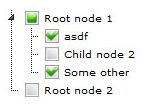
由于这里显示的复选框只是图像,您可以轻松地用单选按钮替换它们,通过事件处理,您可以不允许多个选择,以便它们在需要时表现得像单选按钮一样。
这是通过如下所示的"checkbox"插件来实现的(有关完整的工作代码,请参阅下面提供的代码片段):
$(function () {
    $("#demo1")
        .jstree({
        "themes": {
            "theme": "apple","dots": false,"icons": false
        },
        "plugins": ["themes", "html_data", "checkbox", "sort", "ui"]
    });
});
相应的HTML结构如下所示,只需将其包含在页面正文中:
<div id="demo1" class="demo" style="height:100px;">
    <ul>
        <li id="phtml_1">   <a href="#">Root node 1</a>
            <ul>
                <li id="phtml_2">   <a href="#">Child node 1</a>
                </li>
                <li id="phtml_3">   <a href="#">Child node 2</a>
                </li>
            </ul>
        </li>
        <li id="phtml_4">   <a href="#">Root node 2</a>
        </li>
    </ul>
</div>要获得选中的值,请使用此函数(假设您已经使用id="listForDisplay"创建了一个div,就像我在JSFiddle示例中所做的那样):
var $listForDisplay = $("#listForDisplay");
function displayList(data) { // see: https://www.jstree.com/docs/events/
    var i, j, r = [];
    for (i = 0, j = data.selected.length; i < j; i++) {
        r.push(data.instance.get_node(data.selected[i]).text);
    }
    $listForDisplay.html('Selected: ' + r.join(', '));
}
可以在单击事件中触发此代码,也可以像我一样绑定JSTree事件。在前面的JavaScript片段中附加以下内容可以完成这项工作:
    $("#demo1")
    .on('loaded.jstree', function (e, data) {
            displayList(data);
        })
    .on('change_state.jstree', function (e, data) {
            displayList(data);
        });
注意:当选择父节点时,父节点名称与子节点一起列出。如果只选择了子程序,则不会列出相关的父级。
您可以找到更多关于指定此插件这里行为的选项的信息。
可运行代码段(完整代码)
$(function() {

  var $demo1 = $("#demo1");

  var $listForDisplay = $("#listForDisplay");
  function displayList(data) { // see: https://www.jstree.com/docs/events/
    var i, j, r = [];
    for (i = 0, j = data.selected.length; i < j; i++) {
      r.push(data.instance.get_node(data.selected[i]).text);
    }
    $listForDisplay.html('Selected: ' + r.join(', '));
  }

  $demo1.jstree({
    "themes": {
      "theme": "apple",
      "dots": false,
      "icons": false
    },
    "plugins": ["themes", "html_data", "checkbox", "sort", "ui"]
  });
  $demo1.on('loaded.jstree', function(e, data) {
    displayList(data);
  });
  $demo1.on('changed.jstree', function(e, data) {
    displayList(data);
  });
});<head>
<script src="https://ajax.googleapis.com/ajax/libs/jquery/2.1.1/jquery.min.js"></script>
<link href="https://cdnjs.cloudflare.com/ajax/libs/jstree/3.2.1/themes/default/style.min.css" rel="stylesheet" />
<script src="https://cdnjs.cloudflare.com/ajax/libs/jstree/3.2.1/jstree.min.js"></script>
</head>
<body>
<div id="demo1" class="demo" style="height:100px;">
<ul>
<li id="phtml_1"> <a href="#">Root node 1</a>
<ul>
<li id="phtml_2"> <a href="#">Child node 1</a>
</li>
<li id="phtml_3"> <a href="#">Child node 2</a>
</li>
</ul>
</li>
<li id="phtml_4"> <a href="#">Root node 2</a>
</li>
</ul>
</div>
<br/>
<div id="listForDisplay" />
</body>
Stack Overflow用户
发布于 2013-12-03 16:20:20
你可以试试这样的东西
  $(function () {
  $('input[type="checkbox"]').change(function (e) {
      var checked = $(this).prop("checked"),
          container = $(this).closest("li"),//get closest li instead of parent
          siblings = container.siblings();
      container.find('input[type="checkbox"]').prop({
          indeterminate: false,
          checked: checked
      });

      function checkSiblings(el) {
          var parent = el.parent().parent(),
              all = true,
              parentcheck=parent.children("label");//get the label that contains the disabled checkbox
          el.siblings().each(function () {
              return all = ($(this).find('input[type="checkbox"]').prop("checked") === checked);
          });
          //use parentcheck instead of parent to get the children checkbox
          if (all && checked) {
              parentcheck.children('input[type="checkbox"]').prop({
                  indeterminate: false,
                  checked: checked
              });
              checkSiblings(parent);
          } else if (all && !checked) {
              parentcheck.children('input[type="checkbox"]').prop("checked", checked);
              parentcheck.children('input[type="checkbox"]').prop("indeterminate", (parent.find('input[type="checkbox"]:checked').length > 0));
              checkSiblings(parent);
          } else {
             parentcheck.children('input[type="checkbox"]').prop({
                  indeterminate: true,
                  checked: false
              });
          }
      }
      checkSiblings(container);
  });
});
http://jsfiddle.net/Mvs87/2/
https://stackoverflow.com/questions/20355375
复制相似问题
腾讯云开发者

Copyright © 2013 - 2026 Tencent Cloud. All Rights Reserved. 腾讯云 版权所有
深圳市腾讯计算机系统有限公司 ICP备案/许可证号:粤B2-20090059  粤公网安备44030502008569号
腾讯云计算(北京)有限责任公司 京ICP证150476号 | 京ICP备11018762号