
WPF UniformGrid逆序
WPF UniformGrid逆序
提问于 2013-11-28 21:08:30
我有一个字符串的IList,我想在一个按钮中定位每一个按钮,以一种向下和左的网格顺序;
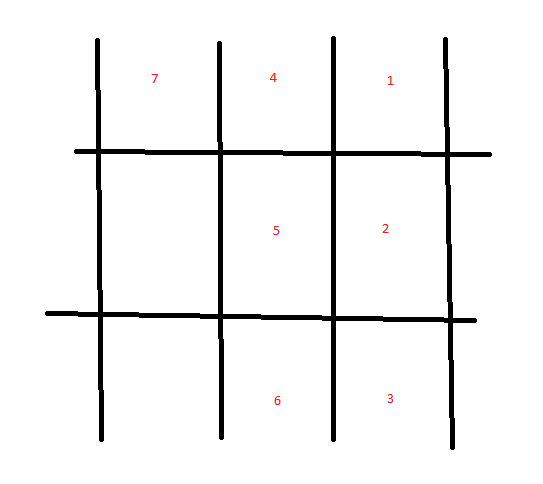
但是,我想不出有什么方法可以做到这一点,因为字符串的数量并不是有限的,所以我不能只使用带有col/row定义的网格。有人在WPF中尝试过这样做吗?
回答 1
Stack Overflow用户
回答已采纳
发布于 2013-11-29 00:40:35
你可以用WrapPanel来做。WrapPanel通常不支持从右到左,但是您可以通过翻转整个面板的布局转换,然后再为每个子面板翻转它来绕过它:
<Window.Resources >
    <x:Array Type="{x:Type sys:String}" x:Key="theItems" xmlns:sys="clr-namespace:System;assembly=mscorlib">
        <sys:String>1</sys:String>
        <sys:String>2</sys:String>
        <sys:String>3</sys:String>
        <sys:String>4</sys:String>
        <sys:String>5</sys:String>
        <sys:String>6</sys:String>
        <sys:String>7</sys:String>
    </x:Array>
</Window.Resources>

<Grid>
    <ItemsControl Name="itemsControl" FontSize="72" ItemsSource="{StaticResource theItems}">
        <ItemsControl.ItemsPanel>
            <ItemsPanelTemplate>
                <WrapPanel Orientation="Vertical" HorizontalAlignment="Right">
                    <WrapPanel.LayoutTransform>
                        <ScaleTransform ScaleX="-1" ScaleY="1" />
                    </WrapPanel.LayoutTransform>
                </WrapPanel>
            </ItemsPanelTemplate>
        </ItemsControl.ItemsPanel>
        <ItemsControl.ItemContainerStyle>
            <Style TargetType="ContentPresenter">
                <Setter Property="ContentTemplate">
                    <Setter.Value>
                        <DataTemplate>
                            <Button Width="100" Height="100" Margin="10">
                                <ContentPresenter Content="{Binding}"/>
                            </Button>
                        </DataTemplate>
                    </Setter.Value>
                </Setter>
                <Setter Property="LayoutTransform">
                    <Setter.Value>
                        <ScaleTransform ScaleX="-1" ScaleY="1" />
                    </Setter.Value>
                </Setter>
            </Style>
        </ItemsControl.ItemContainerStyle>
</ItemsControl>页面原文内容由Stack Overflow提供。腾讯云小微IT领域专用引擎提供翻译支持
原文链接:
https://stackoverflow.com/questions/20274766
复制相关文章
相似问题
腾讯云开发者

Copyright © 2013 - 2026 Tencent Cloud. All Rights Reserved. 腾讯云 版权所有
深圳市腾讯计算机系统有限公司 ICP备案/许可证号:粤B2-20090059  粤公网安备44030502008569号
腾讯云计算(北京)有限责任公司 京ICP证150476号 | 京ICP备11018762号