
如何使所选窗格的X轴同步?
如何使所选窗格的X轴同步?
提问于 2013-11-27 11:16:00
我在尝试同步佐德图中选定窗格的X轴,
目前我有三个窗格:
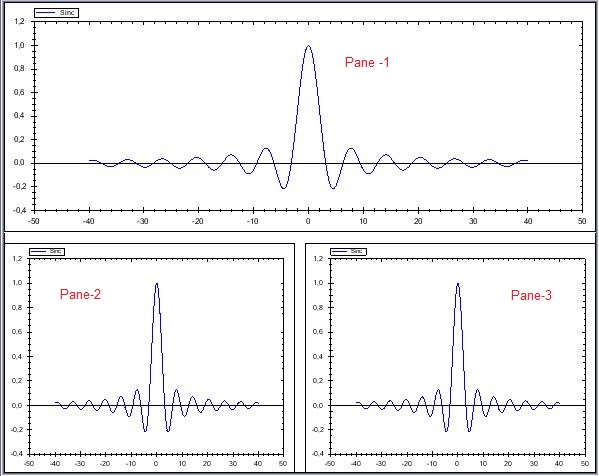
借助折叠属性,我可以同步所有可用窗格的X轴:
zedGraphControl1.IsSynchronizeXAxes = true;但是我只想同步Pane-1和Pane-3,有可能吗?
谢谢你抽出时间.)
回答 1
Stack Overflow用户
回答已采纳
发布于 2013-11-28 19:36:10
- 列表项目
是的。
基本上,您必须连接到ZoomEvent,然后捕获已被平移或缩放的窗格,使用FindPane,将其缩尺Min和Max属性应用于其他属性,如果其他缩放属性设置为Auto,则执行AxisChange。
假设要排除的GraphPane对象是excludedGraphPane
void zedGraphControl1_ZoomEvent(ZedGraph.ZedGraphControl z, ZedGraph.ZoomState oldState, ZedGraph.ZoomState newState)
{
    GraphPane pane;

    using (var g = z.CreateGraphics())
        pane = z.MasterPane.FindPane(z.PointToClient(MousePosition));

    // The excludedGraphPane has to remain independant
    if (pane == null || pane == excludedGraphPane)
        return;

    foreach (var gp in z.MasterPane.PaneList)
    {
        if (gp == pane || gp == excludedGraphPane)
            continue;

        gp.XAxis.Scale.Min = pane.XAxis.Scale.Min;
        gp.XAxis.Scale.Max = pane.XAxis.Scale.Max;
        gp.AxisChange(); // Only necessary if one or more scale property is set to Auto.
    }

    z.Invalidate();
}
当然,由于同步现在是手动完成的,所以需要设置
zedGraphControl1.IsSynchronizeXAxes = false;页面原文内容由Stack Overflow提供。腾讯云小微IT领域专用引擎提供翻译支持
原文链接:
https://stackoverflow.com/questions/20240971
复制相关文章
相似问题
腾讯云开发者

Copyright © 2013 - 2026 Tencent Cloud. All Rights Reserved. 腾讯云 版权所有
深圳市腾讯计算机系统有限公司 ICP备案/许可证号:粤B2-20090059  粤公网安备44030502008569号
腾讯云计算(北京)有限责任公司 京ICP证150476号 | 京ICP备11018762号