
如何为文本创建三维循环滚动视图?(见Appy Geek)
如何为文本创建三维循环滚动视图?(见Appy Geek)
提问于 2013-11-25 12:30:31
我希望实现某种“画布”,您可以将X号TextViews/链接放置在“随机位置”(如下图所示)。然后,您将能够连续地滚动这个“画布”视图,视图将重复/循环(有点像HTML块,只是手动滚动)。在最简单的情况下,我只是希望有水平滚动-但一个更复杂的例子是你可以做的“球滚动”-见下面的例子从Appy Geek。(现在我只对水平滚动感兴趣)
Appy的例子:

回答 1
Stack Overflow用户
发布于 2013-11-25 15:31:40
这将使您开始,我已经实现了一个简单的标记云使用这两种方法(即通过扩展View和ViewGroup),保持旋转。您可以在自定义ViewGroup中使用此逻辑,它相应地定位视图。之后,在布局中添加可单击的TextView,并处理触摸事件。
最终结果(当然是旋转,仔细观察):
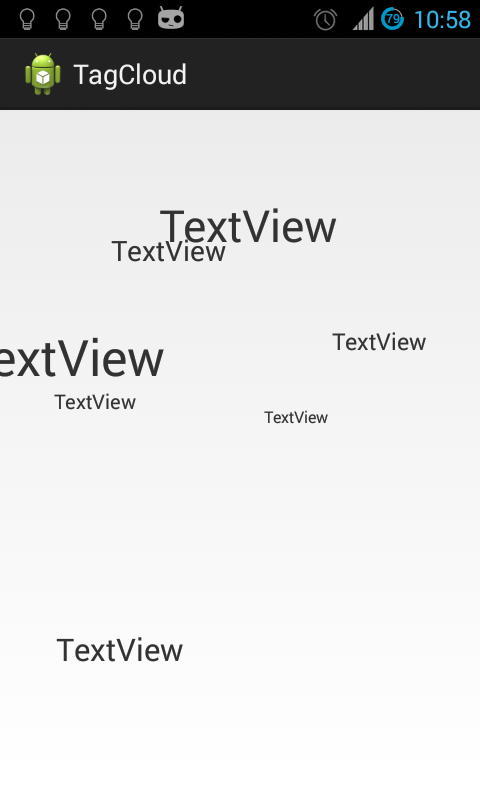
在下面的代码中,很多东西都可以改进。
通过扩展ViewGroup**:**扩展
将其放在xml布局中:
 <com.vj.tagcloud.TagCloudLayout
    android:layout_width="match_parent"
    android:layout_height="match_parent" >

    <TextView
        android:layout_width="wrap_content"
        android:layout_height="wrap_content"
        android:text="TextView" />

    <TextView
        android:layout_width="wrap_content"
        android:layout_height="wrap_content"
        android:text="TextView" />

    <TextView
        android:layout_width="wrap_content"
        android:layout_height="wrap_content"
        android:text="TextView" />

    <TextView
        android:layout_width="wrap_content"
        android:layout_height="wrap_content"
        android:text="TextView" />

    <TextView
        android:layout_width="wrap_content"
        android:layout_height="wrap_content"
        android:text="TextView" />

    <TextView
        android:layout_width="wrap_content"
        android:layout_height="wrap_content"
        android:text="TextView" />
</com.vj.tagcloud.TagCloudLayout>TagCloudLayout类:
import java.util.Random;

import android.content.Context;
import android.os.Handler;
import android.util.AttributeSet;
import android.view.View;
import android.view.ViewGroup;
import android.widget.TextView;

public class TagCloudLayout extends ViewGroup {
final Random mRandom = new Random();
private float mRotateAngle;

private Handler mHandler = new Handler();
private float rotateAngleDegree;

public TagCloudLayout(Context context) {
    super(context);
}

public TagCloudLayout(Context context, AttributeSet attrs) {
    super(context, attrs);
}

public TagCloudLayout(Context context, AttributeSet attrs, int defStyle) {
    super(context, attrs, defStyle);
}

@Override
protected void onMeasure(int widthMeasureSpec, int heightMeasureSpec) {
    super.onMeasure(widthMeasureSpec, heightMeasureSpec);
    final float radius = Math.min(getMeasuredWidth(), getMeasuredHeight()) / 2F;
    float halfWidth = getMeasuredWidth() / 2F;
    float halfHeight = getMeasuredHeight() / 2F;
    final int count = getChildCount();
    for (int i = 0; i < count; i++) {
        View child = getChildAt(i);
        LayoutParams lp = (LayoutParams) child.getLayoutParams();
        float sinTheta = (float) Math.sin(lp.theta);
        float x = (int) (radius * Math.cos(lp.fi + mRotateAngle)
                * sinTheta);

        if (child instanceof TextView) {
            ((TextView) child)
                    .setTextSize(15 * ((radius - x) / radius) + 10);
        }
        measureChild(child, widthMeasureSpec, heightMeasureSpec);
        //  http://en.wikipedia.org/wiki/Spherical_coordinates
        lp.x = (int) ((halfWidth + radius * Math.sin(lp.fi + mRotateAngle)
                * sinTheta) - /* for balancing on x-axis */(child
                .getMeasuredWidth() / 2F));
        lp.y = (int) (halfHeight + radius * Math.cos(lp.theta)-/* for balancing on y-axis */(child
                .getMeasuredHeight() / 2F));
    }
}

@Override
protected void onAttachedToWindow() {
    super.onAttachedToWindow();
    mHandler.postDelayed(new Runnable() {

        @Override
        public void run() {
            rotateAngleDegree += 5;
            mRotateAngle = (float) Math.toRadians(rotateAngleDegree);
            requestLayout();
            mHandler.postDelayed(this, 40);
        }
    }, 40);
}

@Override
protected void onDetachedFromWindow() {
    super.onDetachedFromWindow();
    mHandler.removeCallbacksAndMessages(null);
}

@Override
public void addView(View child, int index,
        android.view.ViewGroup.LayoutParams params) {
    super.addView(child, index, params);

    LayoutParams lp = (LayoutParams) child.getLayoutParams();
    lp.fi = (float) Math.toRadians(mRandom.nextInt(360));
    lp.theta = (float) Math.toRadians(mRandom.nextInt(360));
}

@Override
protected void onLayout(boolean changed, int l, int t, int r, int b) {
    final int count = getChildCount();
    for (int i = 0; i < count; i++) {
        View child = getChildAt(i);
        LayoutParams lp = (LayoutParams) child.getLayoutParams();
        child.layout(lp.x, lp.y, lp.x + child.getMeasuredWidth(), lp.y
                + child.getMeasuredHeight());
    }
}

@Override
protected boolean checkLayoutParams(ViewGroup.LayoutParams p) {
    return p instanceof LayoutParams;
}

@Override
protected LayoutParams generateDefaultLayoutParams() {
    return new LayoutParams(LayoutParams.WRAP_CONTENT,
            LayoutParams.WRAP_CONTENT);
}

@Override
public LayoutParams generateLayoutParams(AttributeSet attrs) {
    return new LayoutParams(getContext(), attrs);
}

@Override
protected LayoutParams generateLayoutParams(ViewGroup.LayoutParams p) {
    return new LayoutParams(p.width, p.height);
}

public static class LayoutParams extends ViewGroup.LayoutParams {
    int x;
    int y;
    float fi, theta;

    public LayoutParams(Context context, AttributeSet attrs) {
        super(context, attrs);
    }

    public LayoutParams(int w, int h) {
        super(w, h);
    }
}
}通过扩展View**:**扩展
将其放在xml布局中:
<com.vj.wordtap.TagCloud
    android:layout_width="match_parent"
    android:layout_height="match_parent" />
这是在java代码中:
import java.util.ArrayList;
import java.util.List;
import java.util.Random;

import android.content.Context;
import android.graphics.Camera;
import android.graphics.Canvas;
import android.graphics.Color;
import android.graphics.Paint;
import android.os.Handler;
import android.text.TextPaint;
import android.util.AttributeSet;
import android.view.View;

public class TagCloud extends View {

private List<String> mItems = new ArrayList<String>();
private List<Angles> mAngles = new ArrayList<Angles>();
private Camera mCamera = new Camera();
private TextPaint mTextPaint = new TextPaint(Paint.ANTI_ALIAS_FLAG);
private Handler mHandler = new Handler();
private float mRotateAngle;
private float rotateAngleDegree;

public static class Angles {
    float fi, theta;
}

public TagCloud(Context context) {
    super(context);
    init();
}

public TagCloud(Context context, AttributeSet attrs) {
    super(context, attrs);
    init();
}

public TagCloud(Context context, AttributeSet attrs, int defStyleAttr) {
    super(context, attrs, defStyleAttr);
    init();
}

private void init() {
    List<String> items = new ArrayList<String>();
    for (int i = 0; i < 10; i++) {
        items.add("item:" + i);
    }
    setItems(items);
}

@Override
protected void onDraw(Canvas canvas) {
    super.onDraw(canvas);
    canvas.translate(canvas.getWidth() / 2F, canvas.getHeight() / 2F);
    mTextPaint.setColor(Color.BLACK);
    final float radius = 100;
    mCamera.setLocation(0, 0, -100);
    for (int i = 0; i < mItems.size(); i++) {
        String item = mItems.get(i);
        Angles xyz = mAngles.get(i);
        mCamera.save();
        canvas.save();
        float sinTheta = (float) Math.sin(xyz.theta);
        float x = (float) (radius * Math.cos(xyz.fi + mRotateAngle) * sinTheta);
        float y = (float) (radius * Math.sin(xyz.fi + mRotateAngle) * sinTheta);
        float z = (float) (radius * Math.cos(xyz.theta));
        // mapping coordinates with Android's coordinates
        // http://en.wikipedia.org/wiki/Spherical_coordinates
        mCamera.translate(y, z, x);
        mCamera.applyToCanvas(canvas);

        // http://en.wikipedia.org/wiki/Spherical_coordinates
        // set size based on x-Axis that is coming towards us
        mTextPaint.setTextSize(20 * ((100 - x) / 100) + 10);
        canvas.drawText(item, 0, 0, mTextPaint);
        mCamera.restore();
        canvas.restore();
    }
}

@Override
protected void onAttachedToWindow() {
    super.onAttachedToWindow();
    mHandler.postDelayed(new Runnable() {

        @Override
        public void run() {
            rotateAngleDegree += 5;
            mRotateAngle = (float) Math.toRadians(rotateAngleDegree);
            invalidate();
            mHandler.postDelayed(this, 40);
        }
    }, 40);
}

@Override
protected void onDetachedFromWindow() {
    super.onDetachedFromWindow();
    mHandler.removeCallbacksAndMessages(null);
}

@Override
protected void onMeasure(int widthMeasureSpec, int heightMeasureSpec) {
    super.onMeasure(widthMeasureSpec, heightMeasureSpec);
}

public void setItems(List<String> items) {
    mItems = items;
    final Random ran = new Random();
    final List<Angles> xyzList = mAngles;
    xyzList.clear();

    for (int i = 0; i < items.size(); i++) {
        Angles xyz = new Angles();
        float fi = (float) Math.toRadians(ran.nextInt(360));
        xyz.fi = fi;
        float theta = (float) Math.toRadians(ran.nextInt(360));
        xyz.theta = theta;
        xyzList.add(xyz);
    }
}
}页面原文内容由Stack Overflow提供。腾讯云小微IT领域专用引擎提供翻译支持
原文链接:
https://stackoverflow.com/questions/20193168
复制相关文章
相似问题
腾讯云开发者

Copyright © 2013 - 2026 Tencent Cloud. All Rights Reserved. 腾讯云 版权所有
深圳市腾讯计算机系统有限公司 ICP备案/许可证号:粤B2-20090059  粤公网安备44030502008569号
腾讯云计算(北京)有限责任公司 京ICP证150476号 | 京ICP备11018762号