
从C#在线创建Quickbook客户
我需要添加新的客户到QuickBooks在线从C#。
我很难找到任何有用的端到端样本。基于此:how to add invoice or sales receipt quickbooks rest api v3.0我需要accessToken,accessTokenSecret,consumerKey,consumerKeySecret,realmId。
基于此:IPP .NET SDK for QuickBooks v3.0 Create Invoice Error - Bad Request我需要accessToken,accessTokenSecret,consumerKey,consumerKeySecret,appToken,companyId。
我只有应用令牌,Oauth消费者密钥,OAuth消费者秘密,可能是realmId (应用程序ID)
在哪里可以找到访问令牌、访问令牌秘密、领域id和/或公司ID?
我不喜欢发布图片,但是https://developer.intuit.com/Application/Manage/IA?appId=XXX上的开发人员设置页面显示了以下信息:
应用程序ID:这是什么?王国Id,公司身份?
应用程序令牌,OAuth消费者密钥,OAuth消费者机密
我正在为QuickBooks使用.Net在线REST v3.0
守则如下:
   var customer = new Customer();

   customer.GivenName = txtFirstName.Text;
   customer.FamilyName = txtLastName.Text;
   customer.MiddleName = txtMiddleName.Text;
   customer.CompanyName = txtCompany.Text;

   customer.PrimaryEmailAddr = new EmailAddress() { Address = txtEmail.Text, Default = true };
   customer.PrimaryPhone = new TelephoneNumber() { FreeFormNumber = txtPrimaryPhone.Text };


   OAuthRequestValidator oauthValidator = new OAuthRequestValidator(accessToken, accessTokenSecret, consumerKey, consumerSecret);
   ServiceContext context = new ServiceContext(accessToken, consumerKey, IntuitServicesType.QBO, oauthValidator);

   DataService service = new DataService(context);
   var c = service.Add(customer);
// do something with c.Id回答 3
Stack Overflow用户
发布于 2013-11-19 05:11:54
您需要在应用程序中实现3条腿的oauth流,使用C2QB按钮获取访问令牌和秘密。请查看我们的示例应用程序,看看这是如何实现的。下载示例应用程序,然后在配置文件中配置使用者密钥和机密。然后检查3条腿的oauth happens.You如何尝试使用示例应用程序的本地副本调用V3 API。https://github.com/IntuitDeveloperRelations/还参考:started
Stack Overflow用户
发布于 2016-06-08 05:36:55
Intuit开发者游乐场提供了获取accessToken、accessTokenSecret和realmId的工具。
点击下面提到的链接到QuickBooks操场-
https://appcenter.intuit.com/Playground/OAuth/IA
确保您已经登录到Intuit帐户。
填充使用者密钥,用户秘密和访问令牌持续时间(120000秒)。
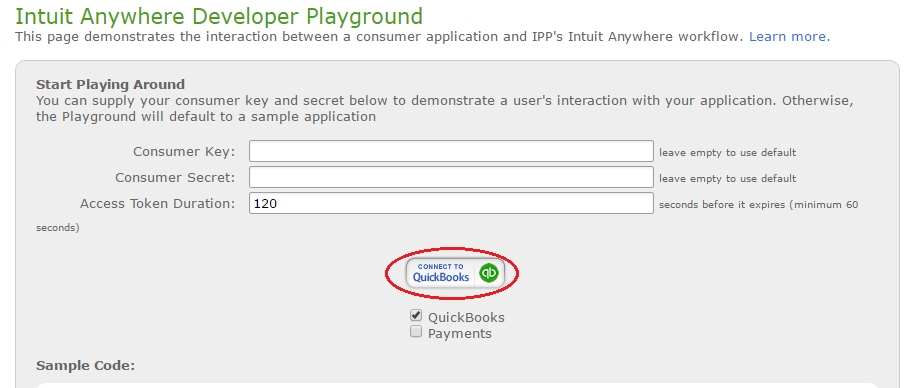
点击连接到QuickBooks图标,如图片所示。你将被要求选择公司。如果您有多家公司连接到您的沙箱帐户,选择任何根据您的要求。然后单击“授权按钮”。
您将获得访问令牌、访问令牌秘密、RealmId (公司Id)和DataSource。现在,您有了实现会计API的所有键。这些密钥将在120000秒后过期。
我写了一个博客,你可以如何添加,更新,查找和删除客户。
Stack Overflow用户
发布于 2021-02-27 23:26:50
我是QuickBooks Online API的新手,在.NET 5.0WPF应用程序中使用代码时遇到了困难,下面是一些对我有用的示例代码:
安装所需的QBO依赖项:
- IppDotNetSdkForQuickBooksApiV3
- IppOAuth2PlatformSdk
WPF窗口C#代码:
using Intuit.Ipp.Data;

public partial class MainWindow : Window
{
    QuickbooksOnline qbo = new QuickbooksOnline();

    public MainWindow()
    {
        qbo.FindCustomerResponse += HandleFindQBOCustomerResponse;
        qbo.FindInvoiceResponse += HandleFindQBOInvoiceResponse;
        qbo.FindCreditMemoResponse += HandleFindQBOCreditMemoResponse;
    }

    private void btnTest_Click(object sender, RoutedEventArgs e)
    {
        //Get IDs to test from QBO website URL when accessing a record

        string customerId = "737";
        qbo.FindCustomer(customerId);

        string invoiceId = "3198";
        qbo.FindInvoice(invoiceId);

        string creditMemoId = "3077";
        qbo.FindCreditMemo(creditMemoId);
    }

    private void HandleFindQBOCustomerResponse(object sender, Intuit.Ipp.Data.Customer customer)
    {
        if (customer == null)
        {
            MessageBox.Show("Customer not found");
        }
        else
        {
            MessageBox.Show(customer.DisplayName);
        }
    }

    private void HandleFindQBOInvoiceResponse(object sender, Intuit.Ipp.Data.Invoice invoice)
    {
        if (invoice == null)
        {
            MessageBox.Show("Invoice not found");
        }
        else
        {
            MessageBox.Show(invoice.TotalAmt.ToString());
        }
    }

    private void HandleFindQBOCreditMemoResponse(object sender, Intuit.Ipp.Data.CreditMemo creditMemo)
    {
        if (creditMemo == null)
        {
            MessageBox.Show("CreditMemo not found");
        }
        else
        {
            MessageBox.Show(creditMemo.TotalAmt.ToString());
        }
    }
}
在线速记类:
using System;
using System.Threading.Tasks;
using Intuit.Ipp.Core;
using Intuit.Ipp.Data;
using Intuit.Ipp.Security;
using Intuit.Ipp.DataService;
using System.Windows;
using System.Reflection;
using Intuit.Ipp.OAuth2PlatformClient;

class QuickbooksOnline
{
    //Get this information from the OAuth 2.0 Playground: https://developer.intuit.com/app/developer/playground
    private string ClientId = "";
    private string ClientSecret = "";
    private string RedirectURI = "https://developer.intuit.com/v2/OAuth2Playground/RedirectUrl";
    private string RealmId = "";
    private string AccessToken = "";
    private string RefreshToken = "";
    private string QBOBaseURL = "https://quickbooks.api.intuit.com/";
    private string QBOMinorVersion = "55";

    private OAuth2Client OAuthClient;

    public event EventHandler<Intuit.Ipp.Data.Customer> FindCustomerResponse;
    public event EventHandler<Intuit.Ipp.Data.Invoice> FindInvoiceResponse;
    public event EventHandler<Intuit.Ipp.Data.CreditMemo> FindCreditMemoResponse;

    public QuickbooksOnline()
    {
        this.OAuthClient = new OAuth2Client(ClientId, ClientSecret, RedirectURI, "production");
    }

    public async void FindCustomer(string customerId)
    {
        OAuth2RequestValidator oAuthValidator = new OAuth2RequestValidator(AccessToken);
        ServiceContext serviceContext = new ServiceContext(RealmId, IntuitServicesType.QBO, oAuthValidator);
        serviceContext.IppConfiguration.BaseUrl.Qbo = QBOBaseURL;
        serviceContext.IppConfiguration.MinorVersion.Qbo = QBOMinorVersion;
        DataService service = new DataService(serviceContext);

        Customer customer = new Customer();
        customer.Id = customerId;

        service.OnFindByIdAsyncCompleted += HandlePrivateFindByIdResponse;

        service.FindByIdAsync(customer);
    }


    public void FindInvoice(string invoiceId)
    {
        OAuth2RequestValidator oAuthValidator = new OAuth2RequestValidator(AccessToken);
        ServiceContext serviceContext = new ServiceContext(RealmId, IntuitServicesType.QBO, oAuthValidator);
        serviceContext.IppConfiguration.BaseUrl.Qbo = QBOBaseURL;
        serviceContext.IppConfiguration.MinorVersion.Qbo = QBOMinorVersion;
        DataService service = new DataService(serviceContext);

        Intuit.Ipp.Data.Invoice invoice = new Intuit.Ipp.Data.Invoice();
        invoice.Id = invoiceId;

        service.OnFindByIdAsyncCompleted += HandlePrivateFindByIdResponse;

        service.FindByIdAsync(invoice);
    }

    public void FindCreditMemo(string creditMemoId)
    {
        OAuth2RequestValidator oAuthValidator = new OAuth2RequestValidator(AccessToken);
        ServiceContext serviceContext = new ServiceContext(RealmId, IntuitServicesType.QBO, oAuthValidator);
        serviceContext.IppConfiguration.BaseUrl.Qbo = QBOBaseURL;
        serviceContext.IppConfiguration.MinorVersion.Qbo = QBOMinorVersion;
        DataService service = new DataService(serviceContext);

        CreditMemo creditMemo = new CreditMemo();
        creditMemo.Id = creditMemoId;

        service.OnFindByIdAsyncCompleted += HandlePrivateFindByIdResponse;

        service.FindByIdAsync(creditMemo);
    }

    private async void HandlePrivateFindByIdResponse(object sender, CallCompletedEventArgs<IEntity> entity)
    {
        // The Intuit.Ipp.DataService.AsyncService class is not public, so that to use reflection
        // to get the requestedEntity object and determine the sender type.
        // This is useful when the authToken has expired and after refreshing the tokens
        // the request has to be sent again.
        string entityType = sender.GetType().GetField("requestedEntity", BindingFlags.NonPublic | BindingFlags.Instance).GetValue(sender).GetType().FullName;

        if (entity.Error != null && entity.Error.Message.Equals("Unauthorized-401"))
        {

            if (await RefreshTokens())
            {
                switch (entityType)
                {
                    case "Intuit.Ipp.Data.Customer":
                        Customer senderCustomer = (Customer)sender.GetType().GetField("requestedEntity", BindingFlags.NonPublic | BindingFlags.Instance).GetValue(sender);
                        FindCustomer(senderCustomer.Id);
                        break;
                    case "Intuit.Ipp.Data.Invoice":
                        Intuit.Ipp.Data.Invoice senderInvoice = (Intuit.Ipp.Data.Invoice)sender.GetType().GetField("requestedEntity", BindingFlags.NonPublic | BindingFlags.Instance).GetValue(sender);
                        FindInvoice(senderInvoice.Id);
                        break;
                    case "Intuit.Ipp.Data.CreditMemo":
                        Intuit.Ipp.Data.CreditMemo senderCreditMemo = (Intuit.Ipp.Data.CreditMemo)sender.GetType().GetField("requestedEntity", BindingFlags.NonPublic | BindingFlags.Instance).GetValue(sender);
                        FindCreditMemo(senderCreditMemo.Id);
                        break;
                }
            }
            else
            {
                MessageBox.Show("Error refreshing tokens.");
            }
        }
        else if (entity.Entity != null)
        {
            switch (entity.Entity.GetType().FullName)
            {
                case "Intuit.Ipp.Data.Customer":
                    if (FindCustomerResponse != null)
                    {
                        FindCustomerResponse(this, entity.Entity as Intuit.Ipp.Data.Customer);
                    }
                    break;
                case "Intuit.Ipp.Data.Invoice":
                    if (FindInvoiceResponse != null)
                    {
                        FindInvoiceResponse(this, entity.Entity as Intuit.Ipp.Data.Invoice);
                    }
                    break;
                case "Intuit.Ipp.Data.CreditMemo":
                    if (FindCreditMemoResponse != null)
                    {
                        FindCreditMemoResponse(this, entity.Entity as Intuit.Ipp.Data.CreditMemo);
                    }
                    break;
            }
        }
        else if (entity.Entity == null)
        {
            switch (entityType)
            {
                case "Intuit.Ipp.Data.Customer":
                    if (FindCustomerResponse != null)
                    {
                        FindCustomerResponse(this, null);
                    }

                    break;
                case "Intuit.Ipp.Data.Invoice":
                    if (FindInvoiceResponse != null)
                    {
                        FindInvoiceResponse(this, null);
                    }
                    break;
                case "Intuit.Ipp.Data.CreditMemo":
                    if (FindCreditMemoResponse != null)
                    {
                        FindCreditMemoResponse(this, null);
                    }
                    break;
            }
        }
    }

    private async Task<bool> RefreshTokens()
    {
        var tokenResp = await OAuthClient.RefreshTokenAsync(RefreshToken);

        if (tokenResp.AccessToken != null && tokenResp.RefreshToken != null)
        {
            this.AccessToken = tokenResp.AccessToken;
            this.RefreshToken = tokenResp.RefreshToken;
            return true;
        }
        else
        {
            return false;
        }
    }

}https://stackoverflow.com/questions/20054968
复制相似问题
腾讯云开发者

Copyright © 2013 - 2026 Tencent Cloud. All Rights Reserved. 腾讯云 版权所有
深圳市腾讯计算机系统有限公司 ICP备案/许可证号:粤B2-20090059  粤公网安备44030502008569号
腾讯云计算(北京)有限责任公司 京ICP证150476号 | 京ICP备11018762号