
Android中图像位图的透明色彩效应
Android中图像位图的透明色彩效应
提问于 2013-11-18 05:51:07
我正在开发一个图像编辑器安卓应用程序,比如:BeFunkey,我已经实现了许多类似这个安卓应用程序的效果,但是仍然有一些效果让我头疼。比如PopArt效应。请看下面的图片。一个是原创的,第二个是流行色彩的效果:
原件:

PopArt ::

我已经使用RGB颜色矩阵,以获得颜色效果的位图。但是当我使用它时,它就像整个图像中的一种颜色,但是在这个效果中,图像上有多种颜色。如果这里有谁能指导我,请告诉我如何达到这个颜色效果。谢谢您抽时间见我。
以下代码用于颜色效果:
    public static final float[] float_color_matrix = new float[] { 2.6f, 0, 0.1f, 0, 0, 0.1f, 1.2f, 0, 0, 0, 0, 0, 0, 0, 0, 0, 0, 0, 1, 0 };

    ColorMatrix cm = new ColorMatrix();
    cm.postConcat(new ColorMatrix(float_color_matrix));
    ColorFilter colorFilter = new ColorMatrixColorFilter(cm);

imageView.setColorFilter(colorFilter);回答 1
Stack Overflow用户
回答已采纳
发布于 2013-11-18 07:19:38
这段代码应该能起作用。我很接近你想要的结果。如果不完全相同,您只需在colors数组中使用颜色即可。我使用这精巧的工具来查找十六进制颜色代码。
/**
 *
 * @param context
 * @param yourDrawableResource (ex R.drawable.ic_drawable)
 * @return the image bitmap with the correct overlay
 */
public static Bitmap setPopArtGradient(Context context, int yourDrawableResource) {
    int[] colors = new int[]{Color.parseColor("#FFD900"),Color.parseColor("#FF5300"),
                             Color.parseColor("#FF0D00"),Color.parseColor("#AD009F"),
                             Color.parseColor("#1924B1")};
    float[] colorPositions = new float[]{0.2f,0.4f,0.6f,0.8f,1.0f};

    final Resources res = context.getResources();
    Drawable drawable = res.getDrawable(yourDrawableResource);

    Bitmap bitmap = Bitmap.createBitmap(drawable.getIntrinsicWidth(), drawable.getIntrinsicHeight(), Config.ARGB_8888);
    Canvas canvas = new Canvas(bitmap);
    drawable.setBounds(0, 0, canvas.getWidth(), canvas.getHeight());
    drawable.draw(canvas);

    /* Create your gradient. */
    LinearGradient grad = new LinearGradient(0, 0, 0, canvas.getHeight(), colors, colorPositions, TileMode.CLAMP);

    /* Draw your gradient to the top of your bitmap. */
    Paint p = new Paint();
    p.setStyle(Style.FILL);
    p.setAlpha(110); //adjust alpha for overlay intensity
    p.setShader(grad);
    canvas.drawRect(0, 0, canvas.getWidth(), canvas.getHeight(), p);

    return bitmap;
}
然后您只需通过以下操作来实现它
imageView.setImageBitmap(setPopArtGradient(yourContext, R.drawable.your_drawable));如果你想传递一个位图,你可以这样做。
/**
 *
 * @param context
 * @param bmp (your bitmap)
 * @return the image bitmap with the correct overlay
 */
public static Bitmap setPopArtGradientFromBitmap(Context context, Bitmap bmp) {
    int[] co = new int[]{Color.parseColor("#FFD900"),Color.parseColor("#FF5300"),Color.parseColor("#FF0D00"),Color.parseColor("#AD009F"),Color.parseColor("#1924B1")};
    float[] coP = new float[]{0.2f,0.4f,0.6f,0.8f,1.0f};

    Bitmap bitmap = bmp.copy(Bitmap.Config.ARGB_8888, true);
    Canvas canvas = new Canvas(bitmap);

    /* Create your gradient. */
    LinearGradient grad = new LinearGradient(0, 0, 0, canvas.getHeight(), co, coP, TileMode.CLAMP);

    /* Draw your gradient to the top of your bitmap. */
    Paint p = new Paint();
    p.setStyle(Style.FILL);
    p.setAlpha(110);
    p.setShader(grad);
    canvas.drawRect(0, 0, canvas.getWidth(), canvas.getHeight(), p);

    return bitmap;
}
我把它应用在我拍的照片上,这就是结果
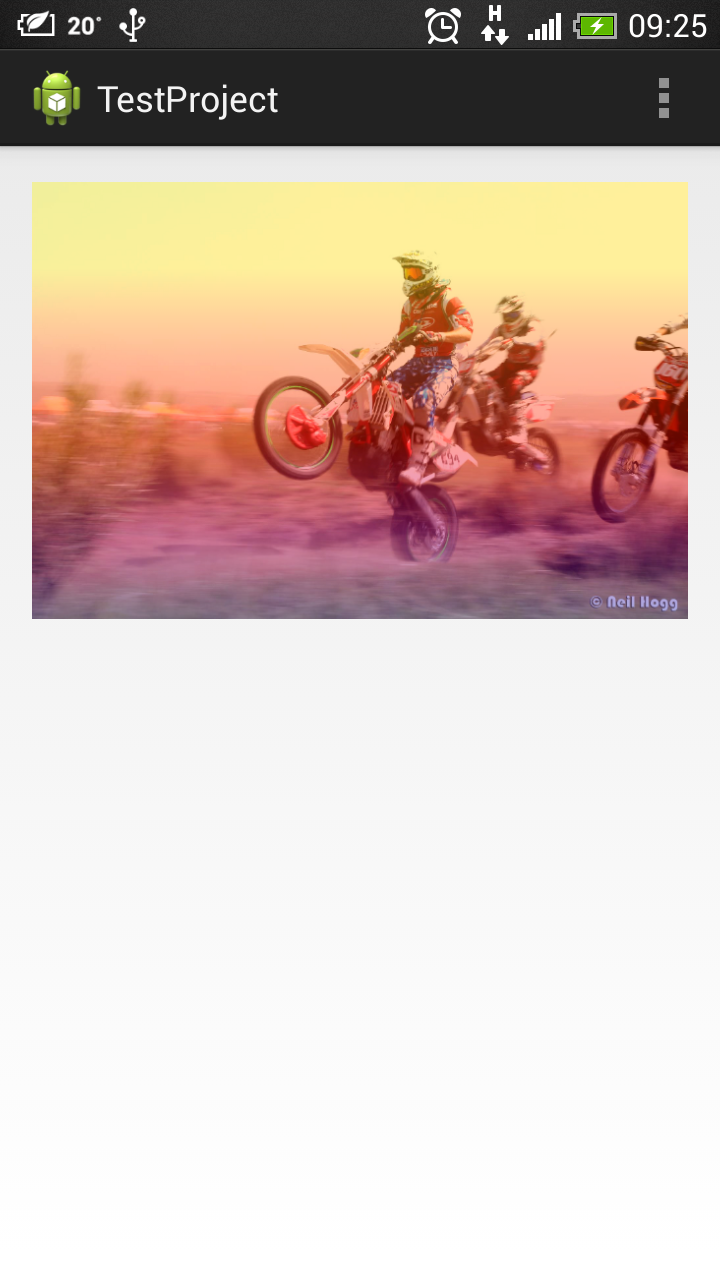
希望它能帮到你。
页面原文内容由Stack Overflow提供。腾讯云小微IT领域专用引擎提供翻译支持
原文链接:
https://stackoverflow.com/questions/20040988
复制相关文章
相似问题
腾讯云开发者

Copyright © 2013 - 2026 Tencent Cloud. All Rights Reserved. 腾讯云 版权所有
深圳市腾讯计算机系统有限公司 ICP备案/许可证号:粤B2-20090059  粤公网安备44030502008569号
腾讯云计算(北京)有限责任公司 京ICP证150476号 | 京ICP备11018762号