
用于firefox中缩放背景svg的css精灵
用于firefox中缩放背景svg的css精灵
提问于 2013-11-18 02:13:46
我想使用缩放的svg图像作为不同大小的图标,但是在firefox中发现了不一致的行为。
如果没有css精灵,firefox就会将缩放的图像反化成别名。但是有了css精灵,火狐就不会给它们起名了。因此,这些图标看起来很难看,与css精灵。
详情请访问本小提琴。火狐有什么问题?
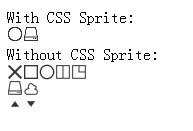
<!DOCTYPE html>
<html>
<head>
<style type='text/css'>
.whole {
    width: 80px;
    height: 80px;
    background-image: url("outliner.svg");
    background-size: 100% 100%;
}
i {
    width: 16px;
    height: 16px;
    display: inline-block;
    background-image: url("outliner.svg");
    background-size: 500% 500%;
}
.circle { background-position: -32px 0;}
.disk { background-position: 0 -16px; }
</style>
</head>
<body>
<div>With CSS Sprite:</div>
<i class="circle"></i><i class="disk"></i>
<div>Without CSS Sprite:</div>
<i class="whole"></i>
</body>
</html>回答 1
Stack Overflow用户
回答已采纳
发布于 2013-11-18 02:35:21
目前,还没有CSS方法来更改SVG元素的呈现模式,尽管有一个SVG属性可以这样做:shape-rendering。
在将通过base64编码器运行SVG文件添加到每个<g>元素之后(您可以使用它来解码以下示例中的数据),在此之前,<value>有几个选项:(例如)、(例如)和(例如)。
根据您希望最后的SVG显示的方式,只需选择一个特定的值,最后的SVG代码看起来有点像下面的内容(注意每个shape-rendering标记上的<g>属性):
<svg version="1.1" xmlns="http://www.w3.org/2000/svg" width="480" height="480" viewBox="0 0 480 480">
<g shape-rendering="crispEdges" stroke="#333" fill="#333">
  <g shape-rendering="crispEdges" id="icon-1-1" transform="translate(0,0)">
    <line x1="10" y1="10" x2="86" y2="86" stroke-width="12"/>
    <line x1="10" y1="86" x2="86" y2="10" stroke-width="12"/>
  </g>
  <g shape-rendering="crispEdges" id="icon-1-2" transform="translate(96,0)">
<!-- svg continues below ... -->页面原文内容由Stack Overflow提供。腾讯云小微IT领域专用引擎提供翻译支持
原文链接:
https://stackoverflow.com/questions/20038944
复制相关文章
相似问题
腾讯云开发者

Copyright © 2013 - 2026 Tencent Cloud. All Rights Reserved. 腾讯云 版权所有
深圳市腾讯计算机系统有限公司 ICP备案/许可证号:粤B2-20090059  粤公网安备44030502008569号
腾讯云计算(北京)有限责任公司 京ICP证150476号 | 京ICP备11018762号