
Java GUI定位
Java GUI定位
提问于 2013-11-16 16:17:12
我正试着把两个按钮放置在左边的顶部。不过,他们总是处于中上。
我试过这样做:
jp = new JPanel();
jp.setLayout(new GridBagLayout());

GridBagConstraints c = new GridBagConstraints();

//c.anchor = GridBagConstraints.BASELINE_TRAILING;
c.anchor = GridBagConstraints.WEST;

c.gridx = 0;
c.gridy = 0;
jp.add(test, c);
c.gridy++;
jp.add(atest, c);
add(jp);但它仍然处于中心位置,而不是左侧(http://i.imgur.com/MYF8dqr.png)。

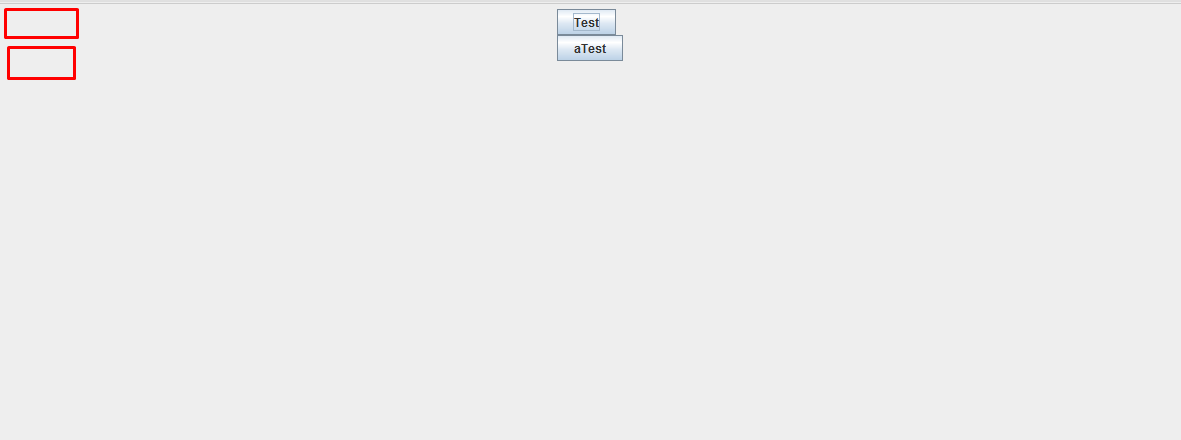
这是我拍的一张照片。红色是我希望按钮是怎样的剪刀。
更新:
 ArrayList<String> atest = new ArrayList<String>();
    JLabel[ ] asd = new JLabel[100];

    int temp = 0;


GridBagConstraints c = new GridBagConstraints();
c.anchor = GridBagConstraints.FIRST_LINE_START;
c.weightx = 1.0;
c.weighty = 1.0;
c.gridx = 0;
c.gridy = 0;
atest.add("Hello");
atest.add("haelp");
atest.add("yummy");
atest.add("whats wrong");

for(String server : servers)
{
    asd[temp] = new JLabel();
    asd[temp].setText(server);
    jp.add(asd[temp], c);
    c.weighty++;
    c.gridy++;
    temp++;

}
我试着从数组中读取字符串,并将其添加为左边的一个标签。结果不是很好,结果是:如果网格布局不好,那么我应该选择哪种方式呢?
回答 3
Stack Overflow用户
发布于 2013-11-16 16:29:11
阅读Swing教程中关于如何使用GridBagLayout的部分,了解违禁品是如何工作的。关于weightx, weighty的部分应该解决您的问题。
Stack Overflow用户
发布于 2013-11-16 16:36:06
如果您正在使用Eclipse,您可以使用名为WindowBuilder的插件来构建框架:
http://www.eclipse.org/windowbuilder/
您必须将弹簧布局应用到WindowBuilder中的窗口中,才能像在.NET designer中的VisualStudio中那样,从工具栏中拖放按钮。
Stack Overflow用户
发布于 2016-04-10 12:50:54
您需要像这样设置jp : jp.setLayout(null);
页面原文内容由Stack Overflow提供。腾讯云小微IT领域专用引擎提供翻译支持
原文链接:
https://stackoverflow.com/questions/20020688
复制相关文章
相似问题
腾讯云开发者

Copyright © 2013 - 2026 Tencent Cloud. All Rights Reserved. 腾讯云 版权所有
深圳市腾讯计算机系统有限公司 ICP备案/许可证号:粤B2-20090059  粤公网安备44030502008569号
腾讯云计算(北京)有限责任公司 京ICP证150476号 | 京ICP备11018762号