
与cocos2d-x-3.0项目创建有关的许多错误
因此,我正在尝试使用cocos2d-x-3.0来设置一个项目。我可以很好地设置所有内容,然后在Eclipse中导入和运行我的新项目,没有任何问题;但是,一旦我第一次打开main.cpp文件,就会弹出一堆错误,并且我无法再编译我的项目。它给我的错误是Unresolved inclusion: AppDelegate.h在#include "AppDelegate.h"上
#include "AppDelegate.h"
#include "cocos2d.h"
#include "CCEventType.h"
#include "platform/android/jni/JniHelper.h"
#include <jni.h>
#include <android/log.h>

#define  LOG_TAG    "main"
#define  LOGD(...)  __android_log_print(ANDROID_LOG_DEBUG,LOG_TAG,__VA_ARGS__)

using namespace cocos2d;

void cocos_android_app_init (struct android_app* app) {
    LOGD("cocos_android_app_init");
    AppDelegate *pAppDelegate = new AppDelegate();
}然后我查看并注意到项目中的Classes文件夹是空的,尽管项目中的Classes文件夹中有类。因此,我添加了一个新的Class文件夹,其中包含一个指向项目文件夹中自动生成的类文件夹的链接。这再次解决了这个问题,但是如果我在我的新Class文件夹中打开任何文件,它会突出显示大量无法解决的错误,并且我无法再编译。下面是我的AppDelegate.h文件的一部分:
#ifndef  _APP_DELEGATE_H_
#define  _APP_DELEGATE_H_

#include "cocos2d.h"

/**
@brief    The cocos2d Application.

The reason for implement as private inheritance is to hide some interface call by Director.
*/
class  AppDelegate : private cocos2d::Application
{cocos2d::Application部分出现了一个错误,名为Symbol 'Application' could not be resolved。
编辑:在重新生成项目之后,我发现Classes文件夹在Eclipse中自动标记为弃用。我能够创建一个新的(非链接的) Class文件夹,并手动添加预先创建的类,并且不再出现任何错误。我不知道这是为什么,但成功了。
现在我只看到这四个文件中的一个错误。在HelloWorldScene.cpp中
// add a "close" icon to exit the progress. it's an autorelease object
auto closeItem = MenuItemImage::create(  // Says "Invalid arguments" for the create call
                                       "CloseNormal.png",
                                       "CloseSelected.png",
                                       CC_CALLBACK_1(HelloWorld::menuCloseCallback, this)); // "Symbol'_1' could not be resolved" (What is Symbol_1)?

closeItem->setPosition(Point(origin.x + visibleSize.width - closeItem->getContentSize().width/2 ,
                            origin.y + closeItem->getContentSize().height/2));

// create menu, it's an autorelease object
auto menu = Menu::create(closeItem, NULL);
menu->setPosition(Point::ZERO);
this->addChild(menu, 1);其中还有一些Could not be resolved和Invalid arguments错误。最让我困惑的是,在打开文件和错误加载之前,所有的东西都编译和运行得很好。
回答 3
Stack Overflow用户
发布于 2013-11-19 05:58:47
在移动过程中,您应该使用COCOCS 2d-x2.2来创建cocos2d-x中的项目。这很容易,也很好。试试看。
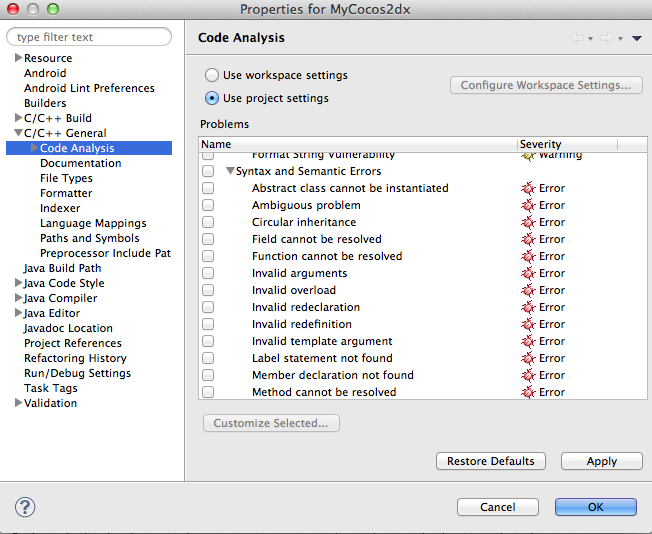
还有一件事,就是转到Projectproperty、int和codeAnalysis(在C/c++ Gneral中),然后单击use,设置取消标记的SYantax和语义错误复选框。它将删除大量的错误。
Stack Overflow用户
发布于 2014-04-26 01:38:20
确保有两件事:
- 在您自己的项目目录下导入libcocos2dx,如这里所记录的Eclipse;
- 在您的项目- Properties - C/C++ General > Code,取消选择语法和语义错误-否则您将看到错误,将无法从Eclipse构建。
Stack Overflow用户
发布于 2014-05-08 13:00:31
我不知道为什么会这样,但你可以:
- 右键单击Explorer中的项目
- 点击“运行C/C++代码分析”
这将删除错误,以便您可以再次构建/运行项目。
https://stackoverflow.com/questions/19968470
复制相似问题
腾讯云开发者

Copyright © 2013 - 2026 Tencent Cloud. All Rights Reserved. 腾讯云 版权所有
深圳市腾讯计算机系统有限公司 ICP备案/许可证号:粤B2-20090059  粤公网安备44030502008569号
腾讯云计算(北京)有限责任公司 京ICP证150476号 | 京ICP备11018762号