
用VBA自动创建Word模板
我正在创建一个word文档模板,处于一个十字路口。我想用MATLAB创建的数字填充文档,并从MATLAB输出填充Excel表。这些数字被组织到文件夹中,Excel表在Excel模板中被组织成工作表,如下所示:
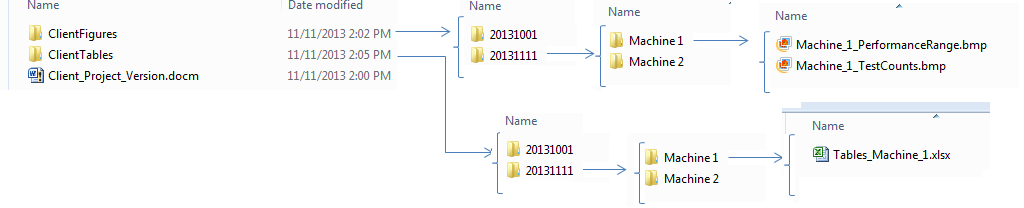
我以前在这里问过几个关于自动更新这些表格和数字的问题,现在有了这方面的代码:
这些报告很长,但篇幅不同。这些报告记录了机器测试。一些客户测试1台机器,另一些测试5台机器。对于5台机器,报告有100张表格和400张数字。
例如,2台机器的报告结构如下:
文本1
图1.1
图1.2
文本2
表1.1
表1.2
图2.1
图2.2
我要以方案方式编写这份报告。用户会将Word模板、Excel模板和文件结构复制并粘贴到他们的工作目录中。Excel模板中将有包含测试信息的工作表。即要测试的机器数量。模板将为1台机器构建。
VBA将从Excel模板中提取要测试的机器数量。然后,它将索引Word文件中的数字和表,将它们复制到Word文件中正确位置的指定数量的机器,并将它们链接到正确的源文件位置。如果运行了测试的迭代,我将在这里使用上面发布的代码更新数字和表。
设置这个最简单的方法是什么?怎样才能最快地生成和刷新表数据?从我所做的阅读来看,将表设置为图片而不是链接数据(如http://www.datawright.com.au/other/update_word_file_using_bookmarks_and_VBA.htm应用程序)可能会更快。我希望代码是快速的、万无一失的、健壮的,并且不依赖于像http://www.experts-exchange.com/Software/Office_Productivity/Office_Suites/MS_Office/Excel/A_8933-How-to-quickly-and-accurately-populate-Word-documents-with-Excel-data-charts-and-images-including-Automated-Bookmark-generation.html这样的任何加载项。可能我需要类似https://stackoverflow.com/questions/5106743/generate-word-documents-in-excel-vba-from-a-series-of-document-templates的东西,但这似乎有点过火了。
任何帮助都将是非常感谢的--我正试图掌握单词VBA、字段代码和书签之间的关系,并将它们最好地用于我的优势。
回答 2
Stack Overflow用户
发布于 2013-11-25 00:06:24
这个问题是自动化的理想选择。在我看来,您应该能够有一个基本的模板,并且完全基于Excel电子表格和机器信息来填写这些信息。
文字上的书签你是这里的朋友吗。您可以使用它们最初放置表和数字,并在新信息可用时更新它们(尽管这需要额外的努力)。我做了相当多的工作,把数据从Excel导入到Word作为表,并且肯定不推荐将表作为图片导入。您的文件大小会非常迅速地膨胀,想要从表中以电子方式提取数据的人会想要用生锈的茶匙刺死您。
根据您提供的信息,我可能会在Excel中以Excel模板作为活动工作簿开始您的代码。这就是我设置的方式:
- 从显示带状选项卡的外接程序开始。这可以用于任何‘机器’excel模板。
- 使用OLE自动化打开Word并从Word模板创建新文档(网络上有大量信息可用于此)
- 从Excel模板读取文档的结构并设置word文档。由于您知道布局,您可以填充所有数字和表格的占位符(书签)以及标题。
- 循环遍历所有表并首先插入它们。从Excel插入表格数据到Word的技巧是以分隔文本的形式插入表,然后将其转换为表。
- 循环遍历并插入所有数字。
- 如果您用书签封装这些数字并将书签添加到表中,那么您可以根据需要单独更新它们。
请注意,这些选项中没有任何一个本身是如此琐碎。如果要应用额外的格式,如粗体标题、合并单元格或分页的表,则工作量要大得多。
您可以使用字段代码依次更新表和数字,并再次使用书签提供交叉引用。
这个问题非常广泛,可以提供大量代码,但是下面的示例子类和函数应该足够让您开始工作了。如果你有更多的问题,你应该为他们开始一个新的问题。
通过输入Word文档(从模板创建并已经填充了定义表位置的书签)和所有表的名称,下面的函数将将这些表填充到Word中。
Sub PopulateTables(wdDoc As Word.Document, vTableArray As Variant)
    Dim ii As Integer, rInputData As Range

    'Loop through all the bookmarks
    For ii = LBound(vTableArray) To UBound(vTableArray)
        'Get the name of the current table from the list in the Excel template
        sTableName = vTableArray(ii)

        'Check if the bookmark exists in the document
        If wdDoc.Bookmarks.Exists("tblplc_" & sTableName) Then
            'Use the function to check if there is a table already at the bookmark
            Call CheckTableBookMark(wdDoc, "tblplc_" & sTableName)

            'Get the range of the information to be put into the table here.
            'THIS WILL BE YOUR OWN CUSTOM FUNCTION
            Set rInputData = GetMyInputData(sTableName)

            'Insert the data into Word
            Call CreateTableFromString(wdDoc.Bookmarks("tblplc_" & sTableName).Range, rInputData)
        End If
    Next ii
End Sub
此功能将删除书签处的任何现有表,并确保新数据有一个新的书签:
Sub CheckTableBookMark(wdDoc As Word.Document, sTargetBM As String)
    'Function to delete any existing tables at a bookmark.

    With wdDoc
        .Activate
        .Bookmarks(sTargetBM).Select

        'If the bookmark has a table in it then we need to delete it
        If .Bookmarks(sTargetBM).Range.Tables.Count > 0 Then
            .Bookmarks(sTargetBM).Range.Tables(1).Delete

            'If the bookmark was 'inside' the table it may have been deleted.  Put it back in
            If Not .Bookmarks.Exists(sTargetBM) Then
                .Application.Selection.TypeParagraph
                .Application.Selection.MoveLeft Unit:=wdCharacter, Count:=1
                .Bookmarks.Add sTargetBM
            Else
                .Bookmarks(sTargetBM).Range.Select
                .Application.Selection.TypeParagraph
            End If

            'Do custom formatting here as required.
            .Bookmarks(sTargetBM).Range.Style = "Normal"
            .Bookmarks(sTargetBM).Range.ParagraphFormat.Alignment = wdAlignParagraphCenter
        End If
    End With
End Sub
以下两个函数将构建包含数据的字符串,然后将其转换为表:
Sub CreateTableFromString(ByRef rWordRange As Word.Range, rFromRange As Range)
    Dim tblWordTarget As Word.Table

    'Build the data from the Excel Spreadsheet and set it to the word range
    rWordRange.Text = BuildDataString(rFromRange)
    Set tblWordTarget = rWordRange.ConvertToTable(vbTab, AutoFitBehavior:=wdAutoFitFixed, DefaultTableBehavior:=wdWord8TableBehavior)

    'Do stuff with the table here (eg apply formatting etc)

    Set tblWordTarget = Nothing
End Sub

Function BuildDataString(rFromRange As Range) As String
    Dim sData As String, nrRow As Long, nrCol As Integer, iTotalColumns As Integer

    'Convert the input range to a variable and determine the number of columns
    vData = rFromRange.Value
    iTotalColumns = UBound(vData, 2)

    'Loop through all the elements in the array
    For nrRow = LBound(vData, 1) To UBound(vData, 1)
        For nrCol = 1 To iTotalColumns
            'Depending on what type of data is encountered either add it to the string or substitute something
            'You'll want to modify this as needed
            If IsError(vData(nrRow, nrCol)) Then
                sData = sData & "Error"
            ElseIf vData(nrRow, nrCol) = "" Or vData(nrRow, nrCol) = 0 Or vData(nrRow, nrCol) = "-" Then
                sData = sData & VBA.Chr$(150)
            Else
                sData = sData & vData(nrRow, nrCol - iIncrement)
            End If

            'Use tab delimiters for Word to know where the columns are
            If nrCol < iTotalColumns Then sData = sData & vbTab
        Next nrCol

        'Add a carriage return for each new line
        If nrRow < UBound(vData, 1) Then sData = sData & vbCr
    Next nrRow

    'Return the completed string
    BuildDataString = sData
End FunctionStack Overflow用户
发布于 2013-11-22 10:16:08
我会亲自使用Matlab代码创建一个LaTeX文件,其中包括包含图像和数据的所有文件名。
在开发过程中,不要忘记定期检查所生产的乳胶是否被‘t胶乳或oolatex所接受。
乳胶的学习曲线很长,但如果你有一个月的时间,你就会成功。
关于oolatex的链接,包括带有图像的文件名:https://groups.google.com/forum/#!topic/comp.text.tex/p--jBb7MIuQ
https://stackoverflow.com/questions/19916536
复制相似问题
腾讯云开发者

Copyright © 2013 - 2026 Tencent Cloud. All Rights Reserved. 腾讯云 版权所有
深圳市腾讯计算机系统有限公司 ICP备案/许可证号:粤B2-20090059  粤公网安备44030502008569号
腾讯云计算(北京)有限责任公司 京ICP证150476号 | 京ICP备11018762号