
TF服务的托管构建控制器运行msbuildcommunitytasks任务:“找不到git.exe”。
TF服务的托管构建控制器运行msbuildcommunitytasks任务:“找不到git.exe”。
提问于 2013-11-11 21:15:49
我正在使用MSBuildCommunityTasks在构建时检索git提交哈希:
<GitVersion LocalPath="$(MSBuildProjectDirectory)">
  <Output TaskParameter="CommitHash" PropertyName="GitRevision" />
</GitVersion>
MSBUILD按预期在本地机器上执行此任务,但在的宿主执行时失败:
SalesApplication.Versioning.csproj (81): The "GitVersion" task failed unexpectedly.
System.Exception: Could not find git.exe.  Looked in PATH locations and various common folders inside Program Files.
显然,根据安装的软件包列表: TFService使用的宿主构建控制器不允许直接访问git.exe:http://listofsoftwareontfshostedbuildserver.azurewebsites.net/
如何检索托管构建控制器上的git提交信息?
回答 2
Stack Overflow用户
发布于 2015-11-03 15:15:05
Stack Overflow用户
发布于 2015-12-16 16:17:18
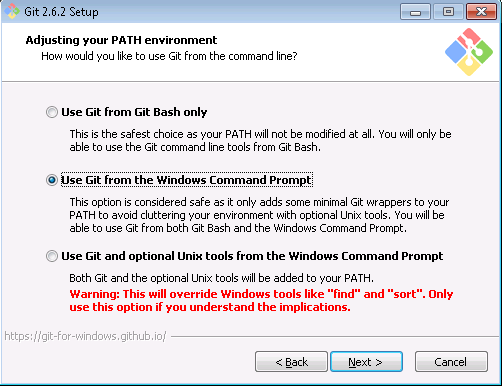
这是因为MSBuild找不到git.exe的位置(即。C:\Program \Git\bin)您可以检查您的java.library.path (Manage > System )是否包含git路径,如果不需要,则需要将git位置添加到path变量中,然后重新启动服务器才能生效。希望能帮上忙。
**在Windows环境中,java.library.path与PATH变量相同。
页面原文内容由Stack Overflow提供。腾讯云小微IT领域专用引擎提供翻译支持
原文链接:
https://stackoverflow.com/questions/19916115
复制相关文章
相似问题
腾讯云开发者

Copyright © 2013 - 2026 Tencent Cloud. All Rights Reserved. 腾讯云 版权所有
深圳市腾讯计算机系统有限公司 ICP备案/许可证号:粤B2-20090059  粤公网安备44030502008569号
腾讯云计算(北京)有限责任公司 京ICP证150476号 | 京ICP备11018762号