
如何使用Access 2013将ADP转换为ACCDB?
2013年接入不支持ADP。文中给出了ADP的一些替代方案:
- 将ADP转换为链接Access桌面数据库。
- 将对象导入ACCDE文件,然后使用早期版本的Access创建到现有数据的链接表。
我的ADP只包含表单、报表、宏和模块。我希望在Access 2013中使用此ADP (而不是在Access的任何早期版本上)。
我还没有找到任何方法来将ADP转换为链接Access桌面数据库,或者在Access 2013上将对象导入ACCDE文件。
如何使用Access 2013将ADP转换为链接Access桌面数据库或将对象导入ACCDE文件?
回答 2
Stack Overflow用户
发布于 2013-11-06 15:09:11
如何使用Access 2013将ADP转换为链接Access桌面数据库或将对象导入ACCDE文件?
你不能这样做。Access 2013将无法与ADP文件在所有上工作。如果试图在Access 2013中从ADP文件导入对象,则会得到以下错误:
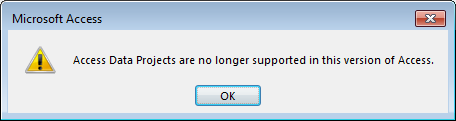
你需要做的是
- 找到一台带有Access 2010或更早版本的机器,
- 使用它将查询、表单等从ADP导入到
.accdb或.mdb文件中,然后 - 将该
.accdb或.mdb文件带回您的Access 2013机器,然后从那里继续。
编辑re:注释
是否无法使用Access 2013将ADP转换为链接access桌面数据库?
显然不是。即使试图使用VBA将表单对象从.adp文件复制到.accdb文件中,也会失败。以下代码:
Option Compare Database
Option Explicit

Sub adpImportTest()
    Dim dbPath As String, formName As String
    On Error GoTo adpImportTest_Error

    Debug.Print "Try importing a form from an .accdb file..."
    dbPath = "C:\Users\Gord\Documents\accdbTest.accdb"
    formName = "myCustomers"
    DoCmd.TransferDatabase acImport, "Microsoft Access", dbPath, acForm, formName, formName
    Debug.Print "Import succeeded."

    Debug.Print
    Debug.Print "Try importing a form from an .adp file..."
    dbPath = "C:\Users\Gord\Documents\NorthwindCS.adp"
    formName = "Customers"
    DoCmd.TransferDatabase acImport, "Microsoft Access", dbPath, acForm, formName, formName
    Debug.Print "Import succeeded."

    Exit Sub
adpImportTest_Error:
    Debug.Print Err.Description
End Sub
...produces的结果如下:
Try importing a form from an .accdb file...
Import succeeded.

Try importing a form from an .adp file...
The search key was not found in any record.如果我们试图偷偷摸摸地将.adp文件重命名为.mdb,那么Access 2013将不会读取它:
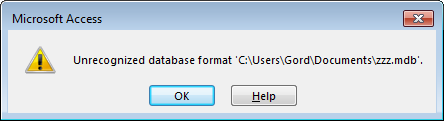
如前所述,您需要使用Access 2010 (或更早版本)将对象从.adp文件中提取为.accdb或.mdb文件。然后,您可以在Access 2013中使用.accdb或.mdb文件。
Stack Overflow用户
发布于 2015-04-07 13:16:50
使用office<2013 (如2010年)
尝试使用“另存为文本/从文本加载到传输表单”,然后可以编辑文本文件,为accdb链接的表准备记录源。
部分和未清理的代码,但给您一个想法。
模块LoadSaveForm:
Option Compare Database
Option Base 0
Option Explicit

Dim path$
Dim DateTimeString$
Dim app As Access.Application


Function SaveFormAsText(FormName As String) As Boolean
  Dim sPath As String
  Access.SaveAsText acForm, FormName, "C:\Temp" & "\" & FormName & ".txt"
End Function

Function LoadFormFromText(FormName As String)
  Access.LoadFromText acForm, FormName, "C:\Temp" & "\" & FormName & ".txt"
End Function

Private Sub SaveMDBObjectsAsText()

    DateTimeString = Format(Now(), "yyyymmddhhnn")
    path = CurrentProject.path & "\" '& "AS_TEXT_" & DateTimeString & "\"

    If Dir(path) <> "" Then
        'It exists
    Else
        On Error Resume Next
        MkDir path
        On Error GoTo 0

    End If

    SaveDataAccessPagesAsText
    SaveFormsAsText
    SaveReportsAsText
    SaveModulesAsText
    'SaveQueriesAsText
    CreateProjectFromText (path)

End Sub


Public Sub CreateProjectFromText(pathString As String)
    path = pathString
    'SaveMDBBase
    SaveAccdbDBase
    LoadDataAccessPagesFromText
    LoadFormsFromText
    LoadReportsFromText
    LoadModulesFromText
    'LoadQueriesFromText
    On Error Resume Next
    Dim r As Reference
    With app
        With .CurrentProject
            path = .FullName
        End With

        For Each r In .References
            With r
                If Not .BuiltIn Then
                    app.References.Remove r
                End If
            End With
        Next r

        For Each r In References
            With r
                If Not .BuiltIn Then
                    app.References.AddFromGuid r.GUID, r.Major, r.Minor
                End If
            End With
        Next r
        .RunCommand acCmdSaveAllModules
        .RunCommand acCmdCompileAndSaveAllModules
        .CloseCurrentDatabase
        .SysCmd 603, path, Replace(Replace(Replace(path, ".accdb", ".accde"), ".adp", ".ade"), ".mdb", ".mde")
        .Quit
    End With
    Set app = Nothing
    MsgBox "All Done with Text Backup"

End Sub

Private Sub SaveDataAccessPagesAsText()
    Dim filename$
    Dim Name$
    Dim DataAccessPage As AccessObject
    For Each DataAccessPage In CurrentProject.AllDataAccessPages
        Name = DataAccessPage.Name
        filename = path & Name & ".txt"
        SaveAsText acDataAccessPage, Name, filename
    Next DataAccessPage
End Sub

Private Sub SaveFormsAsText()
    Dim filename$
    Dim Name$
    Dim Form As AccessObject
    For Each Form In CurrentProject.AllForms
        Name = Form.Name
        filename = path & Name & ".txt"
        SaveAsText acForm, Name, filename
    Next Form
End Sub

Private Sub SaveReportsAsText()
    Dim filename$
    Dim Name$
    Dim Report As AccessObject
    For Each Report In CurrentProject.AllReports
        Name = Report.Name
        filename = path & Name & ".txt"
        SaveAsText acReport, Name, filename
    Next Report
End Sub

Private Sub SaveMacrosAsText()
    Dim filename$
    Dim Name$
    Dim Macro As AccessObject
    For Each Macro In CurrentProject.AllMacros
        Name = Macro.Name
        filename = path & Name & ".txt"
        SaveAsText acMacro, Name, filename
    Next Macro
End Sub

Private Sub SaveModulesAsText()
    Dim filename$
    Dim Name$
    Dim Module As AccessObject
    For Each Module In CurrentProject.AllModules
        Name = Module.Name
        filename = path & Name & ".txt"
        SaveAsText acModule, Name, filename
    Next Module
End Sub

Private Sub SaveQueriesAsText()
    Dim filename$
    Dim Name$
    Dim GetQueryNames As ADODB.Recordset
    Set GetQueryNames = CurrentProject.connection.OpenSchema(adSchemaViews)
    With GetQueryNames
        Do While Not .EOF
            Name = .Fields("TABLE_NAME")
            filename = path & Name & ".txt"
            SaveAsText acQuery, Name, filename
            .MoveNext
        Loop
    End With
End Sub

Private Function SaveAccdbDBase() As Database
    Dim ws As DAO.Workspace
    Dim db As DAO.Database

    'Get default Workspace
    Set ws = DBEngine.Workspaces(0)

    Dim filename$
    Dim Name$
    Name = Replace(CurrentProject.Name, CurrentProject.path, "")
    If Name Like "*.adp" Then
        Name = Replace(Name, "adp", "accdb")
    Else
        Name = Replace(Name, "accdb", "adp")
  End If
    filename = path & Name
 'Make sure there isn't already a file with the name of the new database
   If Dir(filename) <> "" Then Kill filename

   Set app = CreateObject("Access.Application")
   'Create a new mdb file
   If Name Like "*.adp" Then
        Application.CreateAccessProject filename, getConnection.ConnectionString
    Else
    Set db = ws.CreateDatabase(filename, dbLangGeneral)
    End If
   db.Close
   Set db = Nothing
    'SaveAsText 6, "", filename
    If Name Like "*.adp" Then

        app.Visible = True
        app.UserControl = True
        app.OpenAccessProject filename
    Else
        app.OpenCurrentDatabase filename
    End If
    app.SetOption "Show Navigation Pane Search Bar", True
    Set SaveAccdbDBase = db
End Function

Private Sub LoadDataAccessPagesFromText()
    Dim filename$
    Dim Name$
    Dim DataAccessPage As AccessObject
    For Each DataAccessPage In CurrentProject.AllDataAccessPages
        Name = DataAccessPage.Name
        filename = path & Name & ".txt"
        app.LoadFromText acDataAccessPage, Name, filename
    Next DataAccessPage
End Sub

Private Sub LoadFormsFromText()
    Dim filename$
    Dim Name$
    Dim Form As AccessObject
    For Each Form In CurrentProject.AllForms
        Name = Form.Name
        filename = path & Name & ".txt"
        On Error Resume Next
        app.LoadFromText acForm, Name, filename
    Next Form
End Sub

Sub CreateNewMDBFile()

   Dim ws As Workspace
   Dim db As Database
   Dim LFilename As String

   'Get default Workspace
   Set ws = DBEngine.Workspaces(0)

   'Path and file name for new mdb file
   LFilename = "c:\NewDB.mdb"

   'Make sure there isn't already a file with the name of the new database
   If Dir(LFilename) <> "" Then Kill LFilename

   'Create a new mdb file
   Set db = ws.CreateDatabase(LFilename, dbLangGeneral)

   'For lookup tables, export both table definition and data to new mdb file
   DoCmd.TransferDatabase acExport, "Microsoft Access", LFilename, acTable, "Lookup Table1", "Lookup Table1", False

   'For data entry tables, export only table definition to new mdb file
   DoCmd.TransferDatabase acExport, "Microsoft Access", LFilename, acTable, "DataEntry Table1", "DataEntry Table1", True

   db.Close
   Set db = Nothing

End Sub
运行SaveMDBObjectsAsText()来了解发生的事情
https://stackoverflow.com/questions/19807031
复制相似问题
腾讯云开发者

Copyright © 2013 - 2026 Tencent Cloud. All Rights Reserved. 腾讯云 版权所有
深圳市腾讯计算机系统有限公司 ICP备案/许可证号:粤B2-20090059  粤公网安备44030502008569号
腾讯云计算(北京)有限责任公司 京ICP证150476号 | 京ICP备11018762号