
hsv_to_rgb不是matplotlib上rgb_to_hsv的逆
hsv_to_rgb不是matplotlib上rgb_to_hsv的逆
提问于 2013-11-01 17:44:13
我试图将图像转换为hsv并返回到rgb,但不知何故,我丢失了颜色信息。
import matplotlib
import matplotlib.pyplot as plt
import matplotlib.image as mpimg
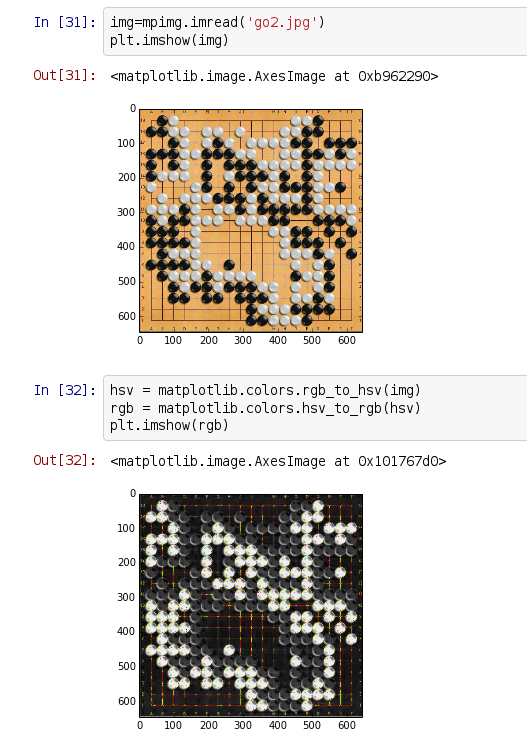
我也在shell上复制了这个问题,只需在导入后编写这一行就可以得到同样的结果。
plt.imshow(
  matplotlib.colors.hsv_to_rgb(
    matplotlib.colors.rgb_to_hsv(mpimg.imread('go2.jpg'))
  )
)
你能告诉我我做错了什么吗?
回答 2
Stack Overflow用户
回答已采纳
发布于 2013-11-02 16:32:03
编辑:这只是一个部分的解决方案,
见https://github.com/matplotlib/matplotlib/pull/2569的讨论
这是整数除法问题。numpy是认真对待它的类型,似乎不尊重from __future__ import division。简单的工作是在调用rgb_to_hsv之前将rgb值转换为浮动值,或者按如下方式对函数进行修补:
def rgb_to_hsv(arr):
    """
    convert rgb values in a numpy array to hsv values
    input and output arrays should have shape (M,N,3)
    """
    arr = arr.astype('float')  # <- add this line
    out = np.zeros(arr.shape, dtype=np.float)
    arr_max = arr.max(-1)
    ipos = arr_max > 0
    delta = arr.ptp(-1)
    s = np.zeros_like(delta)
    s[ipos] = delta[ipos] / arr_max[ipos]
    ipos = delta > 0
    # red is max
    idx = (arr[:, :, 0] == arr_max) & ipos
    out[idx, 0] = (arr[idx, 1] - arr[idx, 2]) / delta[idx]
    # green is max
    idx = (arr[:, :, 1] == arr_max) & ipos
    out[idx, 0] = 2. + (arr[idx, 2] - arr[idx, 0]) / delta[idx]
    # blue is max
    idx = (arr[:, :, 2] == arr_max) & ipos
    out[idx, 0] = 4. + (arr[idx, 0] - arr[idx, 1]) / delta[idx]
    out[:, :, 0] = (out[:, :, 0] / 6.0) % 1.0
    out[:, :, 1] = s
    out[:, :, 2] = arr_max
return outStack Overflow用户
发布于 2013-11-01 19:55:34
这个问题对我来说是可重复的(matplotlib 1.3.0)。在我看来就像个虫子。问题似乎是,在rgb_to_hsv步骤中,饱和度下降到零。至少在大多数颜色中:
import numpy as np
darkgreen = np.array([[[0, 100, 0]]], dtype='uint8')
matplotlib.colors.rgb_to_hsv(darkgreen)                  # [0.33, 1., 100.], okay so far
darkgreen2 = np.array([[[10, 100, 10]]], dtype='uint8')  # very similar colour
matplotlib.colors.rgb_to_hsv(darkgreen2)                 # [0.33, 0., 100.], S=0 means this is a shade of gray
我认为报告bug的正确位置是在github 问题跟踪器上。
页面原文内容由Stack Overflow提供。腾讯云小微IT领域专用引擎提供翻译支持
原文链接:
https://stackoverflow.com/questions/19732270
复制相关文章
相似问题
腾讯云开发者

Copyright © 2013 - 2026 Tencent Cloud. All Rights Reserved. 腾讯云 版权所有
深圳市腾讯计算机系统有限公司 ICP备案/许可证号:粤B2-20090059  粤公网安备44030502008569号
腾讯云计算(北京)有限责任公司 京ICP证150476号 | 京ICP备11018762号