
使用JApplet创建动画
我正在开发一个使用JApplet的Java程序,它可以使球上下弹跳。我可以在JApplet和类似的东西上画这个形状。我只是不能让它动起来。我对此进行了研究,并发现我需要创建一个方法,暂停形状,然后从JApplet中清除它,更改坐标,然后在新的区域中重新绘制形状,但出于某种原因,它只是不适合我。
提前谢谢你的帮助。
import java.awt.Color;
import java.awt.Graphics;
import javax.swing.JApplet;


public class Circle extends JApplet {

int x=100;
int y=100;
int diameter=50;


public void paint(Graphics g) {

int xResize=500;
int yResize=500;

super.paint(g);
resize(xResize,yResize);
g.drawOval(x, y, diameter, diameter);
}

public Circle (int startX, int startY,int startDiameter) {

this.x=startX;
this.y=startY;
this.diameter=startDiameter;

}

public int getX() {
return x;
}
public void setX(int startX){
x=startX;
}
public int getY() {
return y;
}
public void setY(int startY){
y=startY;
}
public int getDiameter() {
return diameter;
}
public void setDiameter(int startDiameter){
diameter=startDiameter;


}

while (ball.getY() + ballDiameter < windowHeight) {

g.clearRect(x-1,100,20,20);

g.fillOval(x,100,20,20);

try

{

Thread.sleep(70);

}

catch(Exception e)

{

}


pause.wait(0.05);

//g.clearRect(0,0,windowWidth,windowHeight);

g.clearRect(x-1,100,20,20);

g.fillOval(x,100,20,20);

try

{

Thread.sleep(70);

}

catch(Exception e)

{

}

ball.setY( ball.getY()+spacer);


}


while (ball.getY() + ballDiameter > 0) {

g.clearRect(x-1,100,20,20);

g.fillOval(x,100,20,20);

try

{

Thread.sleep(70);

}

catch(Exception e)

{

}

pause.wait(0.05);
//g.clearRect(0,0, windowWidth, windowHeight);
ball.setY(ball.getY()-spacer);


}弹跳球级:
import java.awt.Color;
import java.awt.Graphics;
import javax.swing.JApplet;

public class BouncingBall extends JApplet {

public void paint(Graphics g) {

super.paint(g);

final int x = 0;
int y = 0;
final int diameter = 15;
final int spacer = 5;
int windowWidth = getWidth();
int windowHeight = getHeight();

Circle ball = new Circle(x, y, diameter);
Pause pause = new Pause();
int ballDiameter = ball.getDiameter();
int roof = getHeight();回答 1
Stack Overflow用户
发布于 2013-10-29 02:38:52
首先,动画是随着时间的变化而产生的幻觉。因此,首先,您需要一些方法来定期更新您的值。
其次,Swing是一个单独的线程框架,这意味着任何阻塞这个线程的东西都会阻止事件分派线程处理新事件,包括重绘请求。
第三,预期UI的所有交互、更改或更新都将在EDT上下文中执行。
这意味着,您需要某种方式在后台等待(在EDT之外),它可以在执行更新时通知您,并将这些更新同步回EDT。
javax.swing.Timer是实现这一目标的最佳人选。它可以在后台等待一段指定的时间;它将在时间周期到期并重复时,在ActionListener上下文中通知它。
首先重写init、start和JApplet的stop方法
@Override
public void init() {
    super.init();
    timer = new Timer(40, new ActionListener() {

        @Override
        public void actionPerformed(ActionEvent e) {
        }
    });
}

@Override
public void start() {
    super.start();
    timer.start();
}

@Override
public void stop() {
    timer.stop();
    super.stop();
}基本上,这将构造一个Timer,适当地启动和停止它。
接下来,我们需要为动画提供一些逻辑.
正如我之前说过的,动画是一种假象,随着时间的推移而移动。我们有时间部分照顾(或多或少),现在我们需要运动。
其基本思想是对当前值进行少量的修改,提供边界检查,并最终重新绘制结果。
x += delta;
if (x < 0) {
    x = 0;
    delta *= -1;
} else if (x + diameter > getWidth()) {
    x = getWidth() - diameter;
    delta *= -1;
}
repaint();在这里,我将delta声明为applet中的实例变量,并将其值设置为2。这个逻辑应该添加到向actionPerformed注册的ActionListener的Timer方法中。
要使它运行,您将需要删除构造函数,因为applet应该有一个默认/空的构造函数。
您还应该从resize方法中删除paint调用,因为这只会导致发出更多的重绘请求,这最终会消耗您的CPU。
当你运行它时,你可能会幸运地看到这个圆圈,偶尔(否则它会闪烁)。这是因为Swing中的顶级容器不是双缓冲的。现在,您可以实现自己的缓冲策略,但是Swing组件在默认情况下是双缓冲的.
要解决这个问题,我们可以创建一个简单的DrawPanel,它从一个JPanel扩展并覆盖它的paintComponent方法
这样你就能得到更像.
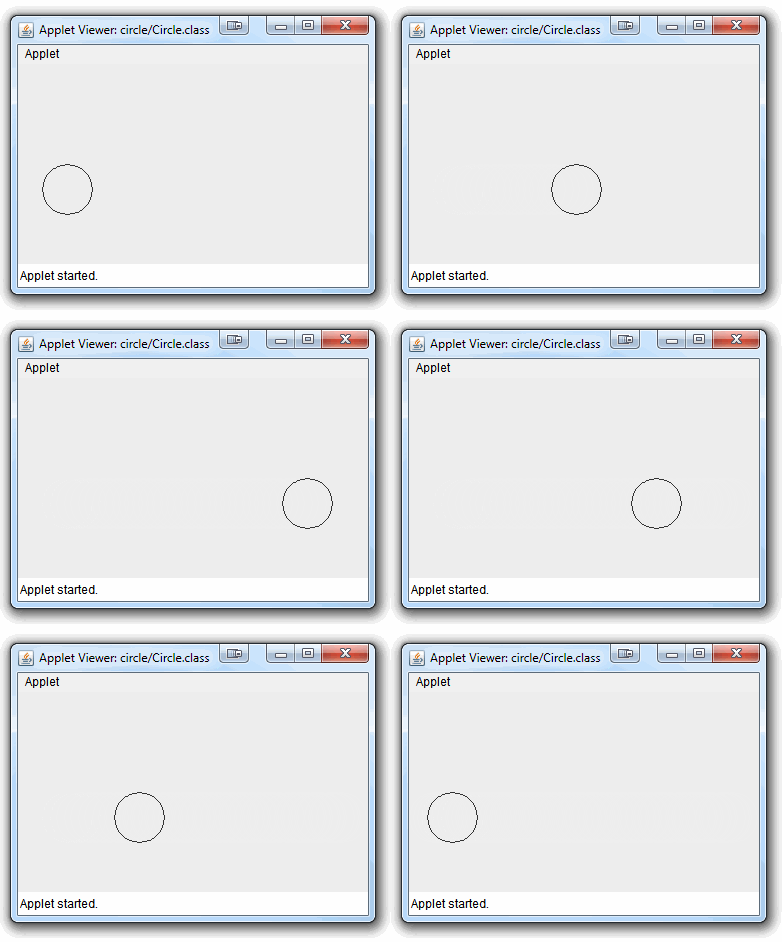
import java.awt.BorderLayout;
import java.awt.Graphics;
import java.awt.event.ActionEvent;
import java.awt.event.ActionListener;
import javax.swing.JApplet;
import javax.swing.JPanel;
import javax.swing.Timer;

public class Circle extends JApplet {

    private int delta = 2;

    private Timer timer;
    private DrawPane drawPane;

    @Override
    public void init() {
        super.init();
        setLayout(new BorderLayout());
        drawPane = new DrawPane();
        add(drawPane);
        timer = new Timer(40, new ActionListener() {

            @Override
            public void actionPerformed(ActionEvent e) {
                int x = drawPane.getAnimationX();
                int diameter = drawPane.getDiameter();
                x += delta;
                if (x < 0) {
                    x = 0;
                    delta *= -1;
                } else if (x + diameter > getWidth()) {
                    x = getWidth()- diameter;
                    delta *= -1;
                }
                drawPane.setAnimationX(x);
                repaint();
            }
        });
    }

    @Override
    public void start() {
        super.start();
        timer.start();
    }

    @Override
    public void stop() {
        timer.stop();
        super.stop();
    }

    public class DrawPane extends JPanel {

        int x = 100;
        int y = 100;
        int diameter = 50;

        public void setAnimationX(int x) {
            this.x = x;
        }

        public void setAnimationY(int y) {
            this.y = y;
        }

        public int getAnimationX() {
            return x;
        }

        public int getAnimationY() {
            return y;
        }

        public int getDiameter() {
            return diameter;
        }

        public void setDiameter(int startDiameter) {
            diameter = startDiameter;
        }

        @Override
        protected void paintComponent(Graphics g) {
            super.paintComponent(g);
            g.drawOval(x, y, diameter, diameter);
        }
    }
}此外,当重写方法时,getX和getY方法具有非常特殊的含义,您可能会通过过度使用它们来削弱应用程序.
我还会质疑使用JApplet的必要性,最好从使用JFrame开始,这样可以更容易地正常工作。
https://stackoverflow.com/questions/19648353
复制相似问题
腾讯云开发者

Copyright © 2013 - 2026 Tencent Cloud. All Rights Reserved. 腾讯云 版权所有
深圳市腾讯计算机系统有限公司 ICP备案/许可证号:粤B2-20090059  粤公网安备44030502008569号
腾讯云计算(北京)有限责任公司 京ICP证150476号 | 京ICP备11018762号