
动态折叠-在Windows / C#中创建面板
动态折叠-在Windows / C#中创建面板
提问于 2013-10-22 17:44:09
我需要编写一个Windows表单,用户可以在其中查看按"customer“分组的许多”合同“。每个客户必须是一个展开折叠面板,客户的合同必须在相应的面板内。
我已经尝试过伟大的ExpandCollapsePanel,但是当客户数量很大时,面板就不会自动滚动,即使autoscroll属性设置为true。
还有人知道其他的选择吗?记住,必须动态创建面板,因为有许多客户和属于每个客户的许多合同。
回答 1
Stack Overflow用户
回答已采纳
发布于 2013-10-24 00:13:57
好的,我已经创建了一个使用ElementHost托管WPF UserControl的示例,如下所示:
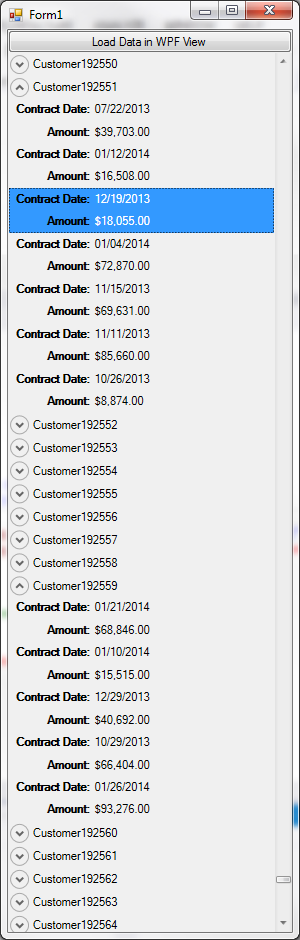
我已经上传了完整的源代码这里,但无论如何,这些都是最相关的部分:
Form1:
public partial class Form1 : Form
{
    public CustomerContractsViewModel ContractsVM { get; set; }

    public Form1()
    {
        InitializeComponent();

        ContractsVM  = new CustomerContractsViewModel();

        var customercontractsview = new CustomerContractsView(){DataContext = ContractsVM};

        var elementHost = new ElementHost() { Dock = DockStyle.Fill };
        elementHost.Child = customercontractsview;

        panel1.Controls.Add(elementHost);
    }

    private void button1_Click(object sender, EventArgs e)
    {
        ContractsVM.LoadCustomers(DataSource.GetCustomers());
    }
}
(为简洁起见省略了设计器代码)
WPF视图:
<UserControl x:Class="ElementHostSamples.CustomerContractsView"
             xmlns="http://schemas.microsoft.com/winfx/2006/xaml/presentation"
             xmlns:x="http://schemas.microsoft.com/winfx/2006/xaml"
             xmlns:mc="http://schemas.openxmlformats.org/markup-compatibility/2006"
             xmlns:d="http://schemas.microsoft.com/expression/blend/2008"
             mc:Ignorable="d"
             d:DesignHeight="300" d:DesignWidth="300">
    <UserControl.Resources>
        <!-- This style is applied to all Label elements within the UserControl-->
        <Style TargetType="Label">
            <Setter Property="FontWeight" Value="Bold"/>
            <Setter Property="HorizontalAlignment" Value="Right"/>
        </Style>

        <!-- This DataTemplate will be used to render the Contract items-->
        <DataTemplate x:Key="ContractTemplate">
            <Grid>
                <Grid.RowDefinitions>
                    <RowDefinition Height="Auto"/>
                    <RowDefinition Height="Auto"/>
                </Grid.RowDefinitions>

                <Grid.ColumnDefinitions>
                    <ColumnDefinition/>
                    <ColumnDefinition/>
                </Grid.ColumnDefinitions>

                <Label Grid.Row="0" Grid.Column="0" Content="Contract Date:"/>
                <Label Grid.Row="1" Grid.Column="0" Content="Amount:"/>

                <TextBlock Grid.Row="0" Grid.Column="1" Text="{Binding ContractDate, StringFormat='MM/dd/yyyy'}" VerticalAlignment="Center"/>
                <TextBlock Grid.Row="1" Grid.Column="1" Text="{Binding Amount, StringFormat=C}" VerticalAlignment="Center"/>
            </Grid>
        </DataTemplate>

        <!-- This DataTemplate will be used to render the Customer Items -->
        <DataTemplate x:Key="CustomerTemplate">
            <Expander Header="{Binding Name}">
                <ListBox ItemsSource="{Binding Contracts}" ItemTemplate="{StaticResource ContractTemplate}">
                    <ListBox.Template>
                        <ControlTemplate TargetType="ListBox">
                            <ItemsPresenter/>
                        </ControlTemplate>
                    </ListBox.Template>
                </ListBox>
            </Expander>
        </DataTemplate>
    </UserControl.Resources>

    <ListBox ItemsSource="{Binding Customers}"
             ItemTemplate="{StaticResource CustomerTemplate}"/>
</UserControl>
代码背后:
public partial class CustomerContractsView : UserControl
{
    public CustomerContractsView()
    {
        InitializeComponent();
    }
}
ViewModel:
public class CustomerContractsViewModel:PropertyChangedBase
{
    public List<Customer> Customers { get; set; }

    public void LoadCustomers(List<Customer> customers)
    {
        Customers = customers;
        OnPropertyChanged("Customers");
    }
}- 注意,这个简单的、少于100行的代码、20分钟的WPF示例比您希望在winforms中实现的任何东西都要好,并且不需要任何“所有者绘图”、"P/Invoke“(不管这意味着什么),也不需要大量的代码。也不会强迫您在第三方组件(如DevExpress或Telerik )上花费大量资金。这就是为什么WPF是所有.Net Windows应用程序开发的最佳选择,不管它是一个简单的Hello类型的东西。
- 我使用ItemsControl托管
Customer项,在其中我使用带有自定义DataTemplate的ListBox来显示Contract项。 - ItemsControl (外部和内部)都是虚拟化,以启用即时响应时间,即使有200000个条目。
- 注意,没有一行代码可以与UserControls的UI元素交互,所有内容都是用XAML定义的,并通过DataBinding填充数据。这支持了大量的可伸缩性和可维护性,因为UI与应用程序逻辑/业务逻辑完全解耦。这就是WPF的方式。
Form代码(初始化代码除外)只与ViewModel交互,不需要与WPF视图交互。- 当您从winforms升级到WPF时,您非常需要采用WPF心理,正如前面提到的,您几乎不使用在过程代码中操作UI元素,或者在后面使用过多的代码,而是使用DataBinding来实现一切,并接受MVVM模式。
- WPF Rocks.下载链接的源代码并查看结果。
- 如果你需要进一步的帮助,请告诉我。
页面原文内容由Stack Overflow提供。腾讯云小微IT领域专用引擎提供翻译支持
原文链接:
https://stackoverflow.com/questions/19524787
复制相关文章
相似问题
腾讯云开发者

Copyright © 2013 - 2026 Tencent Cloud. All Rights Reserved. 腾讯云 版权所有
深圳市腾讯计算机系统有限公司 ICP备案/许可证号:粤B2-20090059  粤公网安备44030502008569号
腾讯云计算(北京)有限责任公司 京ICP证150476号 | 京ICP备11018762号