
带有图标和复选框的ToolStripControlHost。如何高光选择的项目?在图标字段中添加图标?
带有图标和复选框的ToolStripControlHost。如何高光选择的项目?在图标字段中添加图标?
提问于 2013-10-22 14:37:03
我想要创建包含Custom ToolStripItem和图标的checkbox。我建议通过创建带有两个picturebox和label的自定义控件来做到这一点。左picturebox,如果图标和右边是作为特殊的checkbox添加位置到收藏夹。
我将该控件添加到ToolStripControlHost中。
- 问题是左边和右边的空格,我不想移除他们或移动图标到左栏和删除右空间。我试图将
Padding和Margin值设置为0,但它不起作用。我发现有类似问题的帖子,但没有正确的答案。可以这样做吗??
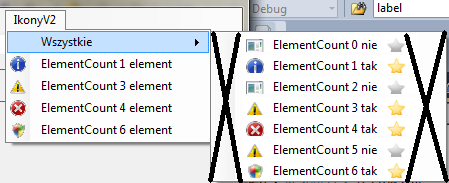
- 我想在MouseEnter上像ToolStripMenuItem中的普通元素一样使整行突出显示。当我重写OnMouseEnter和OnMouseLeave更改背景礼仪时,它只是改变托管控件的颜色,而不是antirie ToolStripControlHost。是否可以模拟与ToolStripMenuItem相同的行为?
现在它看起来像图片'A‘,我希望它看起来更像图片B,但是带有星型复选框:
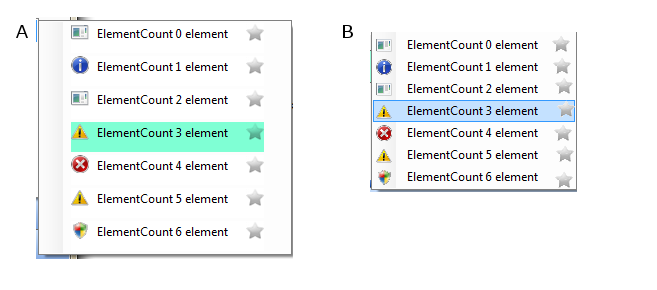
基本上,我希望使我的CustomToolStrip项目尽可能类似于ToolStripMenuItem。使用单独的事件单击(如果您单击文本)、和ChackChange (如果您单击星星)
有什么办法吗?
这是我的ToolStripControlHost代码的一部分:
    private void AddEvents()
    {
        this.ToolStripICItemControl.eMouseEnter += new EventHandler(On_MouseEnter);
        this.ToolStripICItemControl.eMouseLeave += new EventHandler(On_MouseLeave);
    }
    private void AutoSizeControl(Control control, int textPadding)
    {
        // Create a Graphics object for the Control.
        Graphics g = control.CreateGraphics();

        // Get the Size needed to accommodate the formatted Text.
        Size preferredSize = g.MeasureString(
           control.Text, control.Font).ToSize();

        // Pad the text and resize the control.
        this.Size = new Size(
           preferredSize.Width + 5 + 50 + (textPadding * 2),
           this.Size.Height /*+ (textPadding * 2)*/ );

        // Clean up the Graphics object.
        g.Dispose();
    }
    protected override void OnPaint(PaintEventArgs e)
    {
        base.OnPaint(e);
    }
    protected override void OnSubscribeControlEvents(Control c)
    {
        // Call the base so the base events are connected.
        base.OnSubscribeControlEvents(c);

        // Cast the control to a  ToolStripCheckBox control.
        ToolStripImageAndCheckBox checkBoxToolStrip = (ToolStripImageAndCheckBox)c;

        // Add the event.
        checkBoxToolStrip.LabelClick += new EventHandler(checkBoxToolStrip_LabelClick);
        checkBoxToolStrip.CheckedChanged += new EventHandler(checkBoxToolStrip_CheckedChanged);
    }
    protected override void OnUnsubscribeControlEvents(Control c)
    {
        // Call the base method so the basic events are unsubscribed.
        base.OnUnsubscribeControlEvents(c);

        // Cast the control to a ToolStripCheckBox control.
        ToolStripImageAndCheckBox checkBoxToolStrip = (ToolStripImageAndCheckBox)c;

        // Remove the event.
        checkBoxToolStrip.LabelClick -= new EventHandler(checkBoxToolStrip_LabelClick);
    }
    protected override void OnMouseEnter(EventArgs e)
    {
        DefaultBackColor = this.BackColor;
        base.OnMouseEnter(e);
        this.BackColor = Color.Aquamarine;
    }
    protected override void OnMouseLeave(EventArgs e)
    {
        base.OnMouseLeave(e);
        this.BackColor = DefaultBackColor;
    }
    void checkBoxToolStrip_LabelClick(object sender, EventArgs e)
    {
        if (Click != null)
            Click(this, e);
    }
    void checkBoxToolStrip_CheckedChanged(object sender, EventArgs e)
    {
        if (CheckedChange != null)
            CheckedChange(this, e);
    }
    void On_MouseLeave(object sender, EventArgs e)
    {
        OnMouseLeave(e);
        //throw new NotImplementedException();
    }
    void On_MouseEnter(object sender, EventArgs e)
    {
        this.Select();
        this.Focus();
        OnMouseEnter(e);
}回答 1
Stack Overflow用户
回答已采纳
发布于 2013-10-31 10:30:05
我要求通过从MyControl驱动ToolStripMenuItem并重写onPaint方法来做我需要的事情。
public class MyControl : ToolStripMenuItem
{
    public MyControl(){}
    public MyControl(string text, Image image ):base (text,image){}
    public MyControl(string text):base(text){}
    public MyControl(Image image):base(image){}
    public MyControl(string text,Image image,EventHandler onClick):base(text,image,onClick){}
    public MyControl(string text, Image image,int id):base(text,image){  this.ID = id;}
    public MyControl(string text,Image image,int id,EventHandler onClick):base(text,image,onClick){this.ID = id; }

    protected override void OnPaint(PaintEventArgs e)
    {
        base.OnPaint(e);

        if (base.Checked == false)
        {
           Rectangle rect = new Rectangle(this.Width - 20, 1, 20, 20);
            e.Graphics.DrawImage(Properties.Resources.BlackStar, rect);
        }
        else
        {
            Rectangle rect = new Rectangle(this.Width - 20, 1, 20, 20);
            e.Graphics.DrawImage(Properties.Resources.YellowStar, rect);
        }
    }
    public int ID { get; set; }
    public bool StarClicked { get; set; }

    protected override void OnMouseDown(MouseEventArgs e)
    {
        StarClicked = e.X > (this.Width - 20);
        if (StarClicked)
        {
            this.Checked = this.Checked == true ? false : true;
        }
        else
            base.OnClick(e);
        base.OnMouseDown(e);
    }
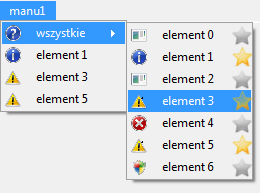
这就是现在的样子
表格代码:
public partial class Form1 : Form
{
    public Form1()
    {
        InitializeComponent();
        AddMenuElements(7);
    }
    public void AddMenuElements(int licznik)
    {
        ToolStripMenuItem wszystkie = new ToolStripMenuItem("wszystkie", SystemIcons.Question.ToBitmap());
        manu1ToolStripMenuItem.DropDownItems.Add(wszystkie);
        menuStrip1.Renderer = new ToolStripSystemRenderer();
        for (int i = 0; i < licznik; i++)
        {
            ToolStripMenuItem element = new ToolStripMenuItem(String.Format("element {0}", i), GetIcon(i),element2_Click);
            element.Visible = i % 2 == 0 ? false:true;
            manu1ToolStripMenuItem.DropDownItems.Add(element);
        }


        for (int i = 0; i < licznik; i++)
        {
            MyControl element2 = new MyControl(String.Format("element {0}",i), GetIcon(i),element2_Click);
            element2.ID = i;
            element2.CheckedChanged += (s, e) =>
            {
                MyControl control = s as MyControl;
                manu1ToolStripMenuItem.DropDownItems[control.ID + 1].Visible = control.Checked;
            };
            element2.Checked = i % 2 == 0 ? false : true;

            wszystkie.DropDownItems.Add(element2);

        }
    }
    void element2_Click(object sender, EventArgs e)
    {
        MyControl kontener = (sender as MyControl);

        if (kontener.ForeColor == Color.Red)
            kontener.ForeColor = Color.Black;
        else
            kontener.ForeColor = Color.Red;

    }
    private static Image GetIcon(int i)
    {
        Image ikona = null;
        switch (i)
        {
            case 0: ikona = SystemIcons.Application.ToBitmap();
                break;
            case 1: ikona = SystemIcons.Asterisk.ToBitmap();
                break;
            case 2: ikona = SystemIcons.WinLogo.ToBitmap();
                break;
            case 3: ikona = SystemIcons.Exclamation.ToBitmap();
                break;
            case 4: ikona = SystemIcons.Hand.ToBitmap();
                break;
            case 5: ikona = SystemIcons.Warning.ToBitmap();
                break;
            default: ikona = SystemIcons.Shield.ToBitmap();
                break;
        }
        return ikona;
    }
}
基本上,它做了我想做的,我只需要阻止它消失,当点击星星。谢谢你的帮助@LarsTech它给了我一个怎么做的提示。
页面原文内容由Stack Overflow提供。腾讯云小微IT领域专用引擎提供翻译支持
原文链接:
https://stackoverflow.com/questions/19520899
复制相关文章
相似问题
腾讯云开发者

Copyright © 2013 - 2026 Tencent Cloud. All Rights Reserved. 腾讯云 版权所有
深圳市腾讯计算机系统有限公司 ICP备案/许可证号:粤B2-20090059  粤公网安备44030502008569号
腾讯云计算(北京)有限责任公司 京ICP证150476号 | 京ICP备11018762号