
UIToolbar tintColor和barTintColor问题
UIToolbar tintColor和barTintColor问题
提问于 2013-10-22 07:33:36
我有这样的代码:
UIView *colorView = [[UIView alloc] init];
colorView.frame = CGRectMake(0.0, 0.0, self.view.frame.size.width, 64.0);
colorView.backgroundColor = [UIColor blackColor];
//colorView.tintColor = [UIColor blackColor];

UIToolbar *toolbar = [[UIToolbar alloc] init];
toolbar.frame = CGRectMake(0.0, 0.0, self.view.frame.size.width, 44.0);

self.view addSubview:colorView];
[self.view addSubview:toolbar];
为什么工具栏子视图与我的视图有不同的颜色?视图显示为黑色,而工具栏显示为浅灰色?是模糊还是什么导致了这一切?
回答 2
Stack Overflow用户
回答已采纳
发布于 2013-10-22 08:05:56
UINavigationBar的某些属性的行为与iOS 7不同。我已经在我的Answer中解释了这件事。
看看条形图样式的iOS 6和iOS 7:
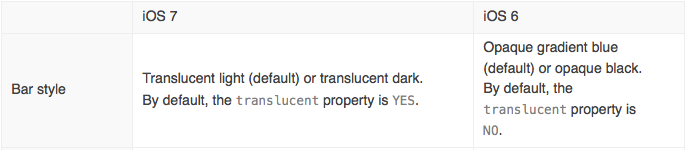
在这里你可以注意到两点:
- 您可以将栏样式更改为
translucent dark,而不是translucent light(默认)。 - 可以将
translucent属性从YES(默认)更改为NO。
Stack Overflow用户
发布于 2013-10-22 08:05:28
试试这个代码,它会对你有帮助的,
UIToolbar *toolbar = [[UIToolbar alloc] init];
toolbar.frame = CGRectMake(0.0, 0.0, self.view.frame.size.width, 44.0);
toolbar.barStyle = UIBarStyleBlackTranslucent;
toolbar.tintColor = [UIColor blackColor];
toolbar.alpha = 0.0;根据您的需求更改tintColor和alpha。
页面原文内容由Stack Overflow提供。腾讯云小微IT领域专用引擎提供翻译支持
原文链接:
https://stackoverflow.com/questions/19511744
复制相关文章
相似问题
腾讯云开发者

Copyright © 2013 - 2026 Tencent Cloud. All Rights Reserved. 腾讯云 版权所有
深圳市腾讯计算机系统有限公司 ICP备案/许可证号:粤B2-20090059  粤公网安备44030502008569号
腾讯云计算(北京)有限责任公司 京ICP证150476号 | 京ICP备11018762号