
选择带画布的绑定ListBox项作为ItemsPanelTemplate
我正在编写一个调度工具,我希望有一个类似于"Day“的视图,它可以在许多日历应用程序中使用。
它是作为一个ListBox来完成的,这样用户就可以选择一些事件。当我试图绑定事件时,问题就会发生--选择不像预期的那样工作。我的意思是,它看起来像拉伸到容器的最顶端,加上click事件不是在元素上处理,而是在元素和容器的顶部之间的空间上处理。
下面是一个例子:在左边-它应该如何工作和外观,这是通过手动放置两个ListBoxItems来完成的。在右边,使用绑定。
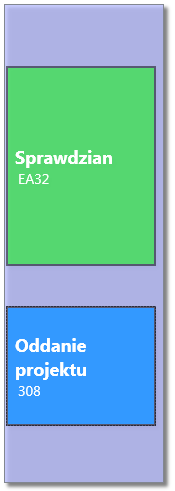
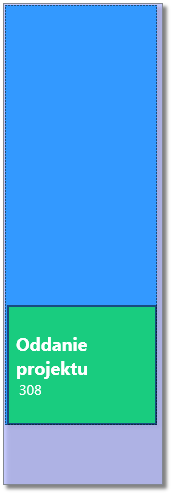
我将这两种情况的可视化树与WPF调试工具进行了比较,并且在例如ContentPresenter方面有很小的差异,但我不清楚具体发生了什么,为什么会发生这种差异,以及如何消除它。
这是我的XAML:
<Window
    xmlns="http://schemas.microsoft.com/winfx/2006/xaml/presentation"
    xmlns:x="http://schemas.microsoft.com/winfx/2006/xaml"
    x:Class="PLA1.MainWindow"
    x:Name="Window"
    xmlns:local="clr-namespace:PLA1"
    Title="MainWindow"
    Width="640" Height="480">

    <Window.Resources>
        <local:MarginConverter x:Key="marginConverter"/>
    </Window.Resources>

    <Grid x:Name="LayoutRoot">
        <ListBox Margin="8,8,0,8" Background="#C9BBC0FF" HorizontalAlignment="Left" Width="160">
           <ItemsControl.ItemsPanel>
                <ItemsPanelTemplate>
                    <Canvas />
                </ItemsPanelTemplate>
            </ItemsControl.ItemsPanel>
            <ListBox.ItemTemplate>
                <DataTemplate>
                    <ListBoxItem Margin="{Binding Path=StartMinutes, Converter={StaticResource marginConverter}}" Height="{Binding Path=Duration}" Width="150" Background="#8000FF00" Foreground="White" BorderThickness="2" BorderBrush="#80000000">
                        <StackPanel>
                            <TextBlock Text="{Binding Path=Name}" Margin="5,0,0,0" Width="130" TextWrapping="Wrap" FontWeight="Bold" FontSize="18" />
                            <TextBlock Text="{Binding Path=Place}"  Margin="8,0,0,0" FontSize="14"/>
                        </StackPanel>
                    </ListBoxItem>
                </DataTemplate>
            </ListBox.ItemTemplate>
            <ListBox.Effect>
                <DropShadowEffect Opacity="0.625"/>
            </ListBox.Effect>

            <!-- uncomment these two lines to test binding -->
            <!--local:Event Duration="200" StartMinutes="60" Name="Sprawdzian" Place="EA32" />
            <local:Event Duration="120" StartMinutes="300" Name="Oddanie projektu" Place="308" /-->

            <ListBoxItem Margin="0,60,0,0" Height="200" Width="150" Background="#8000FF00" Foreground="White" BorderThickness="2" BorderBrush="#80000000">
                <StackPanel>
                    <TextBlock Text="Sprawdzian" Margin="5,0,0,0" Width="130" TextWrapping="Wrap" FontWeight="Bold" FontSize="18" />
                    <TextBlock Text="EA32"  Margin="8,0,0,0" FontSize="14"/>
                </StackPanel>
            </ListBoxItem>

            <ListBoxItem Margin="0,300,0,0" Height="120" Width="150" Background="#8000FF00" Foreground="White" BorderThickness="2" BorderBrush="#80000000">
                <StackPanel>
                    <TextBlock Text="Oddanie projektu" Margin="5,0,0,0" Width="130" TextWrapping="Wrap" FontWeight="Bold" FontSize="18" />
                    <TextBlock Text="308"  Margin="8,0,0,0" FontSize="14"/>
                </StackPanel>
            </ListBoxItem>
        </ListBox>
    </Grid>
</Window>事件类:
public class Event
{
    public int StartMinutes { get;set; }
    public int Duration { get; set; }
    public string Name { get; set; }
    public string Place { get; set; }

    public Event() { }
}MarginConverter类:
public class MarginConverter : IValueConverter
{
    public object Convert(object value, System.Type targetType, object parameter, System.Globalization.CultureInfo culture)
    {
        return new Thickness(0, (int)(value), 0, 0);
    }

    public object ConvertBack(object value, System.Type targetType, object parameter, System.Globalization.CultureInfo culture)
    {
        return null;
    }
}回答 2
Stack Overflow用户
发布于 2013-10-20 20:00:45
应该在ListBoxItem资源中添加样式,在其中设置适当的属性并更改ItemTemplate。
<ListBox Margin="8,8,0,8" Background="#C9BBC0FF" HorizontalAlignment="Left" Width="160">
    <ListBox.Resources>
        <Style TargetType="ListBoxItem">
            <Setter Property="Margin" Value="{Binding Path=StartMinutes, Converter={StaticResource marginConverter}}" />
            <Setter Property="Height" Value="{Binding Path=Duration}" />
            <Setter Property="Foreground" Value="White" />
            <Setter Property="BorderThickness" Value="2" />
            <Setter Property="BorderBrush" Value="#80000000" />
            <Setter Property="Width" Value="150" />
            <Setter Property="Background" Value="#8000FF00" />
        </Style>
    </ListBox.Resources>
    <ItemsControl.ItemsPanel>
        <ItemsPanelTemplate>
            <Canvas />
        </ItemsPanelTemplate>
    </ItemsControl.ItemsPanel>
    <ListBox.ItemTemplate>
        <DataTemplate>
                <StackPanel>
                    <TextBlock Text="{Binding Path=Name}" Margin="5,0,0,0" Width="130" TextWrapping="Wrap" FontWeight="Bold" FontSize="18" />
                    <TextBlock Text="{Binding Path=Place}"  Margin="8,0,0,0" FontSize="14"/>
                </StackPanel>
        </DataTemplate>
    </ListBox.ItemTemplate>
    <ListBox.Effect>
        <DropShadowEffect Opacity="0.625"/>
    </ListBox.Effect>

    <!-- uncomment these two lines to test binding -->
    <local:Event Duration="200" StartMinutes="60" Name="Sprawdzian" Place="EA32" />
    <local:Event Duration="120" StartMinutes="300" Name="Oddanie projektu" Place="308" />

    <!--<ListBoxItem Margin="0,60,0,0" Height="200" Width="150" Background="#8000FF00" Foreground="White" BorderThickness="2" BorderBrush="#80000000">
        <StackPanel>
            <TextBlock Text="Sprawdzian" Margin="5,0,0,0" Width="130" TextWrapping="Wrap" FontWeight="Bold" FontSize="18" />
            <TextBlock Text="EA32"  Margin="8,0,0,0" FontSize="14"/>
        </StackPanel>
    </ListBoxItem>

    <ListBoxItem Margin="0,300,0,0" Height="120" Width="150" Background="#8000FF00" Foreground="White" BorderThickness="2" BorderBrush="#80000000">
        <StackPanel>
            <TextBlock Text="Oddanie projektu" Margin="5,0,0,0" Width="130" TextWrapping="Wrap" FontWeight="Bold" FontSize="18" />
            <TextBlock Text="308"  Margin="8,0,0,0" FontSize="14"/>
        </StackPanel>
    </ListBoxItem>-->
</ListBox>包含两个ListBoxItem项的可视树:
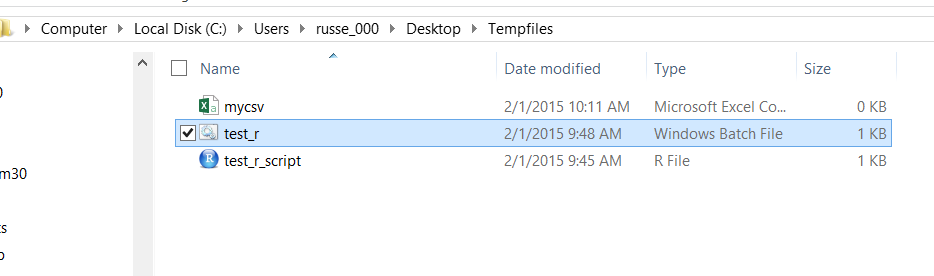
在本例中,一切正常,Height和Margin属性都是在代码中设置的。
包含两个Event项的可视树:
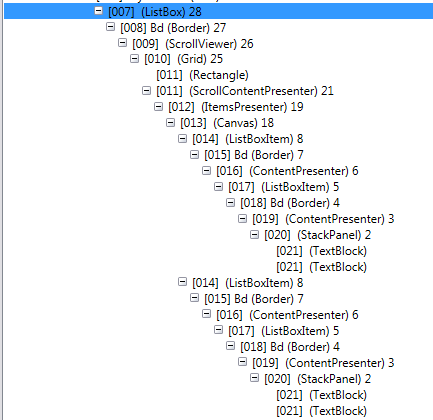
在本例中,您将ItemTemplate定义为ListBoxItem,但默认情况下,ListBox也会添加容器ListBoxItem,因此您有两个ListBoxItem,这里有问题,因为您只为内部ListBoxItem设置了高度和边距。外部ListBoxItem具有默认属性。
如果您想自己检查这一点,您可以使用它来执行这个窥探(http://snoopwpf.codeplex.com/)。
Stack Overflow用户
发布于 2013-10-20 19:59:50
尝试按以下方式更新您的ListBox:
  <ListBox Margin="8,8,0,8" Background="#C9BBC0FF" HorizontalAlignment="Left" Width="160">
       <ListBox.ItemsPanel>
            <ItemsPanelTemplate>
                <StackPanel/>
            </ItemsPanelTemplate>
        </ListBox.ItemsPanel>
        <ListBox.ItemContainerStyle>
           <Style TargetType="ListBoxItem">
                    <Setter Property="Height" Value="{Binding Duration}"/>
                     <Setter Property="Margin" Value="{Binding Path=StartMinutes, Converter={StaticResource marginConverter}}" />
            </Style>
        </ListBox.ItemContainerStyle>
        <ListBox.ItemTemplate>
            <DataTemplate>
                    <StackPanel Background="#8000FF00" BorderThickness="2" BorderBrush="#80000000">
                        <TextBlock Text="{Binding Path=Name}" Margin="5,0,0,0" Width="130" TextWrapping="Wrap" FontWeight="Bold" FontSize="18" />
                        <TextBlock Text="{Binding Path=Place}"  Margin="8,0,0,0" FontSize="14"/>
                    </StackPanel>
            </DataTemplate>
</ListBox.ItemTemplate>https://stackoverflow.com/questions/19481854
复制相似问题
腾讯云开发者

Copyright © 2013 - 2026 Tencent Cloud. All Rights Reserved. 腾讯云 版权所有
深圳市腾讯计算机系统有限公司 ICP备案/许可证号:粤B2-20090059  粤公网安备44030502008569号
腾讯云计算(北京)有限责任公司 京ICP证150476号 | 京ICP备11018762号