
无法使Firepad正常工作
我创建了一个Firebase (https://mkaminsky.firebaseio.com/),并试图使用Firepad创建一个代码协作工具。我创建了这个html文件,如示例(https://github.com/firebase/firepad/blob/master/examples/code.html)中所述。
<!doctype html>
<!-- See http://www.firepad.io/docs/ for detailed embedding docs. -->
   <html>
      <head>
         <meta charset="utf-8" />
         <script src="https://cdn.firebase.com/v0/firebase.js"></script>

         <script src="codemirror/lib/codemirror.js"></script>
         <script src="codemirror/mode/javascript/javascript.js"></script>
         <link rel="stylesheet" href="codemirror/lib/codemirror.css" />

         <script src="firepad.js"></script>
         <link rel="stylesheet" href="firepad.css" />
         <style>
             html { height: 100%; }
             body { margin: 0; height: 100%; position: relative; }
             .firepad {
              position: absolute; left: 0; top: 0; bottom: 0; right: 0; height: auto;
              }
         </style>
   </head>
   <body>
      <button type="button">Test</button>
      <div id="firepad-container"></div>

      <script>
         //// Initialize Firebase.
         var firepadRef = new Firebase('https://mkaminsky.firebaseio.com/');

         //// Create CodeMirror (with line numbers and the JavaScript mode).
         var codeMirror = CodeMirror(document.getElementById('firepad-container'), {
           lineNumbers: true,
           mode: 'javascript'
         });

         //// Create Firepad.
         var firepad = Firepad.fromCodeMirror(firepadRef, codeMirror);

         //// Initialize contents.
         firepad.on('ready', function() {
           if (firepad.isHistoryEmpty()) {
            firepad.setText('//hello');
           }
         });
    </script>
</body>
</html>
但是,这段代码不像它应该的那样工作。它显示代码编辑器,并带有语法突出显示,但不执行“setText(‘//hello’)”方法。放置在其位置上的任何其他命令也不起作用。
此外,该按钮不会显示在html页面中。
我已经测试并验证了Firebase是否正常工作。
回答 2
Stack Overflow用户
发布于 2013-10-20 04:55:41
难道isHistoryEmpty()代码不会仅仅因为它曾经运行过()而运行,而现在历史记录并不是空的吗?
$ curl  https://mkaminsky.firebaseio.com/.json
{"users":{"-J6J90xrR-D-XC6WE23F":{"color":"#d5b3ff"}},"history":{"A0":{"a":"-J6HUBET5icmC-yXAkJb","o":["//hello"]}}}
尝试清除您的防火墙或使用一个新的名称空间的萤火虫文档。测试新名称空间的最简单方法是
Firepad.fromCodeMirror(firepadRef.push(), codeMirror);它始终为我运行isHistoryEmpty()分支(在https://cben-sandbox.firebaseio.com/、Chrome和Firefox上进行了测试)。
Stack Overflow用户
发布于 2017-01-10 11:17:53
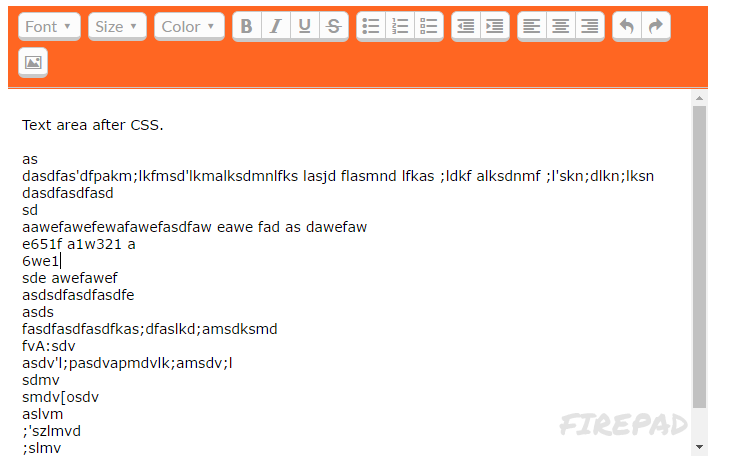
它很可能缺少CSS格式。按照文档,添加以下CSS规则:
.firepad {
  width: 700px;
  height: 450px;
  background-color: #f62; /* dark orange background */
}在CSS样式化之前的

CSS样式化后的
https://stackoverflow.com/questions/19470628
复制相似问题
腾讯云开发者

Copyright © 2013 - 2026 Tencent Cloud. All Rights Reserved. 腾讯云 版权所有
深圳市腾讯计算机系统有限公司 ICP备案/许可证号:粤B2-20090059  粤公网安备44030502008569号
腾讯云计算(北京)有限责任公司 京ICP证150476号 | 京ICP备11018762号