
iOS 7 UITextView垂直对准
为什么我的可编辑UITextView (放置在充当UITextView委托的UISplitView中的一个简单的UIViewController中)不是从一开始就显示文本,而是显示类似于6-7行的文本?
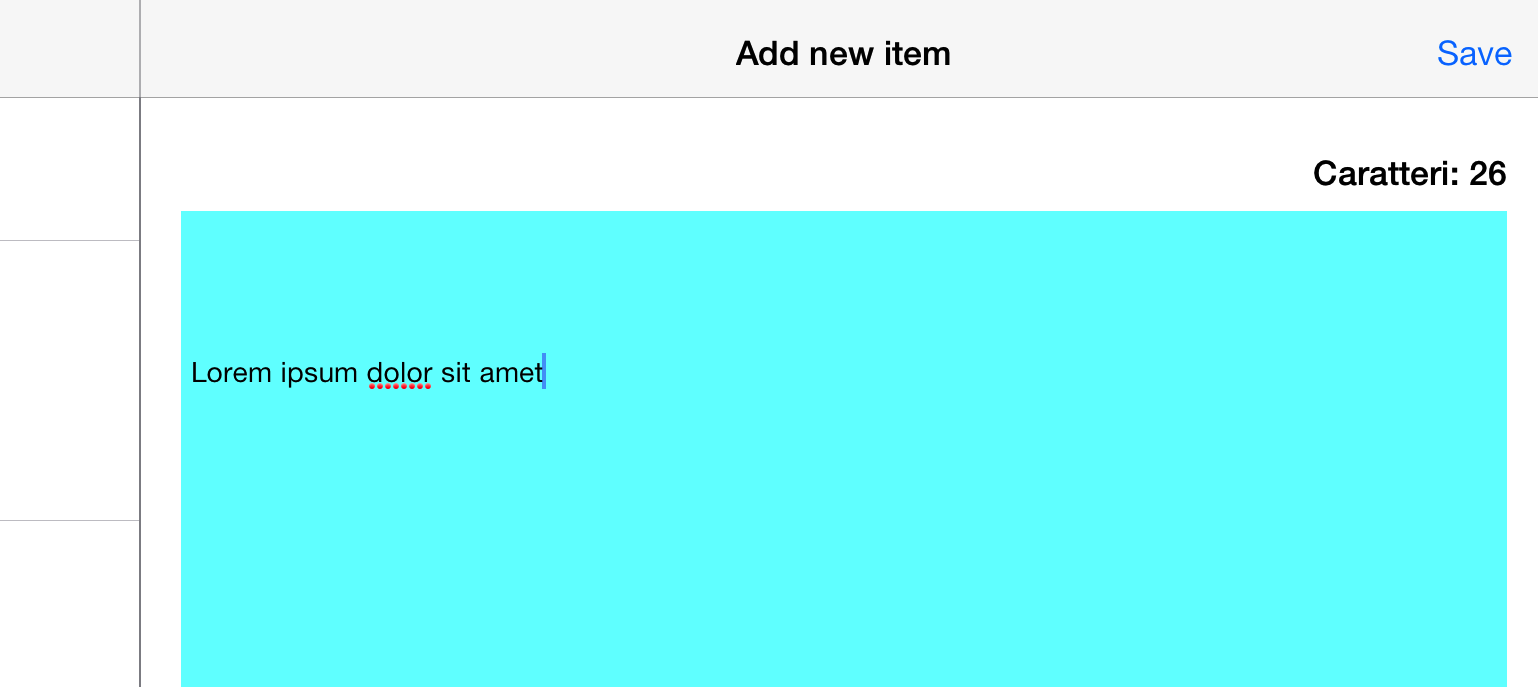
我没有设置任何特定的自动收费表或类似的东西,尝试删除文本没有帮助(所以没有隐藏字符或其他东西)。
我在iPad上用iPad 7,在故事板上很好看.这个问题在iOS模拟器和实际设备上是一样的。我开始生气了:P
这是一些密码。这是ViewController viewDidLoad()
- (void)viewDidLoad
{
    [super viewDidLoad];
    // Do any additional setup after loading the view.
    self.itemTextField.delegate = self;
    self.itemTextField.text = NSLocalizedString(@"NEWITEMPLACEHOLDER", nil);
    self.itemTextField.textColor = [UIColor lightGrayColor]; //optional
}下面是对UITextView的重写函数,我正在使用我在StackOverflow上找到的一些代码来模拟视图的占位符(故事板的iPhone版本上的相同内容很好).
// UITextView placeholder
- (void)textViewDidBeginEditing:(UITextView *)textView
{
    if ([textView.text isEqualToString:NSLocalizedString(@"NEWITEMPLACEHOLDER", nil)]) {
        textView.text = @"";
        textView.textColor = [UIColor blackColor]; //optional
    }
    [textView becomeFirstResponder];
}

- (void)textViewDidEndEditing:(UITextView *)textView
{
    if ([textView.text isEqualToString:@""]) {
        textView.text = NSLocalizedString(@"NEWITEMPLACEHOLDER", nil);
        textView.textColor = [UIColor lightGrayColor]; //optional
    }
    [textView resignFirstResponder];
}

-(void)textViewDidChange:(UITextView *)textView
{
    int len = textView.text.length;
    charCount.text = [NSString stringWithFormat:@"%@: %i",  NSLocalizedString(@"CHARCOUNT", nil),len];
}

- (BOOL)textView:(UITextView *)textView shouldChangeTextInRange:(NSRange)range replacementText:(NSString *)text
{
    return YES;
}回答 7
Stack Overflow用户
发布于 2013-11-10 14:05:37
我也解决了同样的问题。
通过禁用自动scrollView内嵌调整来解决这个问题:
if(SYSTEM_VERSION_GREATER_THAN_OR_EQUAL_TO(@"7.0")){
    self.automaticallyAdjustsScrollViewInsets = NO; // Avoid the top UITextView space, iOS7 (~bug?)
}Stack Overflow用户
发布于 2014-07-21 17:54:51
这是一个相当常见的问题,因此我将创建一个简单的UITextView子类,以便您可以重用它并在IB中使用它。
我将使用contentInset,确保优雅地处理contentSize大于textView界限的情况。
@interface BSVerticallyCenteredTextView : UITextView

@end

@implementation BSVerticallyCenteredTextView

- (id)initWithFrame:(CGRect)frame
{
    if (self = [super initWithFrame:frame])
    {
        [self addObserver:self forKeyPath:@"contentSize" options:  (NSKeyValueObservingOptionNew) context:NULL];
    }
    return self;
}

- (id)initWithCoder:(NSCoder *)aDecoder
{
    if (self = [super initWithCoder:aDecoder])
    {
        [self addObserver:self forKeyPath:@"contentSize" options:  (NSKeyValueObservingOptionNew) context:NULL];
    }
    return self;
}

-(void)observeValueForKeyPath:(NSString *)keyPath ofObject:(id)object change:(NSDictionary *)change context:(void *)context
{
    if ([keyPath isEqualToString:@"contentSize"])
    {
        UITextView *tv = object;
        CGFloat deadSpace = ([tv bounds].size.height - [tv contentSize].height);
        CGFloat inset = MAX(0, deadSpace/2.0);
        tv.contentInset = UIEdgeInsetsMake(inset, tv.contentInset.left, inset, tv.contentInset.right);
    }
}

- (void)dealloc
{
    [self removeObserver:self forKeyPath:@"contentSize"];
}

@endStack Overflow用户
发布于 2013-11-10 14:44:35
使用-observerForKeyPath和contentSize KeyPath
在我的博客上看一些代码(不要关注泰语语言)
http://www.macbaszii.com/2012/10/ios-dev-uitextview-vertical-alignment.html
https://stackoverflow.com/questions/19468417
复制相似问题
腾讯云开发者

Copyright © 2013 - 2026 Tencent Cloud. All Rights Reserved. 腾讯云 版权所有
深圳市腾讯计算机系统有限公司 ICP备案/许可证号:粤B2-20090059  粤公网安备44030502008569号
腾讯云计算(北京)有限责任公司 京ICP证150476号 | 京ICP备11018762号