
日历Pro -如何配置以使用不可扩展的src路径-所有调试
我使用extensible-1.5.1并在
extensible-1.5.1/examples/calendar/TestApp/test-app.html
我尝试通过在此表单中添加一个新的Event窗口来自定义textfield窗体窗口。这里是表单默认值
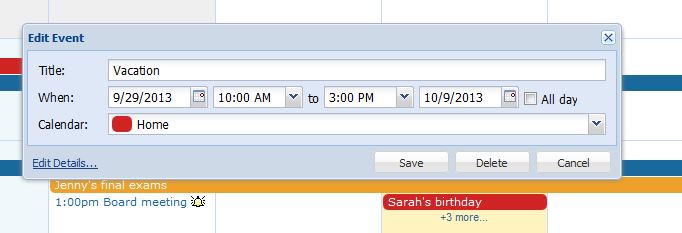
但我找不到要编辑的文件。
我认为这是在extensible-1.5.1\src\calendar\form\EventWindow.js。但是,当我删除src文件夹时,项目仍然工作,什么也不改变?
如何做到这一点谢谢
编辑
我在extensible-all-debug.js文件中找到了这个。但这个文件真的很复杂
在extjs示例中如何配置如何在extensible-1.5.1\src\ (如calendar )中使用数据
回答 1
Stack Overflow用户
发布于 2013-10-22 12:01:18
您是正确的,因为您需要使用的类是Extensible.calendar.form.EventWindow。但是,与其编辑该文件,不如扩展该类并创建自己的版本。您可以使用该文件作为指南,并根据需要重写getFormItemConfigs函数以修改表单:
Ext.define("MyApp.view.EventWindow", {
    extend: "Extensible.calendar.form.EventWindow",
    modal: true,
    enableEditDetails: false,

    initComponent: function()
    {
        this.callParent();
    },

    getFormItemConfigs: function() {
        var items = [/*your form items here */];

        return items;
    },
    //... other stuff here maybe...
});然后,您可以重写Extensible.calendar.view.AbstractCalendar以使用您刚刚创建的类:
Ext.define("MyApp.view.AbstractCalendarOverride", {
    override: 'Extensible.calendar.view.AbstractCalendar',

    getEventEditor : function()
    {
        this.editWin = this.ownerCalendarPanel.editWin;

        if(!this.editWin)
        {
            //Change this line:
            this.ownerCalendarPanel.editWin = Ext.create('MyApp.view.EventWindow', {
                id: 'ext-cal-editwin',
                calendarStore: this.calendarStore,
                modal: this.editModal,
                enableEditDetails: this.enableEditDetails,
                listeners: {
                    'eventadd': {
                        fn: function(win, rec, animTarget) {
                            //win.hide(animTarget);
                            win.currentView.onEventAdd(null, rec);
                        },
                        scope: this
                    },
                    'eventupdate': {
                        fn: function(win, rec, animTarget) {
                            //win.hide(animTarget);
                            win.currentView.onEventUpdate(null, rec);
                        },
                        scope: this
                    },
                    'eventdelete': {
                        fn: function(win, rec, animTarget) {
                            //win.hide(animTarget);
                            win.currentView.onEventDelete(null, rec);
                        },
                        scope: this
                    },
                    'editdetails': {
                        fn: function(win, rec, animTarget, view) {
                            // explicitly do not animate the hide when switching to detail
                            // view as it looks weird visually
                            win.animateTarget = null;
                            win.hide();
                            win.currentView.fireEvent('editdetails', win.currentView, rec);
                        },
                        scope: this
                    },
                    'eventcancel': {
                        fn: function(win, rec, animTarget){
                            this.dismissEventEditor(null, animTarget);
                            win.currentView.onEventCancel();
                        },
                        scope: this
                    }
                }
            });
        }

        // allows the window to reference the current scope in its callbacks
        this.editWin.currentView = this;
        return this.editWin;
    }
});
这也许不能完全满足你的需要,但希望它能让你走上正确的轨道。
https://stackoverflow.com/questions/19408593
复制相似问题
腾讯云开发者

Copyright © 2013 - 2026 Tencent Cloud. All Rights Reserved. 腾讯云 版权所有
深圳市腾讯计算机系统有限公司 ICP备案/许可证号:粤B2-20090059  粤公网安备44030502008569号
腾讯云计算(北京)有限责任公司 京ICP证150476号 | 京ICP备11018762号