
ColumnHeader.Name在运行时生成一个空字符串。
ColumnHeader.Name在运行时生成一个空字符串。
提问于 2013-10-16 10:27:32
使用Winforms中的ListView控件(Visual 2010),我注意到虽然我在列设计器中为其ColumnHeaders的Name属性分配了有意义的值,但调用columnHeaderFoo.Name在运行时返回一个空字符串。这与其他控件的行为不同,例如,在相同的窗体上,buttonOK.Name生成"buttonOK"。
这里是我设置值的地方:
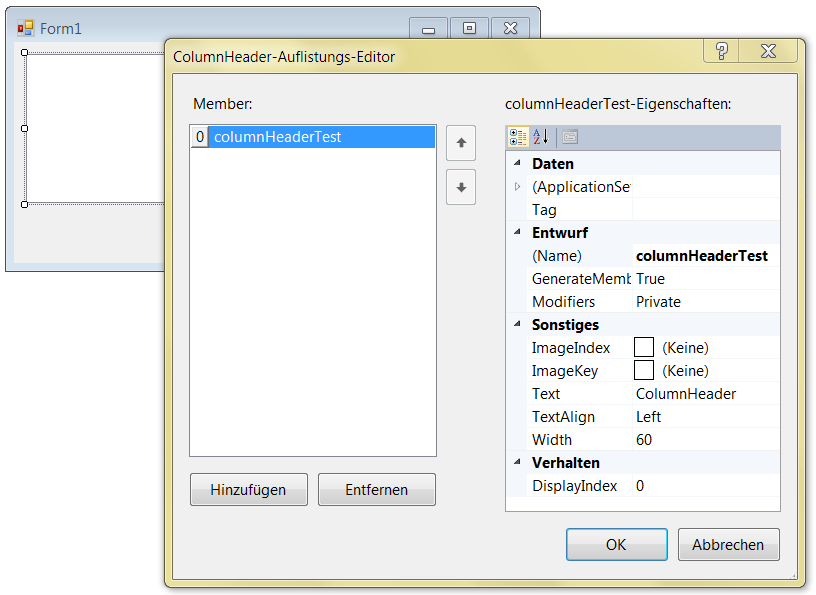
或者,在这里,也有同样的结果:
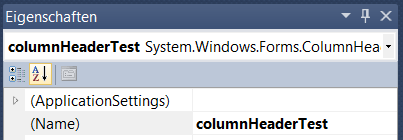
这是一个包含一个列的ListView的表单的设计器生成的代码:
namespace ColumnDemo
{
    partial class Form1
    {
        /// <summary>
        /// Erforderliche Designervariable.
        /// </summary>
        private System.ComponentModel.IContainer components = null;

        /// <summary>
        /// Verwendete Ressourcen bereinigen.
        /// </summary>
        /// <param name="disposing">True, wenn verwaltete Ressourcen gelöscht werden sollen; andernfalls False.</param>
        protected override void Dispose(bool disposing)
        {
            if (disposing && (components != null))
            {
                components.Dispose();
            }
            base.Dispose(disposing);
        }

        #region Vom Windows Form-Designer generierter Code

        /// <summary>
        /// Erforderliche Methode für die Designerunterstützung.
        /// Der Inhalt der Methode darf nicht mit dem Code-Editor geändert werden.
        /// </summary>
        private void InitializeComponent()
        {
            this.listView1 = new System.Windows.Forms.ListView();
            this.columnHeaderTest = ((System.Windows.Forms.ColumnHeader)(new System.Windows.Forms.ColumnHeader()));
            this.button1 = new System.Windows.Forms.Button();
            this.SuspendLayout();
            //
            // listView1
            //
            this.listView1.Columns.AddRange(new System.Windows.Forms.ColumnHeader[] {
            this.columnHeaderTest});
            this.listView1.Location = new System.Drawing.Point(12, 12);
            this.listView1.Name = "listView1";
            this.listView1.Size = new System.Drawing.Size(494, 149);
            this.listView1.TabIndex = 0;
            this.listView1.UseCompatibleStateImageBehavior = false;
            //
            // button1
            //
            this.button1.Location = new System.Drawing.Point(411, 167);
            this.button1.Name = "button1";
            this.button1.Size = new System.Drawing.Size(95, 43);
            this.button1.TabIndex = 1;
            this.button1.Text = "button1";
            this.button1.UseVisualStyleBackColor = true;
            this.button1.Click += new System.EventHandler(this.button1_Click);
            //
            // Form1
            //
            this.AutoScaleDimensions = new System.Drawing.SizeF(8F, 16F);
            this.AutoScaleMode = System.Windows.Forms.AutoScaleMode.Font;
            this.ClientSize = new System.Drawing.Size(518, 221);
            this.Controls.Add(this.button1);
            this.Controls.Add(this.listView1);
            this.Name = "Form1";
            this.Text = "Form1";
            this.ResumeLayout(false);

        }

        #endregion

        private System.Windows.Forms.ListView listView1;
        private System.Windows.Forms.ColumnHeader columnHeaderTest;
        private System.Windows.Forms.Button button1;
    }
}
我在按钮上添加了一些输出:
private void button1_Click(object sender, EventArgs e)
{
    Console.WriteLine("Button: " + button1.Name);
    Console.WriteLine("Column: " + columnHeaderTest.Name);
}
由此产生的产出是:
Button: button1
Column:
另一个有趣的事实是,该项目的任何文件都没有以字符串常量的形式包含作为" name“的值;VS似乎只使用这个值来命名成员变量。
如果我将Name属性设置为运行时,则该值将按预期保留。似乎我总是错误地认为表单设计器使用标记为" Name“的字段来分配Name属性。
是否有任何方法可以在设计时明确定义控件的名称(而不是变量的名称)?
回答 1
Stack Overflow用户
发布于 2013-10-18 10:34:32
你要在哪里设置这个
 this.button1.Name = "button1"; // This value is Set !!!!!
  this.columnHeaderTest.Name ----> this value is not set that's why you are getting empty.
this.columnHeaderTest.Name = "Test";
当我设置这个时,我得到的值是正确的.
 private void button1_Click(object sender, EventArgs e)
    {
        Console.WriteLine("Button: " + button1.Name);
        Console.WriteLine("Column: " + columnHeaderTest.Name);
    }
columnHeaderTest.Name
"Test"


 as you showed in screenshot . just change the " columnHeaderTest to Testing " .... this is
 Control Name ... you have define your controls Display name that is

 Testing.Name = "NewColumn";
然后你会得到这个名字..。..。看看这个
页面原文内容由Stack Overflow提供。腾讯云小微IT领域专用引擎提供翻译支持
原文链接:
https://stackoverflow.com/questions/19401020
复制相关文章
相似问题
腾讯云开发者

Copyright © 2013 - 2026 Tencent Cloud. All Rights Reserved. 腾讯云 版权所有
深圳市腾讯计算机系统有限公司 ICP备案/许可证号:粤B2-20090059  粤公网安备44030502008569号
腾讯云计算(北京)有限责任公司 京ICP证150476号 | 京ICP备11018762号