
Windows :如何用可扩展/可扩展的ListView制作ListItems?
在一个C#中,我有一个带有条目的Listview (这就是您所称的吗?)我听说他们不再叫“地铁应用”了。
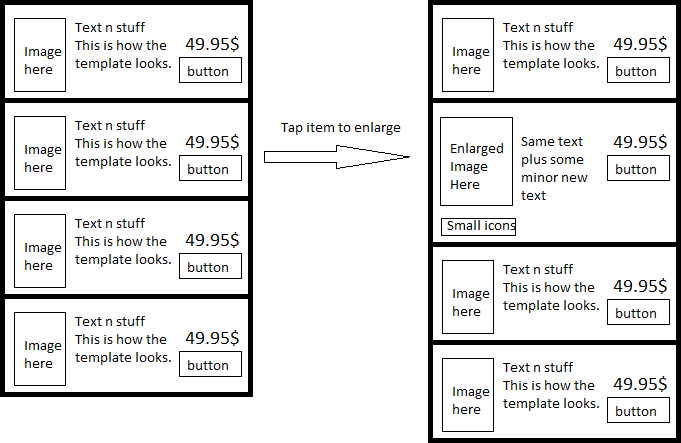
类似于安卓系统中的ExpandableListView,我希望能够通过点击listitem (而不是按钮)来扩展listitem,在扩展的listitem上点击以使其崩溃,如果您点击另一个listitem,当前扩展的listitem将崩溃,而另一个listitem将扩展。
在我的特殊情况下,我有一个DataTemplate,用于词义的扩展视图和非扩展视图。我已经看到,安卓的ExpandableListView可以用更多的信息(来自WPF的膨胀机做类似的事情)来扩展listitem,而不是用更大的项目代替,但是在Windows中有一个通用的解决方案吗?如果不是,最接近的对应值是什么?
与下面的绘图一样,我想知道是否有一个组件可以以这种方式展开词义,或者如果没有,我有哪些选项:
回答 1
Stack Overflow用户
发布于 2013-10-15 23:52:25
最后,我得到了一个可行的解决方案,但看起来不太理想。当您单击items时,它会切换DataTemplate,但是没有动画:它会立即切换。
以下是重要的代码部分:
XAML
<Page.Resources>
    <DataTemplate x:Key="dtSmall">
        <!--Component template for the un-expanded listitems-->
    </DataTemplate>
    <DataTemplate x:Key="dtEnlarged">
        <!--Component template for the expanded listitems-->
    </DataTemplate>
</Page.Resources>
<Grid>
    <ListView x:Name="lvEnlargeable"
        IsItemClickEnabled="True"
        ItemTemplate="{StaticResource dtSmall}"
        ItemsSource="{Binding ...}"
        SelectionChanged="LVEnlargeable_SelectionChanged"
        ItemClick="LVEnlargeable_ItemClick"/>
</Grid>
XAML.CS
public sealed partial class MainPage : Page
{
    private DataTemplate dtSmall;
    private DataTemplate dtEnlarged;

    public MainPage()
    {
        this.InitializeComponent();
        dtSmall = (DataTemplate)Resources["dtSmall"];
        dtEnlarged = (DataTemplate)Resources["dtEnlarged"];
    }

    // A selected item is treated as an expanded/enlarged item
    private void LVEnlargeable_SelectionChanged(object sender, SelectionChangedEventArgs e)
    {
        /* First we set all the items that has been deselected
        to be collapsed, aka. using the dtSmall DataTemplate.
        We expect 0 or 1 item to have been deselected
        but handle all cases easily with a foreach loop.
        */
        foreach (var item in e.RemovedItems)
        {
            // Set the DataTemplate of the deselected ListViewItems
            ((ListViewItem)(sender as ListView).ContainerFromItem(item)).ContentTemplate = dtSmall;
        }

        /* Then we set all the items that has been selected
        to be expanded.
        We should probably throw an Exception if more than 1 was found,
        because it's unwanted behavior, but we'll ignore that for now.
        */
        foreach (var item in e.AddedItems)
        {
            ((ListViewItem)(sender as ListView).ContainerFromItem(e.AddedItems[0])).ContentTemplate = dtEnlarged;
        }
    }

    /* We need click events because SelectionChanged-events
    cannot detect clicks on an already selected item */
    private void LVEnlargeable_ItemClick(object sender, ItemClickEventArgs e)
    {
        ListView lv = (sender as ListView);

        /* Having set the IsItemClickEnabled property on the ListView to True
        we have to handle selection events manually.
        If nothing is selected when this click occurs, then select this item*/
        if (lv.SelectedItem == null)
        {
            lv.SelectedItem = e.ClickedItem;
        }
        else
        {
            // Clicking on an expanded/selected/enlarged item will deselect it
            if (lv.SelectedItem.Equals(e.ClickedItem))
            {
                lv.SelectedItem = null;
            }
            else
            {   /* If it's not a selected item, then select it
                    (and let SelectionChanged unselect the already selected item) */
                lv.SelectedItem = e.ClickedItem;
            }
        }
    }
}
对于这个解决方案,我还没有测试这个孤立的代码是否就足够了,但我希望它足够了,而且这段代码至少包含了关键点。很晚了,我只想给那些有好奇心的人发点东西。如果这表明不适合你,那么请留下一个关于这个问题的评论,我会确保添加缺失的部分。
我还处理了ListViewItemStyleContainer的ListViewItemPresenter,以获得更好的选择效果等等,但我认为最好保持简短。如果你觉得这也很有趣,那么也可以留下评论,我会试着把它包括进去。
https://stackoverflow.com/questions/19379727
复制相似问题
腾讯云开发者

Copyright © 2013 - 2026 Tencent Cloud. All Rights Reserved. 腾讯云 版权所有
深圳市腾讯计算机系统有限公司 ICP备案/许可证号:粤B2-20090059  粤公网安备44030502008569号
腾讯云计算(北京)有限责任公司 京ICP证150476号 | 京ICP备11018762号