
修剪/减去CGPath从CGPath?
修剪/减去CGPath从CGPath?
提问于 2013-10-14 13:24:54
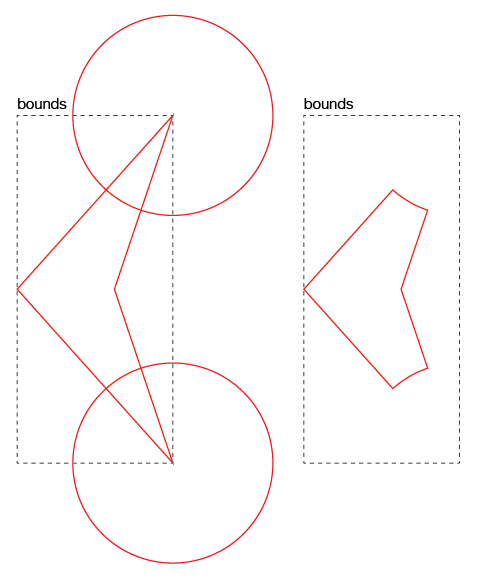
我有一些CGPath (一个带有两个圆圈的多边形)在CAShapeLayer上执行。
我可以像这样修剪/减去路径吗?
回答 2
Stack Overflow用户
回答已采纳
发布于 2013-10-14 17:55:09
用kCGBlendModeClear代替数学运算,可以在绘图时间内得到结果。
// Create the poly.
CGContextBeginPath(context);
CGContextMoveToPoint       (context, a_.x, a_.y);
CGContextAddLineToPoint    (context, b_.x, b_.y);
CGContextAddLineToPoint    (context, c_.x, c_.y);
CGContextAddLineToPoint    (context, d_.x, d_.y);
CGContextClosePath(context);

// Draw with the desired color.
CGContextSetFillColorWithColor(context, self.color.CGColor);
CGContextFillPath(context);

// Create a circle.
CGContextBeginPath(context);
CGContextAddEllipseInRect(context, (CGRect){
    b_.x - self.radius,
    b_.y - self.radius,
    self.radius * 2.0,
    self.radius * 2.0 });
CGContextClosePath(context);

// Draw with Clear (!) blend mode.
CGContextSetBlendMode(context, kCGBlendModeClear);
CGContextSetFillColorWithColor(context, self.color.CGColor);
CGContextFillPath(context);Stack Overflow用户
发布于 2021-07-10 18:48:48
基于Geri's answer,使用Swift 5
context.addPath(path1) // your original CGPath
context.setFillColor(color1) // your color
context.fillPath()

context.addPath(path2) // your clearing CGPath
context.setBlendMode(.clear) // draw with clear mode
context.fillPath()页面原文内容由Stack Overflow提供。腾讯云小微IT领域专用引擎提供翻译支持
原文链接:
https://stackoverflow.com/questions/19361294
复制相关文章
相似问题
腾讯云开发者

Copyright © 2013 - 2026 Tencent Cloud. All Rights Reserved. 腾讯云 版权所有
深圳市腾讯计算机系统有限公司 ICP备案/许可证号:粤B2-20090059  粤公网安备44030502008569号
腾讯云计算(北京)有限责任公司 京ICP证150476号 | 京ICP备11018762号