
Clickonce安装无法下载
我对我的应用程序做了一个Clickonce部署,将安装文件夹和发布文件夹设置为网络共享,然后它对我的开发机器工作得很好,然后当我在客户端机器上打开网络共享时,我尝试使用该安装文件安装应用程序,得到如下消息
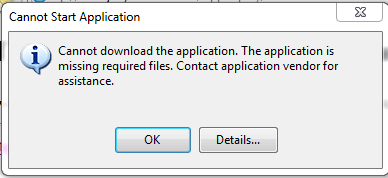
详细地说,我得到了以下信息
LATFORM VERSION INFO
Windows             : 6.1.7601.65536 (Win32NT)
Common Language Runtime     : 4.0.30319.586
System.Deployment.dll       : 4.0.30319.1 (RTMRel.030319-0100)
clr.dll             : 4.0.30319.586 (RTMLDR.030319-5800)
dfdll.dll           : 4.0.30319.1 (RTMRel.030319-0100)
dfshim.dll          : 4.0.31106.0 (Main.031106-0000)

SOURCES
    Deployment url          : file://it-dept/Project/mycutorderlast/CutorderFresh.application
    Deployment Provider url     : http://it-dept/CutorderFresh/CutorderFresh.application

ERROR SUMMARY
    Below is a summary of the errors, details of these errors are listed later in the log.
    * Activation of \\it-dept\Project\mycutorderlast\CutorderFresh.application resulted in exception. Following failure messages were detected:
        + Downloading http://it-dept/CutorderFresh/CutorderFresh.application did not succeed.
        + The remote server returned an error: (404) Not Found.

COMPONENT STORE TRANSACTION FAILURE SUMMARY
    No transaction error was detected.

WARNINGS
    There were no warnings during this operation.

OPERATION PROGRESS STATUS
    * [08/10/2013 14:03:25] : Activation of \\it-dept\Project\mycutorderlast\CutorderFresh.application has started.

ERROR DETAILS
    Following errors were detected during this operation.
    * [08/10/2013 14:03:30] System.Deployment.Application.DeploymentDownloadException (Unknown subtype)
        - Downloading http://it-dept/CutorderFresh/CutorderFresh.application did not succeed.
        - Source: System.Deployment
        - Stack trace:
            at System.Deployment.Application.SystemNetDownloader.DownloadSingleFile(DownloadQueueItem next)
            at System.Deployment.Application.SystemNetDownloader.DownloadAllFiles()
            at System.Deployment.Application.FileDownloader.Download(SubscriptionState subState)
            at System.Deployment.Application.DownloadManager.DownloadManifestAsRawFile(Uri& sourceUri, String targetPath, IDownloadNotification notification, DownloadOptions options, ServerInformation& serverInformation)
            at System.Deployment.Application.DownloadManager.DownloadManifest(Uri& sourceUri, String targetPath, IDownloadNotification notification, DownloadOptions options, ManifestType manifestType, ServerInformation& serverInformation)
            at System.Deployment.Application.DownloadManager.DownloadDeploymentManifestDirect(SubscriptionStore subStore, Uri& sourceUri, TempFile& tempFile, IDownloadNotification notification, DownloadOptions options, ServerInformation& serverInformation)
            at System.Deployment.Application.DownloadManager.FollowDeploymentProviderUri(SubscriptionStore subStore, AssemblyManifest& deployment, Uri& sourceUri, TempFile& tempFile, IDownloadNotification notification, DownloadOptions options)
            at System.Deployment.Application.DownloadManager.DownloadDeploymentManifestBypass(SubscriptionStore subStore, Uri& sourceUri, TempFile& tempFile, SubscriptionState& subState, IDownloadNotification notification, DownloadOptions options)
            at System.Deployment.Application.ApplicationActivator.PerformDeploymentActivation(Uri activationUri, Boolean isShortcut, String textualSubId, String deploymentProviderUrlFromExtension, BrowserSettings browserSettings, String& errorPageUrl)
            at System.Deployment.Application.ApplicationActivator.ActivateDeploymentWorker(Object state)
        --- Inner Exception ---
        System.Net.WebException
        - The remote server returned an error: (404) Not Found.
        - Source: System
        - Stack trace:
            at System.Net.HttpWebRequest.GetResponse()
            at System.Deployment.Application.SystemNetDownloader.DownloadSingleFile(DownloadQueueItem next)

COMPONENT STORE TRANSACTION DETAILS
    No transaction information is available.
有人能建议我第一次使用clickonce是什么问题吗?
回答 3
Stack Overflow用户
发布于 2014-10-15 15:33:10
我也有同样的问题,这让我发疯了。我知道我在网络的共享文件夹上设置了适当的权限。我甚至无法通过网络共享从我自己的机器安装我的应用程序。经过长时间的努力寻找答案,我自己想出了答案。
在属性的“发布”选项卡上,我只填写了“发布文件夹位置”:
\servername\share\Application文件夹
我将“安装文件夹URL”部分留空。
不知何故,“应用程序更新”部分中的一个字段(通过单击发布选项卡上的“更新”按钮)被填充了一个与我的网络共享不同的值。不确定是我自己做的,还是默认设置的。我清除了"Update (如果与发布位置不同的话)“字段,并为我解决了这个问题。下面是我更改字段的屏幕截图:
我会发布一个屏幕截图的形式,是给我带来麻烦,但出于某种原因,我需要10个声誉点来张贴一张照片。
Stack Overflow用户
发布于 2016-02-10 01:11:31
我像你一样解决了我的问题。
我不知道我的应用程序的“发布文件夹位置”(在"formtest“应用程序下面)。与“安装文件夹URL”不同。
事实上,前WEB服务器的两个文件夹用于单击一次部署并没有什么不同。所以,在更改WEB服务器之后,我感到很困惑。
- 发布文件夹位置:\12.39.526.272\root\formtest\
- 安装文件夹URL:http://12.39.526.272:8080/formtest/
- “更新位置(如果与发布位置不同的话)”字段:http://12.39.526.272:8080/formtest/
我很抱歉我的母语不是英语。
Stack Overflow用户
发布于 2018-01-24 19:05:01
我也犯了同样的错误,但解决方法不同。不知怎么的,我无意中没有检查选项中的一些东西。
在“发布”选项卡上,选择“选项”。在部署下,确保选中“使用.deploy文件扩展名”。一旦我检查并重新发布,错误就消失了。
https://stackoverflow.com/questions/19245020
复制相似问题
腾讯云开发者

Copyright © 2013 - 2026 Tencent Cloud. All Rights Reserved. 腾讯云 版权所有
深圳市腾讯计算机系统有限公司 ICP备案/许可证号:粤B2-20090059  粤公网安备44030502008569号
腾讯云计算(北京)有限责任公司 京ICP证150476号 | 京ICP备11018762号