
loglog的Matplotlib错误标记/标签(双轴)
我正在用matplotlib创建日志图。如下图所示,默认的勾选错误(充其量);右y轴甚至一点也没有(在线性等效中是这样),并且两个x轴都只有一个。
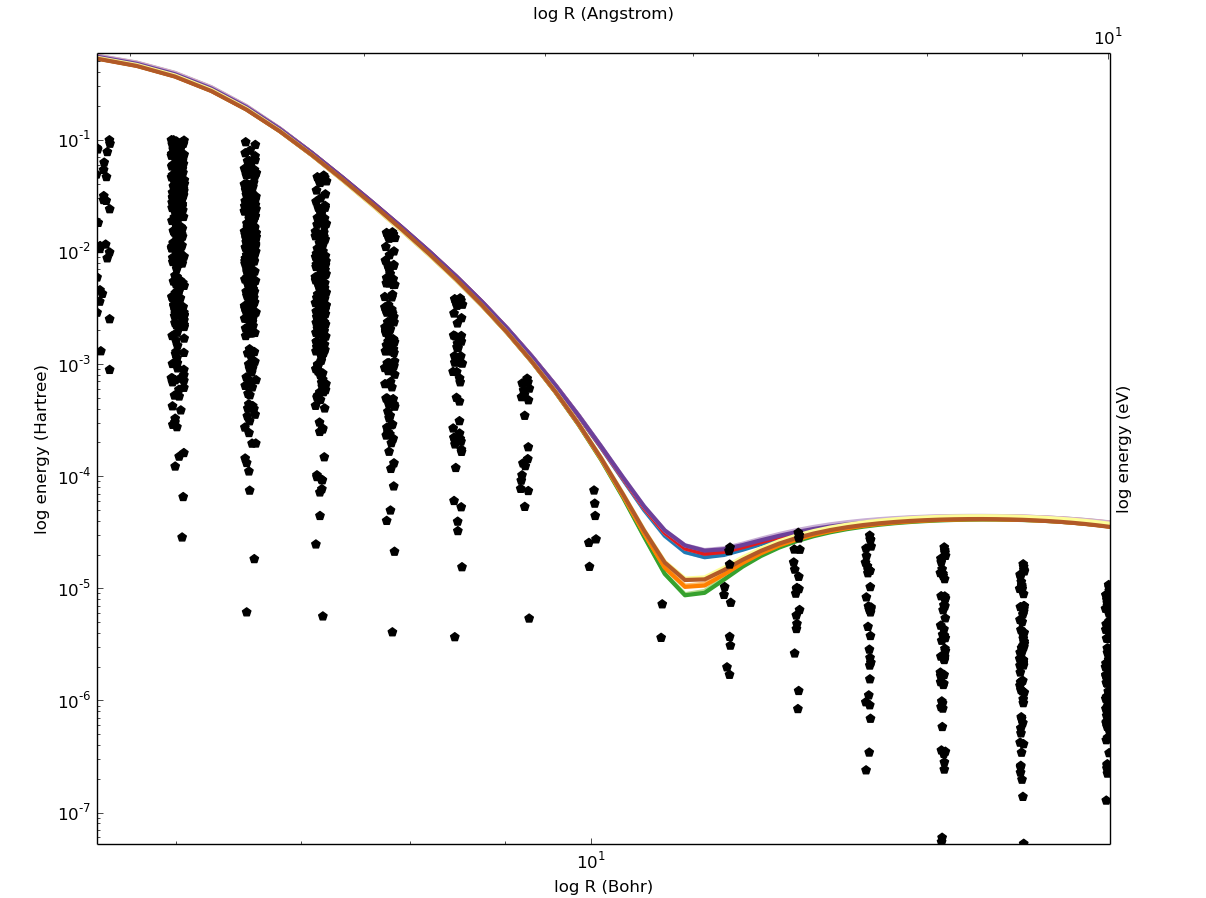
有没有一种方法可以得到一个合理数量的标签,而不需要手工指定他们的每一个情节?
编辑:确切的代码太长了,但下面是一个问题的简短示例:
x = linspace(4, 18, 20)
y = 1 / (x ** 4)
fig = figure()
ax = fig.add_axes([.1, .1, .8, .8])
ax.loglog(x, y)
ax.set_xlim([4, 18])
ax2 = ax.twiny()
ax2.set_xlim([4 / 3., 18 / 3.])
ax2.set_xscale('log')
show()回答 2
Stack Overflow用户
发布于 2013-10-08 09:08:41
我一直在和你所展示的东西作斗争(在轴线范围内只有一个主要的滴答)。没有一个matplotlib滴答程序让我满意,所以我使用matplotlib.ticker.FuncFormatter来实现我想要的结果。我还没有用双轴测试过,但我的感觉是,它无论如何都会起作用的。
import matplotlib.pyplot as plt
from matplotlib import ticker
import numpy as np

#@Mark: thanks for the suggestion :D
mi, ma, conv = 4, 8, 1./3.
x = np.linspace(mi, ma, 20)
y = 1 / (x ** 4)

fig, ax = plt.subplots()

ax.plot(x, y)  # plot the lines
ax.set_xscale('log') #convert to log
ax.set_yscale('log')

ax.set_xlim([0.2, 1.8])  #large enough, but should show only 1 tick

def ticks_format(value, index):
    """
    This function decompose value in base*10^{exp} and return a latex string.
    If 0<=value<99: return the value as it is.
    if 0.1<value<0: returns as it is rounded to the first decimal
    otherwise returns $base*10^{exp}$
    I've designed the function to be use with values for which the decomposition
    returns integers
    """
    exp = np.floor(np.log10(value))
    base = value/10**exp
    if exp == 0 or exp == 1:
        return '${0:d}$'.format(int(value))
    if exp == -1:
        return '${0:.1f}$'.format(value)
    else:
        return '${0:d}\\times10^{{{1:d}}}$'.format(int(base), int(exp))

# here specify which minor ticks per decate you want
# likely all of them give you a too crowed axis
subs = [1., 3., 6.]
# set the minor locators
ax.xaxis.set_minor_locator(ticker.LogLocator(subs=subs))
ax.yaxis.set_minor_locator(ticker.LogLocator(subs=subs))
# remove the tick labels for the major ticks:
# if not done they will be printed with the custom ones (you don't want it)
# plus you want to remove them to avoid font missmatch: the above function
# returns latex string, and I don't know how matplotlib does exponents in labels
ax.xaxis.set_major_formatter(ticker.NullFormatter())
ax.yaxis.set_major_formatter(ticker.NullFormatter())
# set the desired minor tick labels using the above function
ax.xaxis.set_minor_formatter(ticker.FuncFormatter(ticks_format))
ax.yaxis.set_minor_formatter(ticker.FuncFormatter(ticks_format))
我得到的数字如下
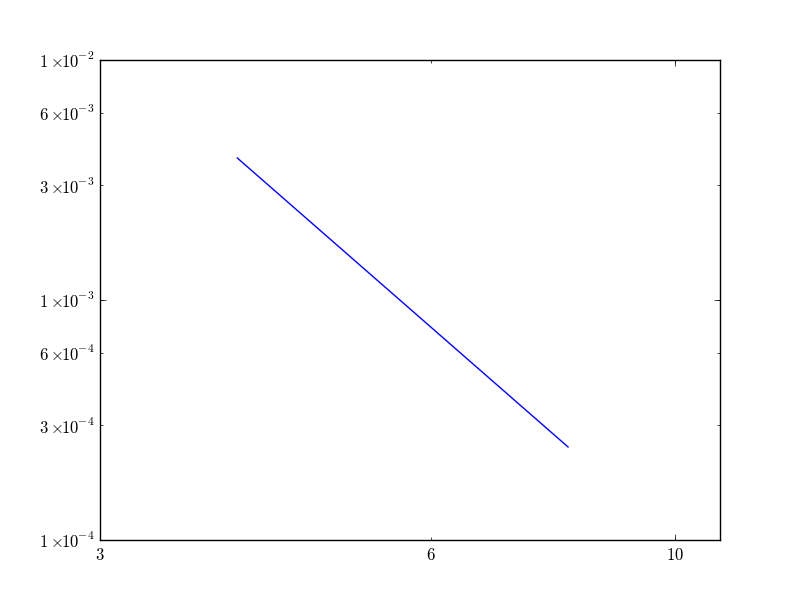
当然,您可以为x和y轴设置不同的小定位器,并且可以将从ticks_format到末尾的所有内容封装到一个函数中,该函数接受一个轴实例ax和subs或subsx和subsy作为输入参数。
我希望这能帮到你
Stack Overflow用户
发布于 2013-10-09 06:24:35
最后,这是我能想到的最好的答案,其他的答案是:
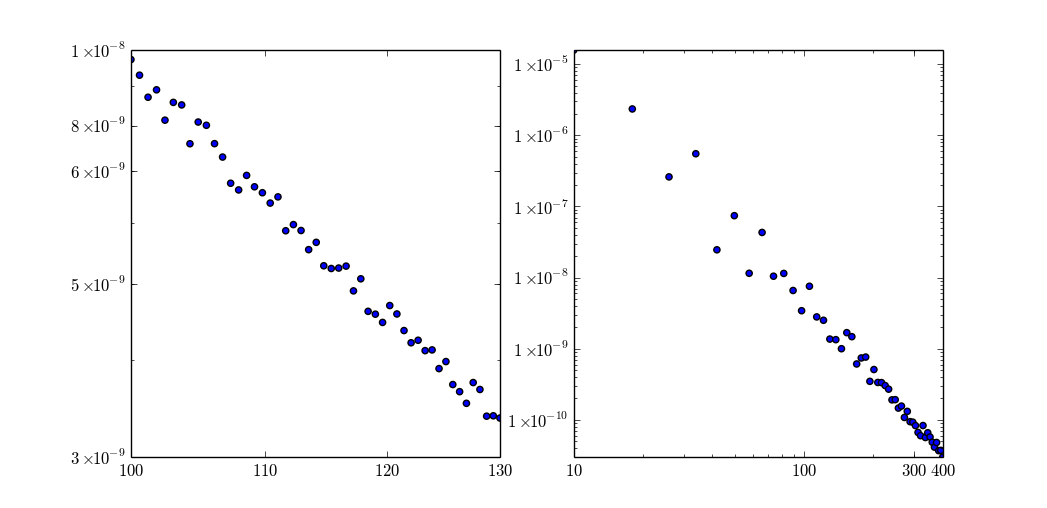
在左边,x和y只在一个数量级的一部分上变化,标签工作得相当好。在左边,x变化在1到2个数量级之间。它可以工作,但方法是达到它的极限。Y值变化了许多数量级,标准标签被自动使用。
from matplotlib import ticker
from numpy import linspace, logspace, log10, floor
from warnings import warn

def round_to_n(x, n):
    ''' http://stackoverflow.com/questions/3410976/how-to-round-a-number-to-significant-figures-in-python '''
    return round(x, -int(floor(log10(abs(x)))) + (n - 1))

def ticks_log_format(value, index):
    ''' http://stackoverflow.com/questions/19239297/matplotlib-bad-ticks-labels-for-loglog-twin-axis '''
    pwr = floor(log10(value))
    base = value / (10 ** pwr)
    if pwr == 0 or pwr == 1:
        return '${0:d}$'.format(int(value))
    if -3 <= pwr < 0:
        return '${0:.3g}$'.format(value)
    if 0 < pwr <= 3:
        return '${0:d}$'.format(int(value))
    else:
        return '${0:d}\\times10^{{{1:d}}}$'.format(int(base), int(pwr))

def calc_ticks(domain, tick_count, equidistant):
    if equidistant:
        ticks = logspace(log10(domain[0]), log10(domain[1]), num = tick_count, base = 10)
    else:
        ticks = linspace(domain[0], domain[1], num = tick_count)
    for n in range(1, 6):
        if len(set(round_to_n(tick, n) for tick in ticks)) == tick_count:
            break
    return list(round_to_n(tick, n) for tick in ticks)

''' small domain log ticks '''
def sdlt_x(ax, domain, tick_count = 4, equidistant = True):
    ''' http://stackoverflow.com/questions/3410976/how-to-round-a-number-to-significant-figures-in-python '''
    if min(domain) <= 0:
        warn('domain %g-%g contains values lower than 0' % (domain[0], domain[1]))
        domain = [max(value, 0.) for value in domain]
    ax.set_xscale('log')
    ax.set_xlim(domain)
    ax.xaxis.set_major_formatter(ticker.FuncFormatter(ticks_log_format))
    if log10(max(domain) / min(domain)) > 1.7:
        return
    ticks = calc_ticks(domain, tick_count = tick_count, equidistant = equidistant)
    ax.set_xticks(ticks)

''' any way to prevent this code duplication? '''
def sdlt_y(ax, domain, tick_count = 5, equidistant = True):
    ''' http://stackoverflow.com/questions/3410976/how-to-round-a-number-to-significant-figures-in-python '''
    if min(domain) <= 0:
        warn('domain %g-%g contains values lower than 0' % (domain[0], domain[1]))
        domain = [max(value, 1e-8) for value in domain]
    ax.set_yscale('log')
    ax.set_ylim(domain)
    ax.yaxis.set_major_formatter(ticker.FuncFormatter(ticks_log_format))
    if log10(max(domain) / min(domain)) > 1.7:
        return
    ticks = calc_ticks(domain, tick_count = tick_count, equidistant = equidistant)
    ax.set_yticks(ticks)

''' demo '''
fig, (ax1, ax2,) = plt.subplots(1, 2)
for mi, ma, ax in ((100, 130, ax1,), (10, 400, ax2,), ):
    x = np.linspace(mi, ma, 50)
    y = 1 / ((x + random(50) * 0.1 * (ma - mi)) ** 4)
    ax.scatter(x, y)
    sdlt_x(ax, (mi, ma, ))
    sdlt_y(ax, (min(y), max(y), ))
show()编辑:使用一个选项进行更新,使标签等距(因此值是对数,但可见位置是等距的)。
https://stackoverflow.com/questions/19239297
复制相似问题
腾讯云开发者

Copyright © 2013 - 2026 Tencent Cloud. All Rights Reserved. 腾讯云 版权所有
深圳市腾讯计算机系统有限公司 ICP备案/许可证号:粤B2-20090059  粤公网安备44030502008569号
腾讯云计算(北京)有限责任公司 京ICP证150476号 | 京ICP备11018762号