
从相互排斥的选项生成所有可能的选项组合
从相互排斥的选项生成所有可能的选项组合
提问于 2013-10-07 06:16:07
我有一个优化问题,要求我测试所有潜在组合的潜在组合,我也需要能够快速适应,以排除某些选择。
这必须在Excel中完成。
下面是我经过消毒的示例的规则:
- 我可以选择从三家杂货店中的任何一家买水果。
- 杂货店可能有不同数量的过道,不同的水果组合可供选择。
- 我只能从所有的杂货店里挑选一种水果(或者根本不选)。
组合
- 我的第一个组合不是任何杂货店的水果。
- 接下来,我从Grocer3的第三通道摘苹果。
- 然后是来自Grocer3第二通道的苹果
- 然后是来自Grocer3的1号通道的苹果
- 然后,我从Grocer2的2号过道摘苹果,从第3号杂货店(也就是从杂货店3号和组合1等相同的选择)摘苹果。
- thenI从Grocer2的第2通道摘苹果,从Grocer3的第3过道摘苹果(与组合2的选择相同)等等。
所有这些都将给我提供7*4*4 = 112可能的组合,包括
- 为食品店提供7种选择(6种选择+1种不做任何选择)
- 4选择食品店2 (3选择+1不做任何事)
- 4选择食品店3 (3选择+1不做任何事)
1.无约束问题
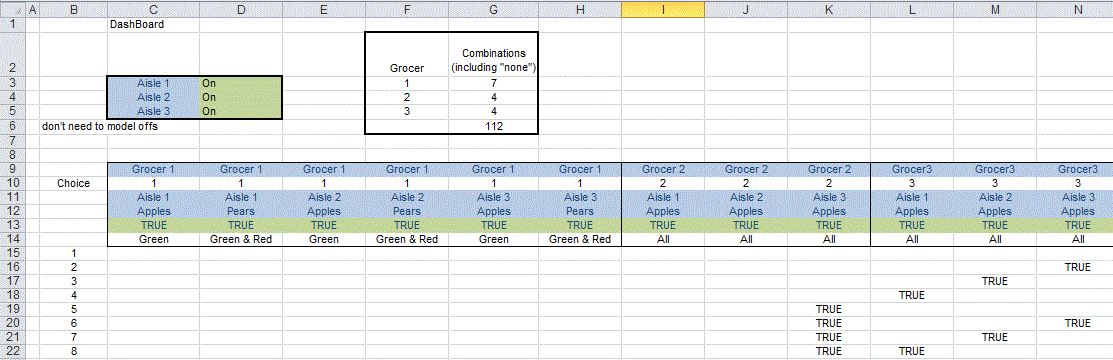
我的实际问题要复杂得多,但基本结构是正确的。
我想做的是使用excel公式或vba方法填充以下所有可用的选项:
- 无约束的问题。
- 一个受限的问题(例如,当我关闭过道2,给我45个有效的组合)
2.约束问题
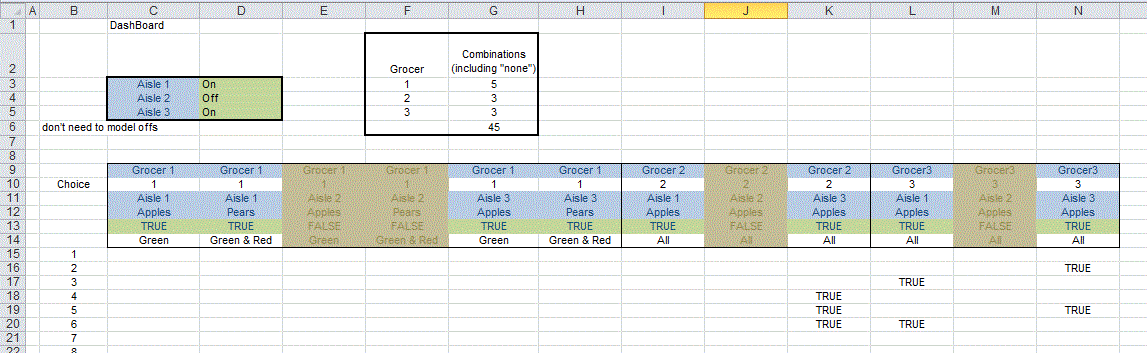
我已经尝试过的
我确实解决了一个初始问题,在这个问题上,食品店的选择数量与MOD\INT方法相同。这是简单的单一公式,因为模式是可重复的。
如果有一个聪明的公式解决方案,那么这将是首选,但我是开放的代码(这是我正在尝试的路线)

回答 1
Stack Overflow用户
回答已采纳
发布于 2013-10-07 14:34:37
在这个专家-Exchange http://rdsrc.us/qdl6tl中,我研究了一个非常类似的问题,列举了五种不同类别的事物的每一个组合。每一类事物的数量各不相同。列举必须考虑在某一类别中不作选择的可能性,以及从该类别中选出的任何一种选择。
我把这个问题看作是写一个五位数的数字,其中数字中每个位置可能的数字数是一个变量。
Sub CombinatrixPlus()
'Forms all the combinations of at least two subattributes taken from a selection. _
    No more than one subattribute may be taken from any row.
'Uses variable base counting method

Dim i As Long, ii As Long, j As Long, k As Long, lenSep As Long, _
    m As Long, mCol As Long, mSheet As Long, mRow As Long, _
    N As Long, nBlock As Long, nMax As Long, nWide As Long
Dim v As Variant, vInputs As Variant, vResults As Variant
Dim rg As Range, rgDest As Range
Dim ws As Worksheet
Dim s As String, sep As String

Application.ScreenUpdating = False
sep = ", "      'Separator substring between each subattribute in results
Set ws = Worksheets("Sheet2")   'Put first batch of results in this worksheet
Set rgDest = ws.[A2]      'Put results starting in this cell
mSheet = rgDest.Worksheet.Index
mCol = rgDest.Column
lenSep = Len(sep)
Set rg = Selection      'Cells containing the subattributes
nBlock = 16384          'Maximum number of values in results array

'Clear the previous results
Application.DisplayAlerts = False
For i = Worksheets.Count To ws.Index Step -1
    Worksheets(i).Cells.Clear                   'Clear the cells
    If i > ws.Index Then Worksheets(i).Delete   'Delete the sheet
Next
Application.DisplayAlerts = True

N = rg.Rows.Count
nWide = N       'If results lists subattributes in separate cells
'nWide = 1      'If results lists subattributes as a single string with separators
ReDim v(N, 1 To 2)
vInputs = rg.Value
v(0, 2) = 1
For i = 1 To N
    v(i, 1) = Application.CountA(rg.Rows(i))
    v(i, 2) = (v(i, 1) + 1) * v(i - 1, 2)
Next
nMax = v(N, 2) - 1


ReDim vResults(1 To nBlock, 1 To nWide)
For i = 1 To nMax
    s = ""
    m = 0
    ii = ii + 1
    For j = 1 To N
        k = (i Mod v(j, 2)) \ v(j - 1, 2)
        If k <> 0 Then
            m = m + 1
            If nWide > 1 Then vResults(ii, j) = vInputs(j, k)
            s = s & sep & vInputs(j, k)
        End If
    Next
    s = Mid$(s, lenSep + 1)
    If nWide = 1 Then vResults(ii, 1) = s  'Results in a concatentated string
    If m < 2 Then ii = ii - 1

    If ii = nBlock Then
        Application.StatusBar = "Now posting combination " & i & " of " & nMax
        mRow = rgDest.Worksheet.Cells(Rows.Count, mCol).End(xlUp).Row
        If rgDest.Worksheet.Cells(mRow, mCol) <> "" Then mRow = mRow + 1
        If mRow < rgDest.Row Then mRow = rgDest.Row
        If (Rows.Count - mRow) >= nBlock Then
            rgDest.Worksheet.Cells(mRow, mCol).Resize(nBlock, nWide).Value = vResults
        Else
            mSheet = mSheet + 1
            If Worksheets.Count < mSheet Then Worksheets.Add After:=Worksheets(mSheet - 1)
            With ActiveSheet
                Set rgDest = .Range(rgDest.Address)
                For j = 1 To N
                    .Columns(j).ColumnWidth = ws.Columns(j).ColumnWidth
                Next
                mRow = rgDest.Row
                .Cells(mRow, mCol).Resize(nBlock, nWide).Value = vResults
            End With
        End If
        ii = 0
        ReDim vResults(1 To nBlock, 1 To nWide)
    End If
Next

If ii > 0 Then
        Application.StatusBar = "Now posting combination " & i & " of " & nMax
        mRow = rgDest.Worksheet.Cells(Rows.Count, mCol).End(xlUp).Row
        If rgDest.Worksheet.Cells(mRow, mCol) <> "" Then mRow = mRow + 1
        If mRow < rgDest.Row Then mRow = rgDest.Row
        If (Rows.Count - mRow) >= nBlock Then
            rgDest.Worksheet.Cells(mRow, mCol).Resize(nBlock, nWide).Value = vResults
        Else
            mSheet = mSheet + 1
            If Worksheets.Count < mSheet Then Worksheets.Add After:=Worksheets(mSheet - 1)
            With ActiveSheet
                Set rgDest = .Range(rgDest.Address)
                For j = 1 To N
                    .Columns(i).ColumnWidth = ws.Columns(j).ColumnWidth
                Next
                mRow = rgDest.Row
                .Cells(mRow, mCol).Resize(nBlock, nWide).Value = vResults
            End With
        End If
    i = rgDest.Worksheet.UsedRange.Rows.Count   'Reset the scrollbar
End If
Application.StatusBar = False   'Clear the status bar
Application.ScreenUpdating = True
End Sub页面原文内容由Stack Overflow提供。腾讯云小微IT领域专用引擎提供翻译支持
原文链接:
https://stackoverflow.com/questions/19218152
复制相关文章
相似问题
腾讯云开发者

Copyright © 2013 - 2026 Tencent Cloud. All Rights Reserved. 腾讯云 版权所有
深圳市腾讯计算机系统有限公司 ICP备案/许可证号:粤B2-20090059  粤公网安备44030502008569号
腾讯云计算(北京)有限责任公司 京ICP证150476号 | 京ICP备11018762号