
背景色不会在面板上改变
背景色不会在面板上改变
提问于 2013-10-06 03:54:12
下面的代码生成一个带有按钮的窗口,但是当我运行i并按下该按钮时会弹出一条错误消息。根据Spring工具提示:
Cannot make a static reference to the non-static method setBackground(Color) from the type JComponent据我所知,这个程序是从我的Java教科书中逐行输入的。这是一本旧书,所以可能有不兼容之处,但似乎不太可能。
import java.awt.*;
import java.awt.event.*;
import javax.swing.*;

public class ButtonTest
{
    public static void main(String[] args)
    {
        final ButtonFrame frame = new ButtonFrame();
        frame.setDefaultCloseOperation(JFrame.EXIT_ON_CLOSE);
        frame.show();
}
}

class ButtonFrame extends JFrame
{
    public ButtonFrame()
    {
    setTitle("Button Test");
    setSize(Default_width, Default_height);

        //panel
        ButtonPanel panel = new ButtonPanel();
        Container contentPane=getContentPane();
        contentPane.add(panel);
    }

    public static final int Default_width = 300;
public static final int Default_height = 200;
}

class ButtonPanel extends JPanel
{
public ButtonPanel()
{
    JButton yellowButton = new JButton("Yellow");
    JButton blueButton = new JButton("Blue");
    JButton redButton = new JButton("Red");

    add(yellowButton);
    add(blueButton);
    add(redButton);

    ColorAction yellowAction= new ColorAction(Color.YELLOW);
    ColorAction redAction = new ColorAction(Color.RED);
    ColorAction blueAction = new ColorAction(Color.BLUE);

    yellowButton.addActionListener(yellowAction);
    blueButton.addActionListener(blueAction);
    redButton.addActionListener(redAction);
    }
}

    class ColorAction implements ActionListener
    {
        public ColorAction(Color c)
    {
        backgroundColor=c;
    }

    public void actionPerformed(ActionEvent event)
    {
    ButtonPanel.setBackground(backgroundColor);
    }

        private Color backgroundColor;
}回答 3
Stack Overflow用户
回答已采纳
发布于 2013-10-06 04:13:36
一种方法是将http://docs.oracle.com/javase/tutorial/java/javaOO/nested.html ColorAction作为ButtonPanel中的一个内部类,在该类中,它可以隐式访问封闭面板。
增编:正如@Andrew和@nachokk的评论中所指出的,通过使用封闭类名限定this,可以使隐式可访问性变得显式化。详情请参见this。在这个例子中,这两个调用是等价的:
 setBackground(backgroundColor);
ButtonPanel.this.setBackground(backgroundColor);作为一种更普遍的选择,请考虑将目标面板和颜色封装到Action中,如概述的这里。
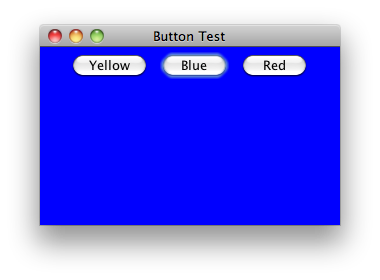
class ButtonPanel extends JPanel {

    public ButtonPanel() {
        JButton yellowButton = new JButton("Yellow");
        JButton blueButton = new JButton("Blue");
        JButton redButton = new JButton("Red");

        add(yellowButton);
        add(blueButton);
        add(redButton);

        ColorAction yellowAction = new ColorAction(Color.YELLOW);
        ColorAction redAction = new ColorAction(Color.RED);
        ColorAction blueAction = new ColorAction(Color.BLUE);

        yellowButton.addActionListener(yellowAction);
        blueButton.addActionListener(blueAction);
        redButton.addActionListener(redAction);
    }

    private class ColorAction implements ActionListener {

        public ColorAction(Color c) {
            backgroundColor = c;
        }

         @Override
         public void actionPerformed(ActionEvent event) {
            setBackground(backgroundColor);
        }
        private Color backgroundColor;
    }
}Stack Overflow用户
发布于 2013-10-06 04:02:22
ButtonPanel.setBackground()不是一个静态方法,所以不能作为一个静态方法来调用它。您需要一个ButtonPanel的具体实例来设置背景。
ButtonPanel bp = new ButtonPanel();
bp.setBackground(backgroundColor);Stack Overflow用户
发布于 2016-02-28 17:10:28
另外,改变外观和感觉也会有帮助:
//UIManager.setLookAndFeel(UIManager.getSystemLookAndFeelClassName());
UIManager.setLookAndFeel(UIManager.getCrossPlatformLookAndFeelClassName());页面原文内容由Stack Overflow提供。腾讯云小微IT领域专用引擎提供翻译支持
原文链接:
https://stackoverflow.com/questions/19205239
复制相关文章
相似问题
腾讯云开发者

Copyright © 2013 - 2026 Tencent Cloud. All Rights Reserved. 腾讯云 版权所有
深圳市腾讯计算机系统有限公司 ICP备案/许可证号:粤B2-20090059  粤公网安备44030502008569号
腾讯云计算(北京)有限责任公司 京ICP证150476号 | 京ICP备11018762号