
KineticJS填充模式
KineticJS填充模式
提问于 2013-10-03 15:28:02
我之前问过如何使用html5画布填充形状的棋盘效果。HTML5 Canvas Fill with two colours
有人给了我一个小提琴手来教我怎么做。http://jsfiddle.net/NdUcv/2/
var can = document.getElementById('canvas1');
var ctx = can.getContext('2d');

// set up a pattern, something really elaborate!
var pattern = document.createElement('canvas');
pattern.width = 40;
pattern.height = 40;
var pctx = pattern.getContext('2d');

pctx.fillStyle = "rgb(188, 222, 178)";
pctx.fillRect(0,0,20,20);
pctx.fillRect(20,20,20,20);

// Now we draw that pattern to a custom shape:

var pattern = ctx.createPattern(pattern, "repeat");
ctx.beginPath();
ctx.moveTo(30, 30);
ctx.lineTo(300, 30);
ctx.lineTo(400, 60);
ctx.lineTo(300, 150);
ctx.lineTo(200, 50);
ctx.lineTo(100, 450);
//ctx.closePath();
ctx.fillStyle = pattern;
ctx.fill();
我想知道如何将这个语法转换为KineticJS?我从kineticjs和示例中注意到,您可以使用图像或渐变填充,但是没有提到填充模式。
当然,如果可以用html5进行本地操作,就可以做到这一点吗?
回答 1
Stack Overflow用户
回答已采纳
发布于 2013-10-03 16:13:30
是的,您可以使用类似的代码创建一个充满模式的动态多边形。
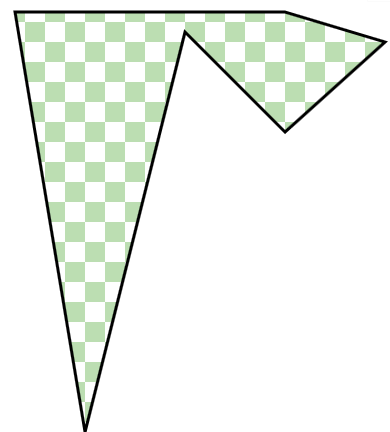
就像在本地html画布中一样,用模式填充画布:
    // use a temp canvas to create a pattern
    var pattern = document.createElement('canvas');
    pattern.width = 40;
    pattern.height = 40;
    var pctx = pattern.getContext('2d');
    pctx.fillStyle = "rgb(188, 222, 178)";
    pctx.fillRect(0,0,20,20);
    pctx.fillRect(20,20,20,20);
现在使用临时画布创建一个图像对象。
    var img=new Image();
    img.onload=function(){
            // img now contains your pattern
    }
    img.src=pattern.toDataURL();
最后,使用fillPatternImage用您的模式填充一个动态多边形:
        // make a kinetic polygon filled with the pattern
        var polyPattern = new Kinetic.Polygon({
          points: [30,30, 300,30, 400,60, 300,150, 200,50, 100,450],
          fillPatternImage: img,
          stroke: 'black',
          strokeWidth: 3
});下面是代码和Fiddle:http://jsfiddle.net/m1erickson/uW8xz/
<!DOCTYPE html>
<html>
  <head>
    <meta charset="utf-8">
    <title>Prototype</title>
    <script type="text/javascript" src="http://code.jquery.com/jquery.min.js"></script>
    <script src="http://d3lp1msu2r81bx.cloudfront.net/kjs/js/lib/kinetic-v4.7.0.min.js"></script>

<style>
#container{
  border:solid 1px #ccc;
  margin-top: 10px;
  width:400px;
  height:400px;
}
</style>
<script>
$(function(){

    var stage = new Kinetic.Stage({
        container: 'container',
        width: 450,
        height: 450
    });
    var layer = new Kinetic.Layer();
    stage.add(layer);

    // use a temp canvas to create a pattern
    var pattern = document.createElement('canvas');
    pattern.width = 40;
    pattern.height = 40;
    var pctx = pattern.getContext('2d');
    pctx.fillStyle = "rgb(188, 222, 178)";
    pctx.fillRect(0,0,20,20);
    pctx.fillRect(20,20,20,20);

    // make an image from the temp canvas pattern
    var img=new Image();
    img.onload=function(){

        // make a kinetic polygon filled with the pattern
        var polyPattern = new Kinetic.Polygon({
          points: [30,30, 300,30, 400,60, 300,150, 200,50, 100,450],
          fillPatternImage: img,
          stroke: 'black',
          strokeWidth: 3
        });
        // add the shape to the layer and layer.draw()
        layer.add(polyPattern);
        layer.draw();

    }
    img.src=pattern.toDataURL();


}); // end $(function(){});

</script>
</head>

<body>
    <div id="container"></div>
</body>
</html>页面原文内容由Stack Overflow提供。腾讯云小微IT领域专用引擎提供翻译支持
原文链接:
https://stackoverflow.com/questions/19163143
复制相关文章
相似问题
腾讯云开发者

Copyright © 2013 - 2026 Tencent Cloud. All Rights Reserved. 腾讯云 版权所有
深圳市腾讯计算机系统有限公司 ICP备案/许可证号:粤B2-20090059  粤公网安备44030502008569号
腾讯云计算(北京)有限责任公司 京ICP证150476号 | 京ICP备11018762号