
CIDetector没有释放内存
我多次使用CIDetector如下所示:
    -(NSArray *)detect:(UIImage *)inimage
    {
        UIImage *inputimage = inimage;
        UIImageOrientation exifOrientation = inimage.imageOrientation;
        NSNumber *orientation = [NSNumber numberWithInt:exifOrientation];

        NSDictionary *imageOptions = [NSDictionary dictionaryWithObject:orientation forKey:CIDetectorImageOrientation];
        CIImage* ciimage = [CIImage imageWithCGImage:inputimage.CGImage options:imageOptions];


        NSDictionary *detectorOptions = [NSDictionary dictionaryWithObject:orientation forKey:CIDetectorImageOrientation];

        NSArray* features = [self.detector featuresInImage:ciimage options:detectorOptions];

        if (features.count == 0)
        {
            PXLog(@"no face found");
        }

        ciimage = nil;
        NSMutableArray *returnArray = [NSMutableArray new];


        for(CIFaceFeature *feature in features)
        {
            CGRect rect = feature.bounds;
            CGRect r = CGRectMake(rect.origin.x,inputimage.size.height - rect.origin.y - rect.size.height,rect.size.width,rect.size.height);

            FaceFeatures * ff = [[FaceFeatures new] initWithLeftEye:CGPointMake(feature.leftEyePosition.x, inputimage.size.height - feature.leftEyePosition.y )
                                                           rightEye:CGPointMake(feature.rightEyePosition.x, inputimage.size.height - feature.rightEyePosition.y )
                                                              mouth:CGPointMake(feature.mouthPosition.x, inputimage.size.height - feature.mouthPosition.y )];

            Face *ob = [[Face new] initFaceInRect:r withFaceFeatures:ff] ;


            [returnArray addObject:ob];
        }

        features = nil;
        return returnArray;
    }

-(CIContext*) context{
    if(!_context){
        _context = [CIContext contextWithOptions:nil];
    }
    return _context;
}
-(CIDetector *)detector
{
    if (!_detector)
    {
        // 1 for high 0 for low
#warning not checking for fast/slow detection operation
        NSString *str = @"fast";//[SettingsFunctions retrieveFromUserDefaults:@"face_detection_accuracy"];


        if ([str isEqualToString:@"slow"])
        {
            //DDLogInfo(@"faceDetection: -I- Setting accuracy to high");
            _detector = [CIDetector detectorOfType:CIDetectorTypeFace context:nil
                                           options:[NSDictionary dictionaryWithObject:CIDetectorAccuracyHigh forKey:CIDetectorAccuracy]];
        } else {
            //DDLogInfo(@"faceDetection: -I- Setting accuracy to low");
            _detector = [CIDetector detectorOfType:CIDetectorTypeFace context:nil
                                           options:[NSDictionary dictionaryWithObject:CIDetectorAccuracyLow forKey:CIDetectorAccuracy]];
        }

    }
    return _detector;
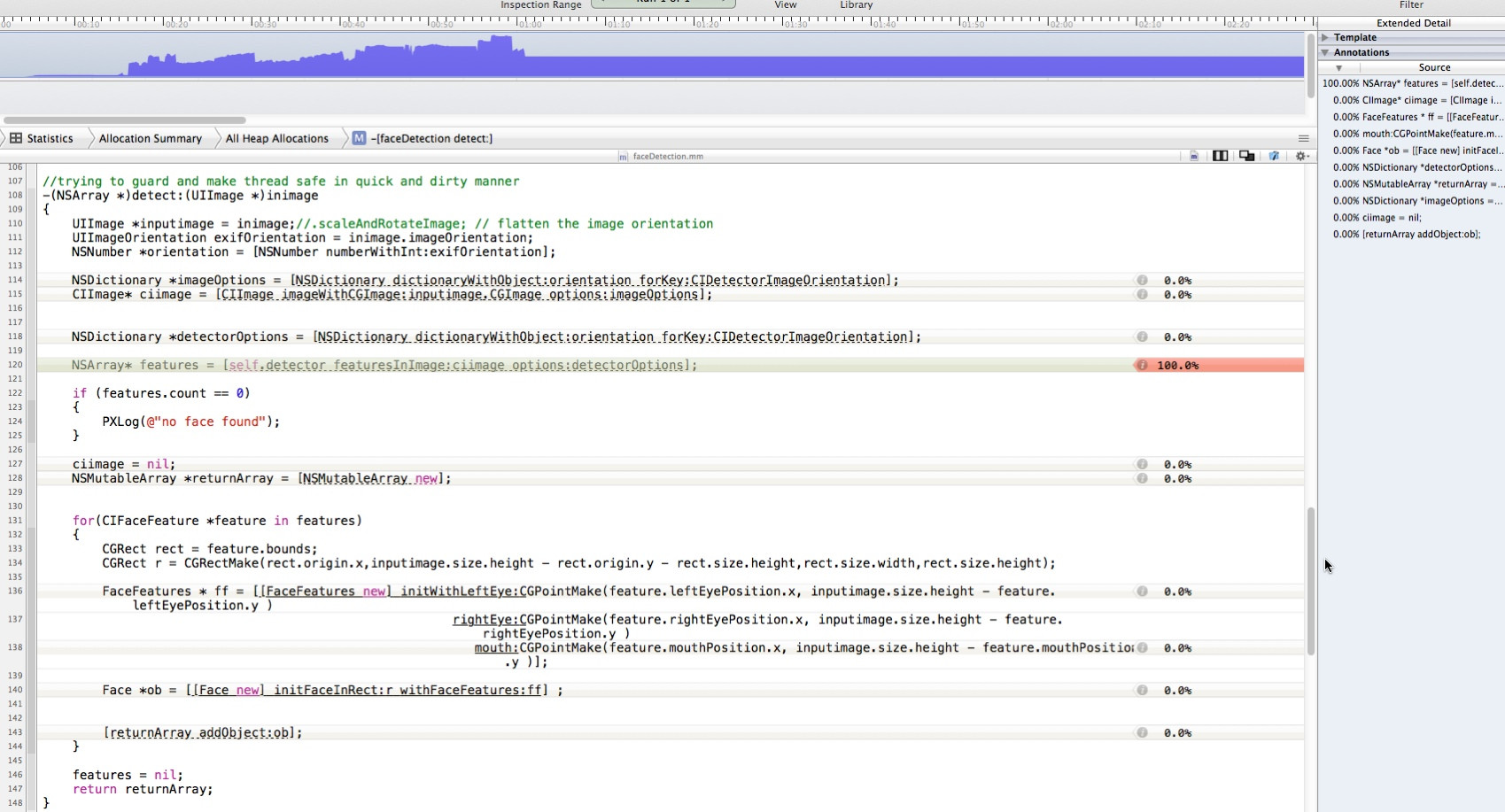
}但是,在出现了各种内存问题之后,根据仪器公司的说法,NSArray* features = [self.detector featuresInImage:ciimage options:detectorOptions];似乎没有发布
我的代码中有内存泄漏吗?

回答 2
Stack Overflow用户
发布于 2014-02-13 20:01:55
我遇到了同样的问题,这似乎是一个错误(出于缓存的目的,可能是出于缓存的目的)重用CIDetector。
我能够绕过它,不重用CIDetector,而是根据需要实例化一个,然后在检测完成后释放它(或者,用ARC的话说,就是不保留引用)。这样做是有代价的,但是如果像您所说的那样在后台线程上进行检测,与无界内存增长相比,这一成本可能是值得的。
也许一个更好的解决方案是,如果您连续检测多个图像,创建一个检测器,将其用于所有检测器(或者,如果增长太大,则释放&每N幅图像创建一个新的检测器。你必须做实验,看看N应该是什么)。
我向苹果公司( Apple:http://openradar.appspot.com/radar?id=6645353252126720 )提交了一个关于这个问题的雷达漏洞
Stack Overflow用户
发布于 2016-11-29 08:10:21
我已经解决了这个问题,您应该在这里使用@autorelease来确定检测方法,就像这样
            autoreleasepool(invoking: {
                let result = self.detect(image: image)
                // do other things
})https://stackoverflow.com/questions/19156330
复制相似问题
腾讯云开发者

Copyright © 2013 - 2026 Tencent Cloud. All Rights Reserved. 腾讯云 版权所有
深圳市腾讯计算机系统有限公司 ICP备案/许可证号:粤B2-20090059  粤公网安备44030502008569号
腾讯云计算(北京)有限责任公司 京ICP证150476号 | 京ICP备11018762号