
多个Google多行线和信息流
多个Google多行线和信息流
提问于 2013-09-28 11:57:07
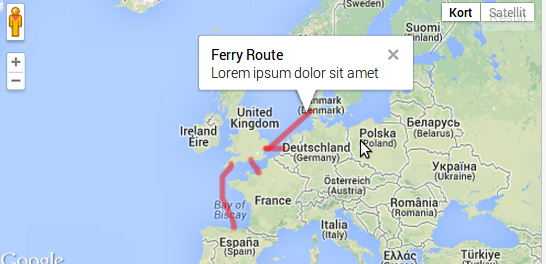
当尝试向多行添加多个infowindow时,则不显示infowindow。
已经用同样的问题尝试了这个线程:Multiple polylines and infowindows with Google Maps V3
正如您所看到的,我尝试在给定的答案中使用建议的函数,但仍然无法工作。
这是我的代码:
var center = new google.maps.LatLng(51.97559, 4.12565);

    var map = new google.maps.Map(document.getElementById('map'), {
        center: center,
        zoom: 6,
        mapTypeId: google.maps.MapTypeId.ROADMAP
    });


var bounds = new google.maps.LatLngBounds();

// start coordinates
var start = ['51.97559, 4.12565',
             '55.46242, 8.43872',
             '49.49259, 0.1065',
             '50.36862, -4.13412']

// end coordinates
var end = ['51.94784, 1.2539',
           '51.94784, 1.2539',
           '50.79726, -1.11048',
           '43.45846, -3.80685']

function initialize() {


    // Make clickable tooltip
   /*

    */

    for (var i=0; i < end.length; i++){
      calcRoute(start[i], end [i]);
    }


}

function calcRoute(source,destination){

      var poly = new google.maps.Polyline({
        path: [],
        strokeColor: '#FF0000',
        strokeWeight: 5,
        strokeOpacity: 0.5
    });


   var directionsService = new google.maps.DirectionsService();
    var request = {
        origin:source,
        destination: destination,
        travelMode: google.maps.DirectionsTravelMode.WALKING
    };

    directionsService.route(request, function(result, status) {
        if (status == google.maps.DirectionsStatus.OK) {
            path = result.routes[0].overview_path;

            $(path).each(function(index, item) {
                poly.getPath().push(item);
                bounds.extend(item);
            })

                // Custom infoWindow
    var toolTip = '<div id="map-box">'+
        '<div id="siteNotice">'+
        '</div>'+
        '<h1 id="firstHeading" class="firstHeading">Route</h1>'+
        '<div id="bodyContent">'+
        '<p>Lorem ipsum dolor sit amet</p>'+
        '</div>'+
        '</div>';


       poly.setMap(map);
       createInfoWindow(poly,toolTip);


            map.fitBounds(bounds);
        }
    });


}


function createInfoWindow(poly,content) {

    google.maps.event.addListener(poly, 'click', function(event) {
        infowindow.content = content;
        //infowindow.position = event.latLng;
        infowindow.setPosition(event.latLng);
        infowindow.open(map);
    });
}

google.maps.event.addDomListener(window, 'load', initialize);以下是jsfiddle链接:http://jsfiddle.net/cnwMG/7/
任何帮助显示在折线上的信息将是非常感谢的。
回答 1
Stack Overflow用户
回答已采纳
发布于 2013-09-28 15:02:00
您缺少最基本的:实例化infowindow :)
然后,设置infowindow属性的正确方法如下
infowindow.setContent(toolTip);
infowindow.setPosition(event.latLng);
不
infowindow.content = toolTip;您在调用信息流的逻辑上也遇到了一些问题。
这是一个清理过的叉子http://jsfiddle.net/b7FHV/
页面原文内容由Stack Overflow提供。腾讯云小微IT领域专用引擎提供翻译支持
原文链接:
https://stackoverflow.com/questions/19066668
复制相关文章
相似问题
腾讯云开发者

Copyright © 2013 - 2026 Tencent Cloud. All Rights Reserved. 腾讯云 版权所有
深圳市腾讯计算机系统有限公司 ICP备案/许可证号:粤B2-20090059  粤公网安备44030502008569号
腾讯云计算(北京)有限责任公司 京ICP证150476号 | 京ICP备11018762号