
VirtualTreeView与UseExplorerThemes
我刚刚发现,使用toUseExplorerTheme选项可以为VirtualStringTree生成一个很好的选择矩形。但是,如果设置了选项toGridExtensions,并且树中有几个列,则不会为内部单元格绘制所选内容的垂直边框,并且也缺少圆角。只有最左边和最右边的列的最外面的边缘和角是正确的。看起来,选择矩形是在最外层的列之间绘制的,而非选定列的背景只是绘制在选择矩形上。
关闭toGridExtensions会产生正确的选择矩形,但我更喜欢打开它,因为只有在标准模式下单击文本才能选择单元格(而不是单击文本旁边的空空间)。
这个问题发生在Delphi7和XE2上,可能也会出现在其他版本中。
若要复制向窗体添加TVirtualStringTree,请显示标题,向标头添加多个列,并激活选项toGridExtensions (MiscOptions)、toUseExplorerTheme (PaintOptions)、toExtendedFocus (SelectionOptions)、运行程序并单击任意单元格。
回答 1
Stack Overflow用户
发布于 2013-09-26 14:23:40
在我看来,这是一个bug,因为谁想要这样的选择:
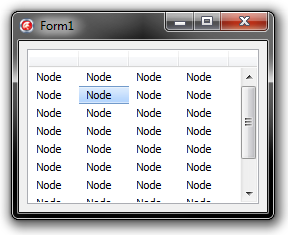
要在虚拟树视图代码中修复它(在我的示例中是v.5.1.4),转到TBaseVirtualTree.PrepareCell方法(在我的例子中是第25802行)并检查这个嵌套的过程代码(注释是我的):
procedure DrawBackground(State: Integer);
begin
  // here the RowRect represents the row rectangle and InnerRect the cell
  // rectangle, so there should be rather, if the toGridExtensions is NOT
  // in options set or the toFullRowSelect is, then the selection will be
  // drawn in the RowRect, otherwise in the InnerRect rectangle
  if (toGridExtensions in FOptions.FMiscOptions) or (toFullRowSelect in FOptions.FSelectionOptions) then
    DrawThemeBackground(Theme, PaintInfo.Canvas.Handle, TVP_TREEITEM, State, RowRect, nil)
  else
    DrawThemeBackground(Theme, PaintInfo.Canvas.Handle, TVP_TREEITEM, State, InnerRect, nil);
end;
若要解决此问题,请以下列方式修改代码:
procedure DrawBackground(State: Integer);
begin
  // if the full row selection is disabled or toGridExtensions is in the MiscOptions, draw the selection
  // into the InnerRect, otherwise into the RowRect
  if not (toFullRowSelect in FOptions.FSelectionOptions) or (toGridExtensions in FOptions.FMiscOptions) then
    DrawThemeBackground(Theme, PaintInfo.Canvas.Handle, TVP_TREEITEM, State, InnerRect, nil)
  else
    DrawThemeBackground(Theme, PaintInfo.Canvas.Handle, TVP_TREEITEM, State, RowRect, nil);
end;
你会得到这样的选择:
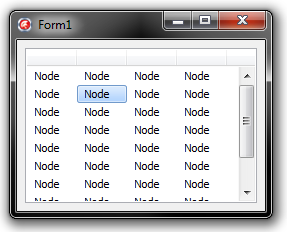
这同样适用于下一个DrawThemedFocusRect嵌套过程。
我把这个问题报告为Issue 376,这是用revision r587解决的。
https://stackoverflow.com/questions/19030376
复制相似问题
腾讯云开发者

Copyright © 2013 - 2026 Tencent Cloud. All Rights Reserved. 腾讯云 版权所有
深圳市腾讯计算机系统有限公司 ICP备案/许可证号:粤B2-20090059  粤公网安备44030502008569号
腾讯云计算(北京)有限责任公司 京ICP证150476号 | 京ICP备11018762号