
ios 7图像选择器中的弹出错误行为
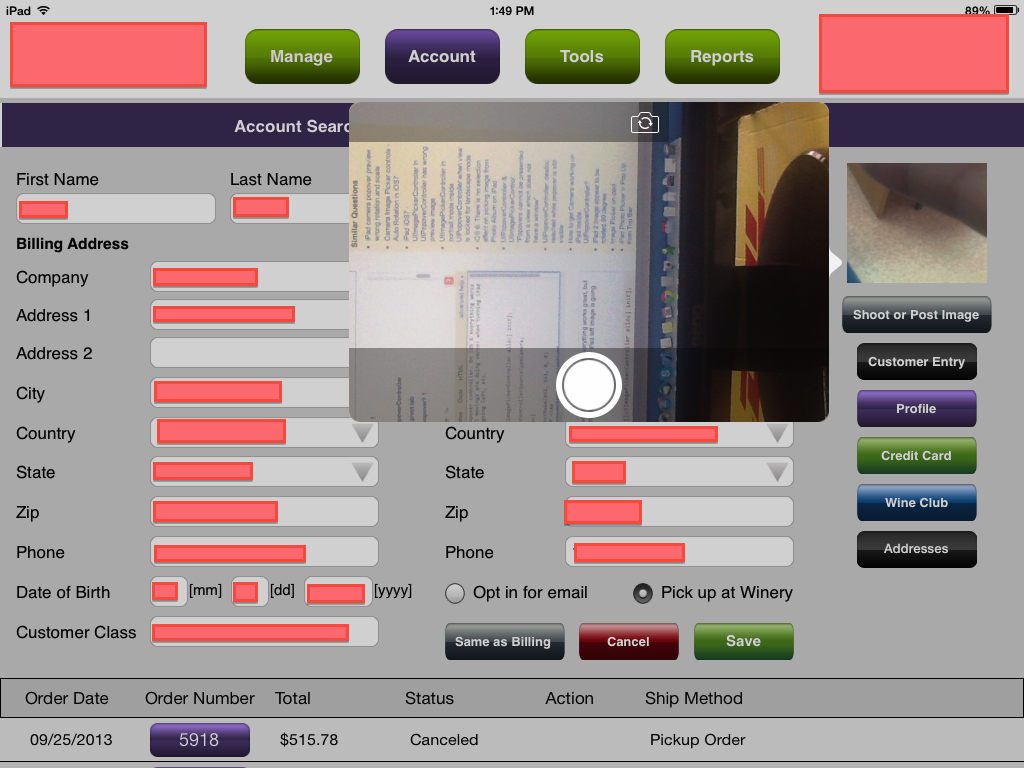
我的图像选择器视图控制器设置在popover控制器内。在iOS 6上,一切都很好,但是在iOS 7上,图像是旋转的,所有的移动都在做诗:当转动iPad时,左图像正在下降,向上的图像向左移动,等等。
下面是显示我的相机的代码:
UIImagePickerController *imagePicker = [[UIImagePickerController alloc] init];
    imagePicker.delegate = self;
    imagePicker.sourceType =  UIImagePickerControllerSourceTypeCamera;

    objPopView = [[UIPopoverController alloc] initWithContentViewController:imagePicker];
    [objPopView presentPopoverFromRect:CGRectMake(842, 163, 0, 0)
                                inView:self.view
              permittedArrowDirections:UIPopoverArrowDirectionRight
                              animated:YES];
我的应用程序只使用景观模式,现在图像被旋转:
回答 3
Stack Overflow用户
发布于 2013-09-26 14:07:40
正如苹果公司的官方文件所说:
呈现用户界面。在iPhone或iPod触摸上,通过调用当前活动视图控制器的iPhone方法(全屏),将配置的图像选择器控制器作为新的视图控制器传递。 在iPad上,显示图像选择器的正确方法取决于其源类型,如下表所述:
- 照相机照片:使用全屏
- 保存的库:必须使用弹出程序
- 相册:必须使用弹出框
..。
在iPad上,如果指定UIImagePickerControllerSourceTypeCamera的源类型,则可以通过模式(全屏)或使用弹出器来显示图像选择器。然而,苹果公司建议您只提供全屏的摄像头界面。
虽然它说“您可以通过模式显示图像选择器(全屏)或通过使用弹出”,正如您所看到的使用弹出将导致这个奇怪的问题。我想这可能是iOS 7 SDK上的一个bug。
我仍在试图解决这个问题,但就目前而言,我唯一能告诉你的方法是通过
-presentViewController:animated:completion:方法,它位于全屏(实际上,我不喜欢这种方式)。
在苹果的Dev论坛上有一个关于它的线程讨论,你可以看看它。;)
Stack Overflow用户
发布于 2014-02-06 20:16:40
尝试以下几点:
UIImagePickerController *imagePicker = [[UIImagePickerController alloc] init];
imagePicker.delegate = self;
imagePicker.sourceType =  UIImagePickerControllerSourceTypeCamera;

CGFloat scaleFactor=1.3f;

switch ([UIApplication sharedApplication].statusBarOrientation) {

    case UIInterfaceOrientationLandscapeLeft:

        imagePicker.cameraViewTransform = CGAffineTransformScale(CGAffineTransformMakeRotation(M_PI * 90 / 180.0), scaleFactor, scaleFactor);

        break;

    case UIInterfaceOrientationLandscapeRight:

        imagePicker.cameraViewTransform = CGAffineTransformScale(CGAffineTransformMakeRotation(M_PI * -90 / 180.0), scaleFactor, scaleFactor);

        break;

    case UIInterfaceOrientationPortraitUpsideDown:

        imagePicker.cameraViewTransform = CGAffineTransformMakeRotation(M_PI * 180 / 180.0);

        break;

        default:
            break;
    }

objPopView = [[UIPopoverController alloc] initWithContentViewController:imagePicker];
[objPopView presentPopoverFromRect:CGRectMake(842, 163, 0, 0)
                            inView:self.view
          permittedArrowDirections:UIPopoverArrowDirectionRight
animated:YES];Stack Overflow用户
发布于 2013-09-26 15:27:57
在iOS7中正确工作的唯一方法是使用
-presentViewController:animated:completion:
您可以尝试通过cameraViewTransform属性更改相机视图转换,但结果将是丑陋的。将视图添加到自定义的ViewController (将视图旋转到景观)也会给您带来丑陋的结果。我开始讨厌这个操作系统版本了。
https://stackoverflow.com/questions/19026329
复制相似问题
腾讯云开发者

Copyright © 2013 - 2026 Tencent Cloud. All Rights Reserved. 腾讯云 版权所有
深圳市腾讯计算机系统有限公司 ICP备案/许可证号:粤B2-20090059  粤公网安备44030502008569号
腾讯云计算(北京)有限责任公司 京ICP证150476号 | 京ICP备11018762号