
为什么我不能在GIMP插件中添加一个变量?
好的,我正在尝试开发一个小插件为gimp,使一个位图字体。由于某种原因,我添加了下面的代码,它将无法工作。
current_cell_x = 0
current_cell_y = 0

x_pos = current_cell_x * cwidth
y_pos = current_cell_y * cheight

x_pos += cwidth / 2.0
y_pos += cheight / 2.0

x_pos -= text_layer.width / 2.0
y_pos -= text_layer.height / 2.0
即使是“current_cell_x=0”的第一行也足以使整个插件无法工作。
以下是工作格式的所有代码:
from gimpfu import *

def create_font(cwidth, cheight, xcells, ycells, font, size, color) :

    char_begin = 32
    char_end = 127
    num_chars = char_end - char_begin

    #current_cell_x = 0
    #current_cell_y = 0

    # Figure out total width & height
    twidth = int(cwidth * xcells)
    theight = int(cheight * ycells)

    # Create Image
    img = gimp.Image(twidth, theight, RGB)
    img.disable_undo()

    # Save the current foreground color:
    pdb.gimp_context_push()

    # Set the text color & background color
    gimp.set_foreground(color)
    gimp.set_background(0, 0, 0)

    # Create All Layers & Position Accordingly
    for i in range(char_begin, char_end):
        string = '%c' % i
        offset = i - char_begin
        text_layer = pdb.gimp_text_fontname(img, None, 0, 0, string, -1, True, size, PIXELS, font)

        #x_pos = current_cell_x * cwidth
        #y_pos = current_cell_y * cheight

        #x_pos += cwidth / 2.0
        #y_pos += cheight / 2.0

        #x_pos -= text_layer.width / 2.0
        #y_pos -= text_layer.height / 2.0

    #pdb.gimp_image_flatten(img)

    img.enable_undo()

    # Create a new image window
    gimp.Display(img)
    # Show the new image window
    gimp.displays_flush()

    # Restore the old foreground color:
    pdb.gimp_context_pop()

register(
    "python_fu_bitmap_font",
    "Bitmap Font",
    "Create a new bitmap font",
    "*****",
    "*****",
    "2013",
    "Bitmap Font (Py)...",
    "",      # Create a new image, don't work on an existing one
    [
        (PF_SPINNER, "cwidth", "Cell Width", 24, (1, 3000, 1)),
        (PF_SPINNER, "cheight", "Cell Height", 51, (1, 3000, 1)),
        (PF_SPINNER, "xcells", "Cells on X axis", 10, (1, 3000, 1)),
        (PF_SPINNER, "ycells", "Cells on Y axis", 10, (1, 3000, 1)),
        (PF_FONT, "font", "Font face", "Consolas"),
        (PF_SPINNER, "size", "Font size", 50, (1, 3000, 1)),
        (PF_COLOR, "color", "Text color", (1.0, 0.0, 0.0))
    ],
    [],
    create_font, menu="<Image>/File/Create")

main()
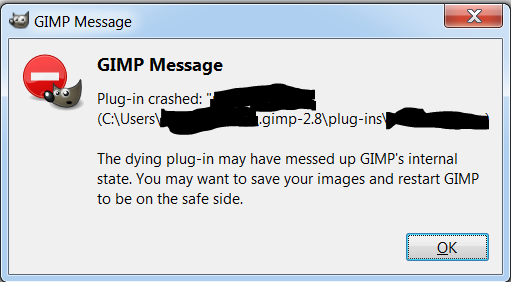
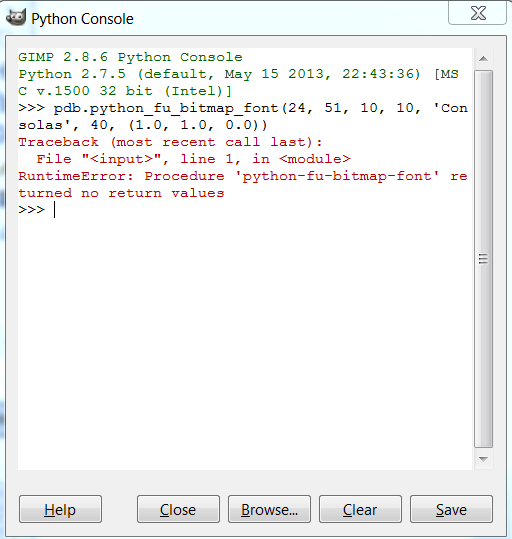
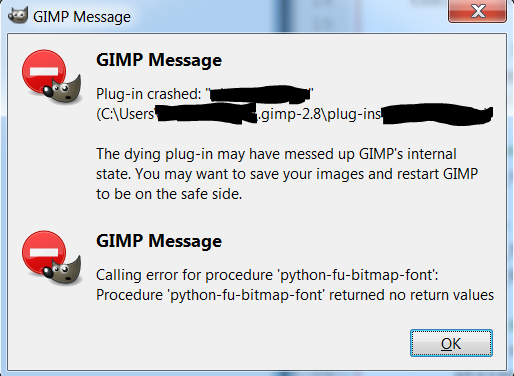
但是,当我不注释第9-10行和第33-40行时,我会得到以下错误。
我希望我的最后代码看起来像这样:
def create_font(cwidth, cheight, xcells, ycells, font, size, color) :

    char_begin = 32
    char_end = 127
    num_chars = char_end - char_begin

    current_cell_x = 0
    current_cell_y = 0

    # Figure out total width & height
    twidth = int(cwidth * xcells)
    theight = int(cheight * ycells)

    # Create Image
    img = gimp.Image(twidth, theight, RGB)
    img.disable_undo()

    # Save the current foreground color:
    pdb.gimp_context_push()

    # Set the text color & background color
    gimp.set_foreground(color)
    gimp.set_background(0, 0, 0)

    # Create All Layers & Position Accordingly
    for i in range(char_begin, char_end):
        string = '%c' % i

        text_layer = pdb.gimp_text_fontname(img, None, 0, 0, string, -1, True, size, PIXELS, font)
        pdb.plug_in_autocrop_layer(0, img, text_layer)

        x_pos = float(current_cell_x * cwidth)
        y_pos = float(current_cell_y * cheight)

        x_pos += float(cwidth) / 2.0
        y_pos += float(cheight) / 2.0

        x_pos -= float(text_layer.width) / 2.0
        y_pos -= float(text_layer.height) / 2.0

        text_layer.translate(x_pos, y_pos)

        #Set current cell
        current_cell_x += 1
        if current_cell_x > xcells:
            current_cell_x = 0
            current_cell_y += 1
        if current_cell_y > ycells:
            break

        gimp.progress_update(float(offset) / float(num_chars))

    #pdb.gimp_image_flatten(img) # Don't do this

    img.enable_undo()

    # Create a new image window
    gimp.Display(img)
    # Show the new image window
    gimp.displays_flush()

    # Restore the old foreground color:
    pdb.gimp_context_pop()
如果你认为有什么建议的话,我不介意。
注意:我的代码来自- font.py和http://gimpbook.com/scripting/
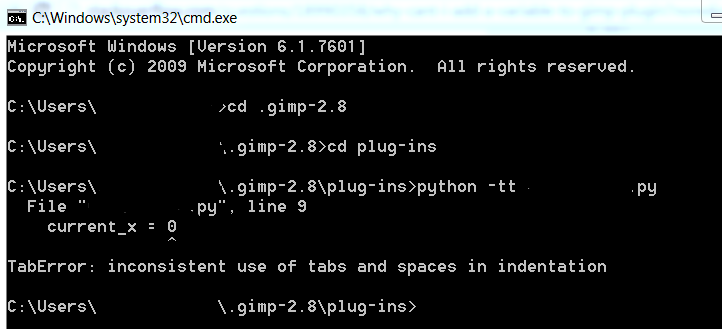
Ran 'python -tt plugin.py‘并得到以下内容:

回答 2
Stack Overflow用户
发布于 2013-10-12 01:01:22
我有不一致的缩进,我需要转到Settings>Preferences>Language菜单/标签Settings>Tab设置,然后检查替换空间。
然后我要跑
python -tt yourscript.py这让我摆脱了我的教诲所造成的所有印字错误。
我还使用了Python33 33/Tools/Script文件夹中的reindent.py,但它对我不起作用。这可能在某种程度上有所帮助,我没有看到。
马提亚斯说对了一半,但他没有给出答案。我在他的位置上这样做。
Stack Overflow用户
发布于 2013-09-26 00:19:23
CMD窗口上的错误是:在源代码中混合制表符和空格--确保添加到代码中的行仅以空格为前缀,而不是以制表符(\x09)字符作为前缀。
您应该配置用于编辑Python代码的编辑器程序,而不是使用选项卡字符。
(可能是相反,您正在编辑带有选项卡的文件,并且您的编辑器被正确配置为使用空格--在这种情况下,您应该替换所有选项卡)
查看Python指南文档:http://www.python.org/dev/peps/pep-0008/
https://stackoverflow.com/questions/18990358
复制相似问题
腾讯云开发者

Copyright © 2013 - 2026 Tencent Cloud. All Rights Reserved. 腾讯云 版权所有
深圳市腾讯计算机系统有限公司 ICP备案/许可证号:粤B2-20090059  粤公网安备44030502008569号
腾讯云计算(北京)有限责任公司 京ICP证150476号 | 京ICP备11018762号