
正确使用iCloud后备存储
我正在为UIManagedDocument开发一个轻量级包装器,它管理一个人的iCloud帐户中多个文档的存在。请参阅:APManagedDocument
我在很大程度上依赖于iOS 7中备用商店的使用,并且尽可能少地关注iCloud的当前状态。因此,根据我从WWDC 2013年视频会话207 什么是核心数据和iCloud的新技术的理解,让核心数据做它在备份存储方面做得最好的事情。
首先,简要介绍一下我的经理是如何工作的:我在本地沙箱中创建了我的所有UIManagedDocuments,并设置了适当的持久存储选项,以启用iCloud同步。我从不从沙箱中移动UIManagedDocument包。
- 当我想知道云中存在哪些文档时,我执行元数据查询。
- 当我想打开其中一个文档时,首先检查它是否存在于本地沙箱中,如果不是在本地沙箱中创建它。(这要求应用程序需要等待与
Using local storage: 0消息对应的通知。) - 有了这个设置,我就不需要知道iCloud是否启用或登录了。我只是在本地工作,让核心数据在iCloud中发挥作用。
到目前为止,一切都很好,但是我遇到了一个小麻烦,在用户登录到iCloud之前创建一个新文档的场景中,我遇到了以下问题:
- 我无法执行元数据查询,因为没有要查询的iCloud。
- 因为有了1,我不得不回到智能本地扫描中,查找路径中包含“local /store/持久化存储”的包,并将这些包作为有效的文档列出。
- 后来,当用户登录时,我的理解是核心数据会将我的本地存储数据移动到云端,但我没有看到。相反,我看到的是为iCloud帐户创建了一个新的持久存储,而没有数据。
我最大的问题是,什么是合适的方法,当涉及到当地的后备商店?我的假设哪里错了?
这是我需要发布的iOS 7更新的最后一部分。任何和所有的反馈将是非常感谢,并将反映在我的github项目,以便其他人可以从我的错误。
在Apple Developer论坛上,我有一个重复的问题。我将用我从那里得到的任何发现来更新这个帖子。我认为这个问题很重要,随着iOS 7的发布,这个问题仍未得到解决。在iCloud技术方面,后备商店是一个巨大的进步,但本地存储部分仍有一些未定义。
回答 3
Stack Overflow用户
发布于 2013-09-28 20:31:47
目前,我一直在努力解决这一问题,因为我似乎无法获得关于备份商店在这种情况下应该如何工作的信息。
基本上,我现在要做的是,如果用户没有登录,我将创建启用了的文档w/o iCloud同步选项。
然后,在启动时,如果启用了iCloud,我会对需要迁移的文档执行扫描,然后通过启用iCloud选项打开文档来迁移它们。打开后,我关闭文档,因为这足以使它们通过元数据扫描迁移和扫描。
最后,迁移完成后,我开始对文档进行新的扫描。
它能工作,但这是个小问题。
请参阅APManagedDocument提交:421
Stack Overflow用户
发布于 2013-10-03 00:30:00
我今晚终于收到答复了。我不能百分之百肯定他明白我的问题,但我会花一些时间去了解他的答案,然后才作出判断。
以下是他的答复:
感谢您对苹果全球开发者技术支持的询问。我的答复是让你知道我收到了你的技术援助请求。 核心数据不会自动将您的UIManagedDocument移动到云中。您需要在ubiquity容器中创建一个新文档,然后将持久存储从本地沙箱迁移到无处不在容器。迁移是创建所有事务日志所必需的,以便其他设备可以创建该文档。 可以将这个类方法实现到您的UIManagedDocument子类:
- (void)moveDocumentAtURL:(NSURL *)sourceDocumentURL toUbiquityContainer:(NSURL *)ubiquityContainerURL;
该方法本质上将在"ubiquityContainerURL“中创建一个新文档,然后将存储从"sourceDocumentURL”迁移到"ubiquityContainerURL“。您可以使用"migratePersistentStore“来执行迁移。
下面是一个例子:
// The name of the file that contains the store identifier.
static NSString *DocumentMetadataFileName = @"DocumentMetadata.plist";

// The name of the file package subdirectory that contains the Core Data store when local.
static NSString *StoreDirectoryComponentLocal = @"StoreContent";

// The name of the file package subdirectory that contains the Core Data store when in the cloud. The Core Data store itself should not be synced directly, so it is placed in a .nosync directory.
static NSString *StoreDirectoryComponentCloud = @"StoreContent.nosync";

+ (NSDictionary *)optionsForStoreAtURL:(NSURL *)url {

    NSURL *metadataDictionaryURL = [url URLByAppendingPathComponent:DocumentMetadataFileName];
    NSDictionary __block *storeMetadata = nil;

    /*
     Perform a coordinated read of the store metadata file; the coordinated read ensures it is downloaded in the event that the document is cloud-based.
     */
    NSFileCoordinator *fileCoordinator = [[NSFileCoordinator alloc] initWithFilePresenter:nil];
    [fileCoordinator coordinateReadingItemAtURL:metadataDictionaryURL options:0 error:NULL byAccessor:^(NSURL *newURL) {
        storeMetadata = [[NSDictionary alloc] initWithContentsOfURL:newURL];
    }];

    NSString *persistentStoreUbiquitousContentName = nil;

    if (storeMetadata != nil) {

        persistentStoreUbiquitousContentName = [storeMetadata objectForKey:PersistentStoreUbiquitousContentNameKey];
        if (persistentStoreUbiquitousContentName == nil) {
            // Should not get here.
            NSLog(@"ERROR in optionsForStoreAtURL:");
            NSLog(@"persistentStoreUbiquitousContentName == nil");
            abort();
        }
    }
    else {

        CFUUIDRef uuid = CFUUIDCreate(NULL);
        CFStringRef uuidString = CFUUIDCreateString(NULL, uuid);
        persistentStoreUbiquitousContentName = (__bridge_transfer NSString *)uuidString;
        CFRelease(uuid);
    }

    // NSPersistentStoreUbiquitousContentURLKey should be the TransactionLogs directory.

    NSDictionary *options = [NSDictionary dictionaryWithObjectsAndKeys:
                             persistentStoreUbiquitousContentName, NSPersistentStoreUbiquitousContentNameKey,
                             [[self URLForUbiquityTransactionLogs] URLByAppendingPathComponent:persistentStoreUbiquitousContentName] , NSPersistentStoreUbiquitousContentURLKey, nil];

    return options;
}

+ (void)moveDocumentAtURL:(NSURL *)sourceDocumentURL toUbiquityContainer:(NSURL *)ubiquityContainerURL {

    if (ubiquityContainerURL == nil) {

        // iCloud isn't configured.
        NSDictionary *dict = [NSDictionary dictionaryWithObjectsAndKeys:
                              NSLocalizedString(@"iCloud does not appear to be configured.", @""), NSLocalizedFailureReasonErrorKey, nil];
        NSError *error = [NSError errorWithDomain:@"Application" code:404 userInfo:dict];
        NSLog(@"%@", [error localizedFailureReason]);
        return;
    }

    // Move the document to the cloud using its existing filename
    NSManagedObjectModel *model = [self managedObjectModel];
    NSDictionary *ubiquitousOptions = [self optionsForStoreAtURL:sourceDocumentURL];

    NSString *documentName = [[sourceDocumentURL lastPathComponent] stringByDeletingPathExtension];
    documentName = [documentName stringByAppendingPathExtension:@"wwWhat"];
    NSURL *destinationURL = [ubiquityContainerURL URLByAppendingPathComponent:documentName];

    dispatch_queue_t q_default;
    q_default = dispatch_get_global_queue(DISPATCH_QUEUE_PRIORITY_DEFAULT, 0);

    dispatch_async(q_default, ^{

        NSError __block *error = nil;

        NSFileCoordinator *coordinator = [[NSFileCoordinator alloc] init];
        [coordinator coordinateWritingItemAtURL:destinationURL options:NSFileCoordinatorWritingForReplacing error:nil byAccessor:^(NSURL *destination) {

            NSFileManager *fileManager = [[NSFileManager alloc] init];
            [fileManager removeItemAtURL:destination error:nil];

            NSURL *destinationStoreDirectoryURL = [destination URLByAppendingPathComponent:StoreDirectoryComponentCloud isDirectory:YES];
            NSURL *destinationStoreURL = [destinationStoreDirectoryURL URLByAppendingPathComponent:StoreFileName isDirectory:NO];

            NSURL *sourceStoreURL = [[sourceDocumentURL URLByAppendingPathComponent:StoreDirectoryComponentLocal isDirectory:YES] URLByAppendingPathComponent:StoreFileName isDirectory:NO];
            NSURL *originalMetadataURL = [sourceDocumentURL URLByAppendingPathComponent:DocumentMetadataFileName isDirectory:NO];
            NSURL *destinationMetadataURL = [destination URLByAppendingPathComponent:DocumentMetadataFileName isDirectory:NO];

            [fileManager createDirectoryAtURL:destinationStoreDirectoryURL withIntermediateDirectories:YES attributes:nil error:nil];
            [fileManager copyItemAtURL:originalMetadataURL toURL:destinationMetadataURL error:nil];

            NSPersistentStoreCoordinator *pscForSave = [[NSPersistentStoreCoordinator alloc] initWithManagedObjectModel: model];
            id store = [pscForSave addPersistentStoreWithType:NSSQLiteStoreType configuration:nil URL:sourceStoreURL options:nil error:nil];

            id success = [pscForSave migratePersistentStore:store toURL:destinationStoreURL options:ubiquitousOptions withType:NSSQLiteStoreType error:&error];

            if (success) {
                [fileManager removeItemAtURL:sourceDocumentURL error:NULL];
            }
            else {
                NSLog(@"Failed to migrate store: %@", error);
            }
        }];
    });
}Stack Overflow用户
发布于 2013-10-05 13:29:24
他的反应与你看到的不一致吗?没有数据,因为你不把事务日志放在云中,以便其他设备可以从日志中重新创建文档。通过迁移,我想您可以在适当的iCloud目录中自动生成日志文件。但是,207个视频似乎表明不再需要使用.sync文件夹。
他们给我的一个好例子就是我想要的.
你知道如何从OSX访问这些文件吗?
顺便说一句,你的东西看起来不错,我希望能在几天内试一试。我真的很想看看这些文件将如何从OSX访问。据我所知,NSPersistentDocument并不了解iCloud。
编辑:我只是仔细查看了一下您的APManagedDocumentManager,您似乎没有将iCloud路径包含在NSPersistentStoreUbiquitousContentURLKey值中。除非我遗漏了一些东西,您只是使用子目录而不是完整的iCloud路径,而且您使用的是NSString而不是NSString(不确定这是否会产生影响)。
编辑:也许我们应该在电话里讨论一下?无论如何,我下面的一些发现:我刚刚安装了小牛,在浏览了两次视频之后,我测试了以下内容:只使用下面的代码创建新文件--不使用UIManagedDocument或其他任何东西。_storeURL正按照视频中的建议指向本地目录。我不使用任何NSPersistentStoreUbiquitousContentURLKey,因为它不再有必要了。目前我的文件名没有UUID。
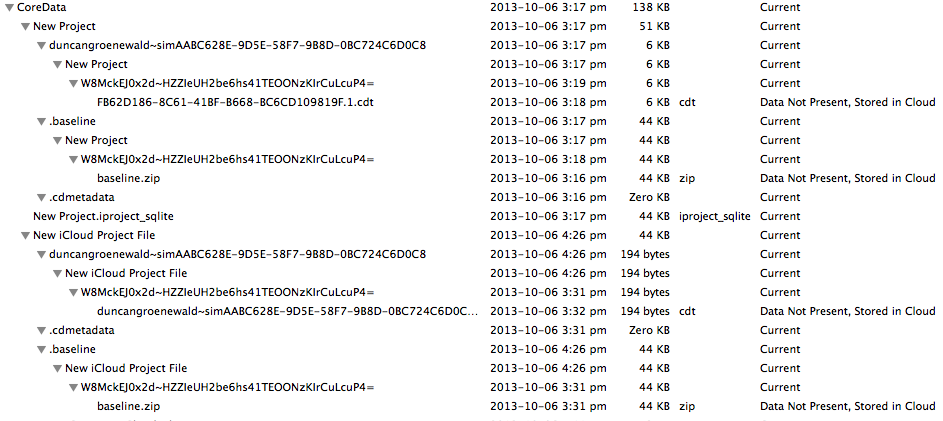
当我在任何设备上这样做时,就会在CoreData文档目录之外创建一个iCloud目录。在CoreData目录中是每个fileNames的子目录,其中有各种压缩文件和可能是基线和日志文件的东西。没有任何DocumentMetaData.plist的迹象。因此,这一切看起来都很有希望,除了我不知道如何“发现”新的文件出现。我希望我只需要注册一些通知就好了.现在回过头来看视频,因为我不记得发送了哪些通知以及如何对它们作出反应的细节。至少在这两个平台上的行为是一致的。奇怪的是,这些文档中没有一个出现在Mac文件-打开对话框中,其中列出了iCloud文档目录中的所有文档,我想这并不奇怪。
_persistentStoreCoordinator = [[NSPersistentStoreCoordinator alloc] initWithManagedObjectModel:[self managedObjectModel]];
//FLOG(@"  got_persistentStoreCoordinator is %@", _persistentStoreCoordinator);
FLOG(@"  calling addPersistentStoreWithType for path %@", [_storeURL path]);
NSString *fileName = [[_storeURL URLByDeletingPathExtension] lastPathComponent];
FLOG(@"  setting NSPersistent for path %@", [_storeURL path]);
@try {
    store = [_persistentStoreCoordinator addPersistentStoreWithType:NSSQLiteStoreType configuration:nil URL:_storeURL
                                                            options:@{NSPersistentStoreUbiquitousContentNameKey:fileName,
                                                              NSMigratePersistentStoresAutomaticallyOption:@YES,
                                                              NSInferMappingModelAutomaticallyOption:@YES,
                                                              NSSQLitePragmasOption:@{ @"journal_mode" : @"DELETE" }}
                                                              error:&error];
..。
https://stackoverflow.com/questions/18971389
复制相似问题
腾讯云开发者

Copyright © 2013 - 2026 Tencent Cloud. All Rights Reserved. 腾讯云 版权所有
深圳市腾讯计算机系统有限公司 ICP备案/许可证号:粤B2-20090059  粤公网安备44030502008569号
腾讯云计算(北京)有限责任公司 京ICP证150476号 | 京ICP备11018762号